
• Link to Facebook
  • Link to Instagram
  • Link to LinkedIn
  • Link to Youtube
  • Link to X
Call Us Today! 512-640-5750
Data Architect as a Service | Remote DBA Services
  • Services
    • Analytics Architecture
    • Database Architecture
    • Software Architecture
    • Microsoft Fabric Consulting
      • Microsoft Fabric Health Check
  • About Us
    • Testimonials
    • Recommendation Program
    • Jobs
      • Data Engineering Consultant
      • Principal Data Analytics Architect
  • Resources
    • Blog
    • Videos
  • Contact
  • Click to open the search input field Click to open the search input field Search
  • Menu Menu

Azure VMs – How To Go Green

Cloud

This article will help guide you to go green with your Azure VMs and save some green! ????

When building a cloud solution, many different items need to be considered. One of these items, which will help guide you in the right direction, would be following the Azure Well-Architected Framework. This is a framework all cloud professionals should be informed about. If your solution is already deployed, take the Assessment Review and see where you can improve:

The Azure Well-Architected Framework Pillars:

  • cost management
  • operational excellence
  • performance efficiency
  • reliability
  • security

On top of that, Microsoft is also making considerable steps towards sustainability and aligning with Green Software Principles from the Green Software Foundation.

Today, we will focus on the sustainability and cost optimizations for Azure VMs.

Go Green with Automation to Stop and Start Your VMs

Depending on your workload, you may need to start and stop your VMs on a schedule. A use case can be development servers that only need to run during business hours.

There is already an Auto-shutdown feature within the VM settings within the Operations section. However, there is no Auto-start feature as of writing this article.
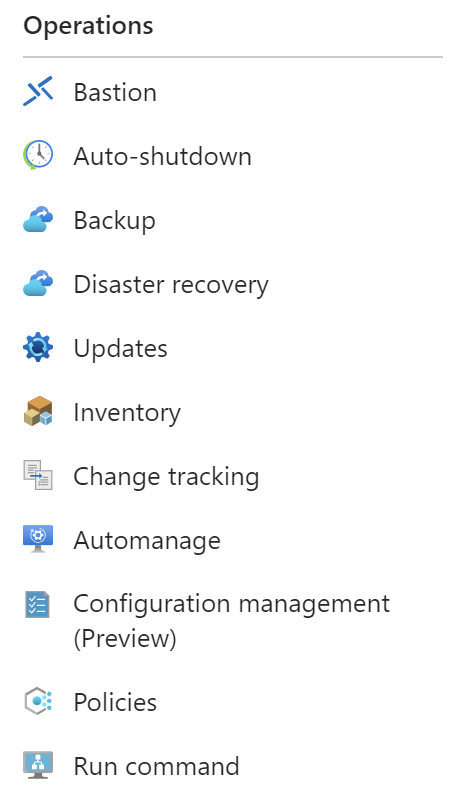
Go Green with Automating Start and Stop of your VMs

Within Auto-shutdown, you simply configure a few properties:

There are many options to achieve the Auto-start functionality, but two of the most common and quickest to implement are Automation Tasks and Logic Apps.

With Automation Tasks, you configure Runbooks within your Automation Account and can browse the gallery for a plug-and-play solution. As of the time of this article, Azure Automation Run As Account will retire on September 30, 2023. So be sure to use a Managed Identity if you opt for this solution.

If you go this route, one of the most popular templates looks like the graph below:

Go Green using Azure Logic Apps to start and stop your VMs.

I would opt for a Logic App. They are very user-friendly and have an abundance of connectors and functionality. You can configure them directly within the individual VM settings, but I would not advise doing so.

If you were to configure them per VM, this is how you would do it.

Go to the Automation section of the VM:
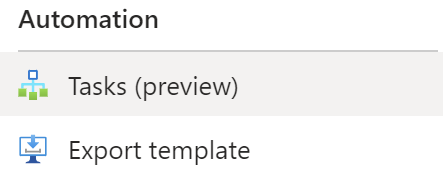
Add a task:

Select a template:

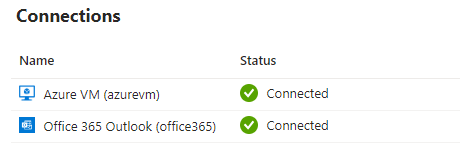
Authenticate:
Configure the task:
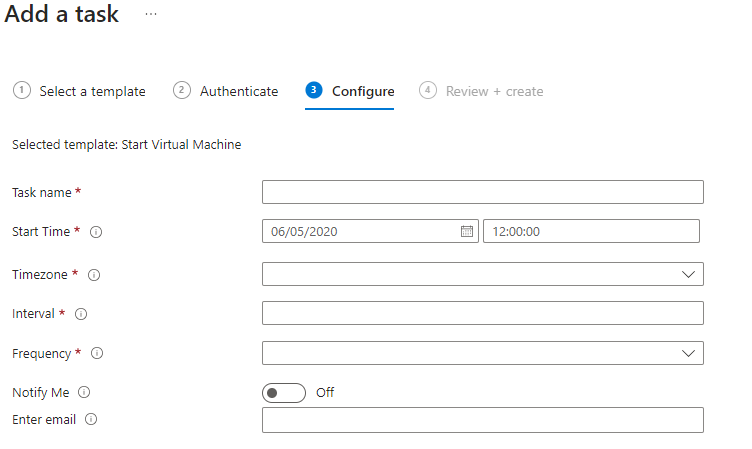
Creating them in the individual VM is very easy but a pain in the ass to manage since it will create a Logic App per VM. When you start seeing the same logic repeatedly, that should be a clue that you are not abiding by the DRY (Don’t Repeat Yourself) principle.

We will use parameterization to make the Logic App easier to build and manage. We will skip the steps needed to create the Logic App resource. Here is a link to guide you through those initial steps and other information around Logic Apps: Overview – Azure Logic Apps | Microsoft Learn.

For the parameterization, we will create the following parameters:

  • EmailID (string): semi-colon separated list of email addresses
  • Frequency (string): set this as “Day”
  • Interval (integer): set this as “1”
  • Notify (bool): set this as “true”
  • StartTime (string): set this as the first day you want the schedule to start
  • TimeZone (string): set this as the wanted Time Zone
    • VmList: (array): this is an JSON object with the following schema:
      {"resourceGroup": "string", "resourceVM": "string", "subscriptionId": "string"}

The first step of developing the Logic App would be to create the trigger. We will create a “Recurrence Trigger” since we are building this on a schedule. You could also make this event based on your needs with an HTTP Request, email, Service Bus, etc.
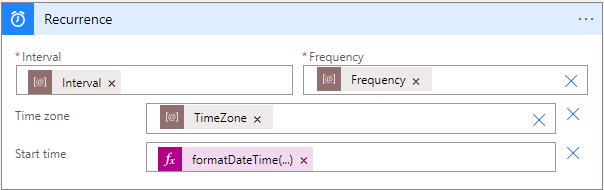
Next, we will want to loop on the VmList array. For each iteration, we will want to execute the following logic:

  • Start the VM: passing subscriptionId, resourceGroup, and resourceVM parameters
  • Send Email on Failure or Success if “Notify” parameter is “true.”

For Each Loop:

Notifications:
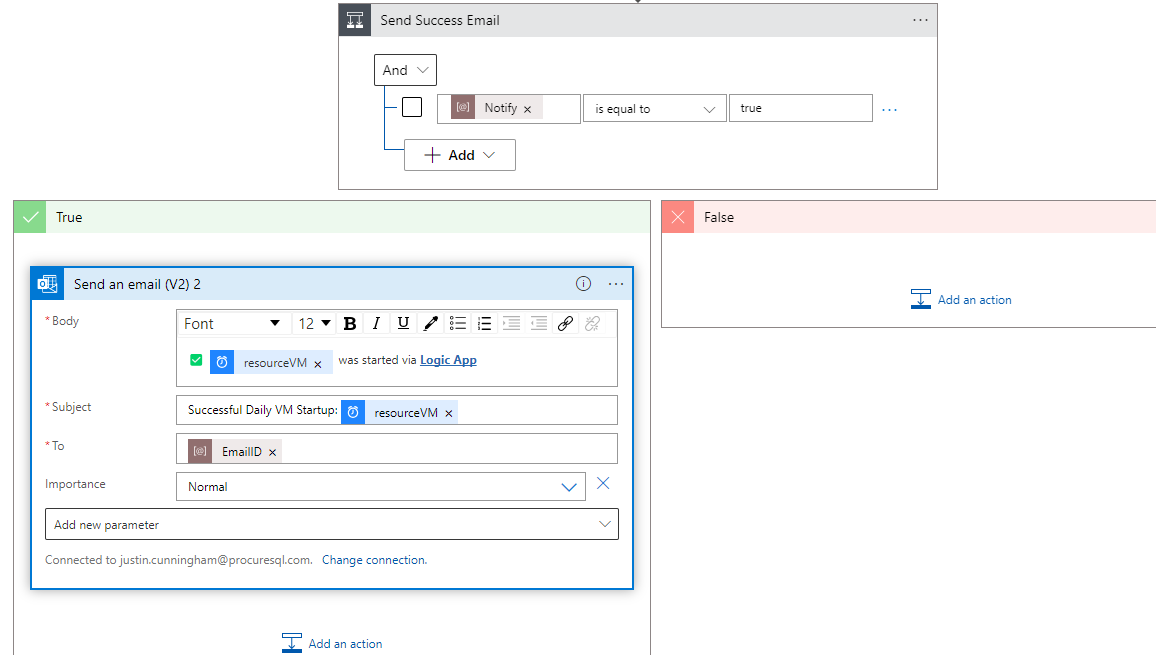
There you have it. A Logic App set up on a schedule to start VMs on the frequency you decide! If any changes need to be made, you can tweak your parameters. One resource with a friendlier interface with an abundance of connectors/controls/functionality to simply start/stop your VMs. As stated, there are many ways to accomplish this task, but driving towards cost optimizations and less computing; is a great solution.

If you need help saving money on your Azure subscriptions, contact us!

Happy coding!

????

October 17, 2023/by Justin Cunningham
https://procuresql.com/wp-content/uploads/2019/03/Procure-SQL-Five-Reasons-Why-Log-Shipping-Should-Be-Used-1.jpg 595 1092 Justin Cunningham /wp-content/uploads/2024/05/Data-Architecture-as-a-Service-with-ProcureSQL.png Justin Cunningham2023-10-17 23:49:472023-10-17 23:49:47Azure VMs – How To Go Green
Join Our Newsletter
  Thank you for Signing Up
Please correct the marked field(s) below.
1,true,6,Contact Email,21,false,1,First Name,21,false,1,Last Name,2
Search Search

Blog Categories

  • $150 Challenge
  • Advice
  • Announcements
  • Artificial Intelligence
  • Awards
  • Azure Data Factory
  • C-Level
  • Cloud
  • Community
  • Conferences
  • Data Architecture
  • Data Integration
  • Data Intergration
  • Data Visualization
  • Data Warehousing
  • DBA 101
  • Design
  • Disaster Recovery or High Availability
  • Education
  • Fabric Dev Ops
  • Fabric Lakehouse
  • Fabric Lakehouses
  • Fabric Mirroring
  • Fabric Notebooks
  • Features
  • General
  • Health Checks
  • Lab
  • Microsoft Fabric
  • Microsoft Technologies
  • Newsletter
  • Performance Tuning
  • Power BI
  • ProcureSQL
  • Python
  • Reporting
  • Security
  • SQL Server
  • SQL Server
  • sql server 101
  • SQLServerPedia Syndication
  • syndication
  • The Blog
  • Uncategorized
  • Visual Studio Credit

Tags

#SQLFamily automatic tuning availability group azure backup Backups career Data Governance Data Loss Data Platform DBA Denver Differential Backup Disaster Recovery Fabric Fabric Architecture Full Backup High Availability Houston Marketing Database Administrator Microsoft Microsoft Fabric Microsoft SQL Server mirroring parameter sniffing PASS performance tuning Professional Development query store Recovery Recovery Model Restores Security SQL Saturday SQL Server SQL Server 2017 sql server 2019 SQL Server 2022 sql server 2025 SSMS System Databases Transaction Log Backup tsqltuesday Tuning Wait Stats

Archives

  • September 2026
  • August 2026
  • July 2026
  • June 2026
  • May 2026
  • April 2026
  • March 2026
  • February 2026
  • November 2025
  • October 2025
  • September 2025
  • July 2025
  • June 2025
  • May 2025
  • April 2025
  • March 2025
  • January 2025
  • December 2024
  • November 2024
  • October 2024
  • September 2024
  • August 2024
  • July 2024
  • June 2024
  • May 2024
  • February 2024
  • January 2024
  • November 2023
  • October 2023
  • March 2023
  • January 2023
  • May 2022
  • April 2022
  • November 2021
  • September 2020
  • August 2020
  • April 2020
  • March 2020
  • February 2020
  • January 2020
  • December 2019
  • November 2019
  • September 2019
  • July 2019
  • April 2019
  • November 2018
  • September 2018
  • August 2018
  • July 2018
  • June 2018
  • May 2018
  • April 2018
  • March 2018
  • February 2018
  • January 2018
  • November 2017
  • October 2017
  • August 2017
  • July 2017
  • June 2017
  • April 2017
  • December 2016
  • November 2016
  • October 2016
  • July 2016
© Copyright 2026 - ProcureSQL - 1464 East Whitestone Blvd., Suite 1902 Cedar Park, TX 78613, USA
  • Link to Facebook
  • Link to Instagram
  • Link to LinkedIn
  • Link to Youtube
  • Link to X
Scroll to top Scroll to top Scroll to top
Manage Consent
To provide the best experiences, we use technologies like cookies to store and/or access device information. Consenting to these technologies will allow us to process data such as browsing behavior or unique IDs on this site. Not consenting or withdrawing consent, may adversely affect certain features and functions.
Functional Always active
The technical storage or access is strictly necessary for the legitimate purpose of enabling the use of a specific service explicitly requested by the subscriber or user, or for the sole purpose of carrying out the transmission of a communication over an electronic communications network.
Preferences
The technical storage or access is necessary for the legitimate purpose of storing preferences that are not requested by the subscriber or user.
Statistics
The technical storage or access that is used exclusively for statistical purposes. The technical storage or access that is used exclusively for anonymous statistical purposes. Without a subpoena, voluntary compliance on the part of your Internet Service Provider, or additional records from a third party, information stored or retrieved for this purpose alone cannot usually be used to identify you.
Marketing
The technical storage or access is required to create user profiles to send advertising, or to track the user on a website or across several websites for similar marketing purposes.
  • Manage options
  • Manage services
  • Manage {vendor_count} vendors
  • Read more about these purposes
View preferences
  • {title}
  • {title}
  • {title}