If you ever follow any of our tips, blogs, or videos, please follow this one and enable multi-factor authentication on all your applications and websites that you access.
If you are procuring a new application or service, now is also a great time to verify that it includes forcing multi-factor authentication.
Hello, Everyone; this is John Sterrett from Procure SQL. Today, we will discuss how you can validate SQL Server Backups with a single line of PowerShell.
Due to the recent global IT outage, I thought this would be an excellent time to focus on the last line of defense-your database backups. I have good news if you are not validating your SQL Server backups today.
DbaTools Is Your Friend
Did you know you can validate your backups with a single PowerShell line? This is just one of several amazing things you can do with dbatools in a single line of PowerShell.
John, what do you mean by validating SQL Server backups?
I mean, find your last backup
See if the backup still exist
Restore the previous backup(s)
Run an Integrity Check
Document the time it took along the way
Validating SQL Server Backups – How Do We Validate Our Backups?
DBATools has a module named Test-DbaLastBackup.
You could run it with the following command to run against all your databases using the instance name provided below.
Great question! If we learned anything from the recent global IT downtime, it’s to validate and test everything!
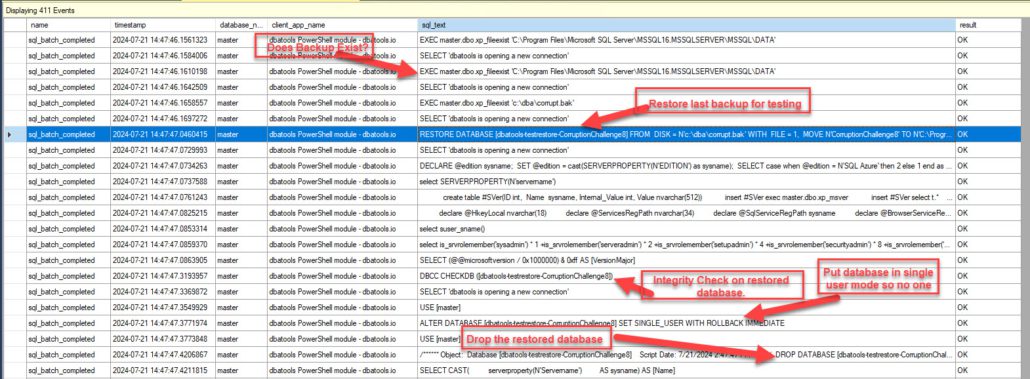
I love to see what’s happening under the hood, so I set up an extended event trace to capture all the SQL statements running. I can see the commands used to find the backups, the restore, the integrity check, and the dropping of the database created during the restore.
All the excellent things I will share are below.
Extended Event
The following is the script for the extended event. I run this to capture events created by my DBATools command in Powershell. Once I start the extended event trace, I run the PowerShell command to do a single check on a database, as shown above. I then stop the capture and review.
CREATE EVENT SESSION [completed] ON SERVER
ADD EVENT sqlserver.sp_statement_completed(
  ACTION(sqlserver.client_app_name,sqlserver.client_hostname,sqlserver.database_name,sqlserver.query_hash,sqlserver.session_id,sqlserver.sql_text,sqlserver.username)
    WHERE ([sqlserver].[like_i_sql_unicode_string]([sqlserver].[client_app_name],N'dbatools PowerShell module%'))),
ADD EVENT sqlserver.sql_batch_completed(
    ACTION(sqlserver.client_app_name,sqlserver.client_hostname,sqlserver.database_name,sqlserver.query_hash,sqlserver.session_id,sqlserver.sql_text,sqlserver.username)
    WHERE ([sqlserver].[like_i_sql_unicode_string]([sqlserver].[client_app_name],N'dbatools PowerShell module%'))),
ADD EVENT sqlserver.sql_statement_completed(
    ACTION(sqlserver.client_app_name,sqlserver.client_hostname,sqlserver.database_name,sqlserver.query_hash,sqlserver.session_id,sqlserver.sql_text,sqlserver.username)
    WHERE ([sqlserver].[like_i_sql_unicode_string]([sqlserver].[client_app_name],N'dbatools PowerShell module%')))
ADD TARGET package0.event_file(SET filename=N'completed',max_file_size=(50),max_rollover_files=(8))
WITH (MAX_MEMORY=4096 KB,EVENT_RETENTION_MODE=ALLOW_SINGLE_EVENT_LOSS,MAX_DISPATCH_LATENCY=30 SECONDS,MAX_EVENT_SIZE=0 KB,MEMORY_PARTITION_MODE=NONE,TRACK_CAUSALITY=OFF,STARTUP_STATE=OFF)
GO
Validate SQL Server Backups – Resulting Events / Statements
Here, you can see we captured many SQL Statements during this capture. Below, I will minimize and focus on key ones that prove what happens when you run this command for your database(s).
The query used to build up the backup set to find the last backup was too big to screenshot, so I included it below.
/* Get backup history */
SELECT
                        a.BackupSetRank,
                        a.Server,
                        '' as AvailabilityGroupName,
                        a.[Database],
                        a.DatabaseId,
                        a.Username,
                        a.Start,
                        a.[End],
                        a.Duration,
                        a.[Path],
                        a.Type,
                        a.TotalSize,
                        a.CompressedBackupSize,
                        a.MediaSetId,
                        a.BackupSetID,
                        a.Software,
                        a.position,
                        a.first_lsn,
                        a.database_backup_lsn,
                        a.checkpoint_lsn,
                        a.last_lsn,
                        a.first_lsn as 'FirstLSN',
                        a.database_backup_lsn as 'DatabaseBackupLsn',
                        a.checkpoint_lsn as 'CheckpointLsn',
                        a.last_lsn as 'LastLsn',
                        a.software_major_version,
                        a.DeviceType,
                        a.is_copy_only,
                        a.last_recovery_fork_guid,
                        a.recovery_model,
                        a.EncryptorThumbprint,
                        a.EncryptorType,
                        a.KeyAlgorithm
                    FROM (
                        SELECT
                        RANK() OVER (ORDER BY backupset.last_lsn desc, backupset.backup_finish_date DESC) AS 'BackupSetRank',
                        backupset.database_name AS [Database],
                        (SELECT database_id FROM sys.databases WHERE name = backupset.database_name) AS DatabaseId,
                        backupset.user_name AS Username,
                        backupset.backup_start_date AS Start,
                        backupset.server_name as [Server],
                        backupset.backup_finish_date AS [End],
                        DATEDIFF(SECOND, backupset.backup_start_date, backupset.backup_finish_date) AS Duration,
                        mediafamily.physical_device_name AS Path,

                backupset.backup_size AS TotalSize,
                backupset.compressed_backup_size as CompressedBackupSize,
                encryptor_thumbprint as EncryptorThumbprint,
                encryptor_type as EncryptorType,
                key_algorithm AS KeyAlgorithm,
                        CASE backupset.type
                        WHEN 'L' THEN 'Log'
                        WHEN 'D' THEN 'Full'
                        WHEN 'F' THEN 'File'
                        WHEN 'I' THEN 'Differential'
                        WHEN 'G' THEN 'Differential File'
                        WHEN 'P' THEN 'Partial Full'
                        WHEN 'Q' THEN 'Partial Differential'
                        ELSE NULL
                        END AS Type,
                        backupset.media_set_id AS MediaSetId,
                        mediafamily.media_family_id as mediafamilyid,
                        backupset.backup_set_id as BackupSetID,
                        CASE mediafamily.device_type
                        WHEN 2 THEN 'Disk'
                        WHEN 102 THEN 'Permanent Disk Device'
                        WHEN 5 THEN 'Tape'
                        WHEN 105 THEN 'Permanent Tape Device'
                        WHEN 6 THEN 'Pipe'
                        WHEN 106 THEN 'Permanent Pipe Device'
                        WHEN 7 THEN 'Virtual Device'
                        WHEN 9 THEN 'URL'
                        ELSE 'Unknown'
                        END AS DeviceType,
                        backupset.position,
                        backupset.first_lsn,
                        backupset.database_backup_lsn,
                        backupset.checkpoint_lsn,
                        backupset.last_lsn,
                        backupset.software_major_version,
                        mediaset.software_name AS Software,
                        backupset.is_copy_only,
                        backupset.last_recovery_fork_guid,
                        backupset.recovery_model
                        FROM msdb..backupmediafamily AS mediafamily
                        JOIN msdb..backupmediaset AS mediaset ON mediafamily.media_set_id = mediaset.media_set_id
                        JOIN msdb..backupset AS backupset ON backupset.media_set_id = mediaset.media_set_id
                        JOIN (
                            SELECT TOP 1 database_name, database_guid, last_recovery_fork_guid
                            FROM msdb..backupset
                            WHERE database_name = 'CorruptionChallenge8'
                            ORDER BY backup_finish_date DESC
                            ) AS last_guids ON last_guids.database_name = backupset.database_name AND last_guids.database_guid = backupset.database_guid AND last_guids.last_recovery_fork_guid = backupset.last_recovery_fork_guid
                    WHERE (type = 'D' OR type = 'P')
                     AND is_copy_only='0'

                    AND backupset.backup_finish_date >= CONVERT(datetime,'1970-01-01T00:00:00',126)

                     AND mediafamily.mirror='0'
                    ) AS a
                    WHERE a.BackupSetRank = 1
                    ORDER BY a.Type;
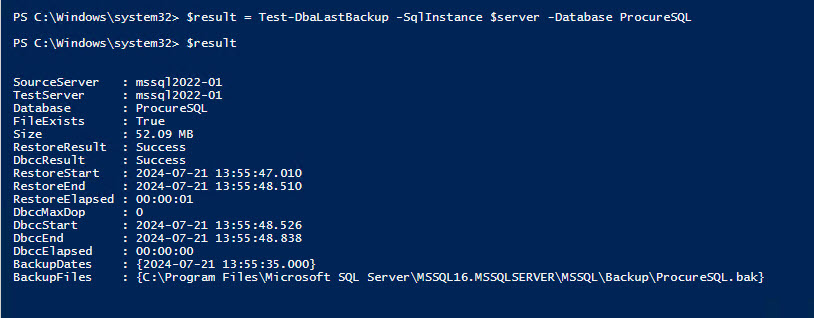
The following is a screenshot of the results of validating a database with a good backup and no corruption.
What should I expect with a corrupted database?
Great question! I thought of the same one, so I grabbed a corrupt database from Steve Stedman’s Corruption Challenge and ran the experiment. I will admit my findings were not what I was expecting, either. This is why you shouldn’t take candy from strangers or run scripts without testing them in non-production and validating their results.
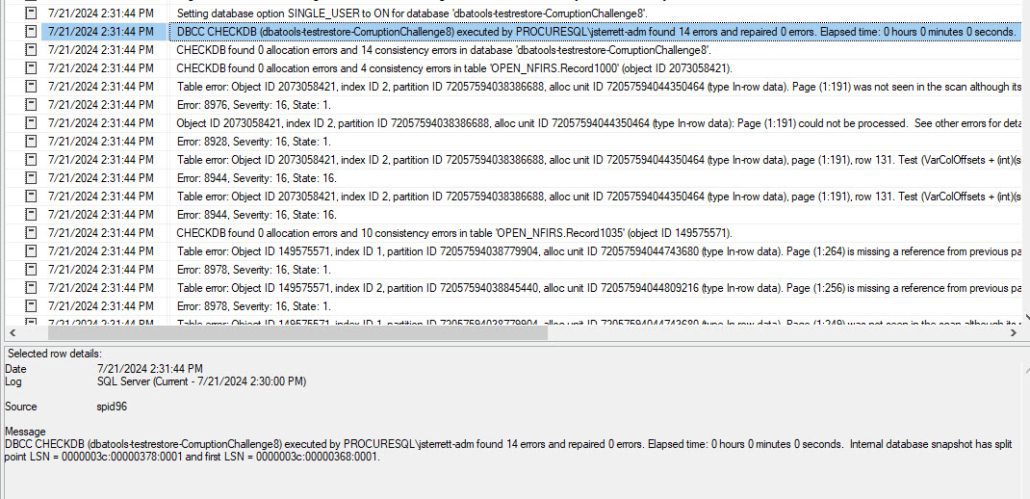
After restoring the corrupted database that had been successfully backed up, I performed a manual integrity check to validate that it would fail, as shown below.
Hopefully, you will have a process or tool to monitor your SQL Server error log and alert you of errors like these. If you duplicate this example, your process or tool will pick up these Severity 16 errors for corruption. I would validate that as well.
Validate SQL Server Backups – PowerShell Results
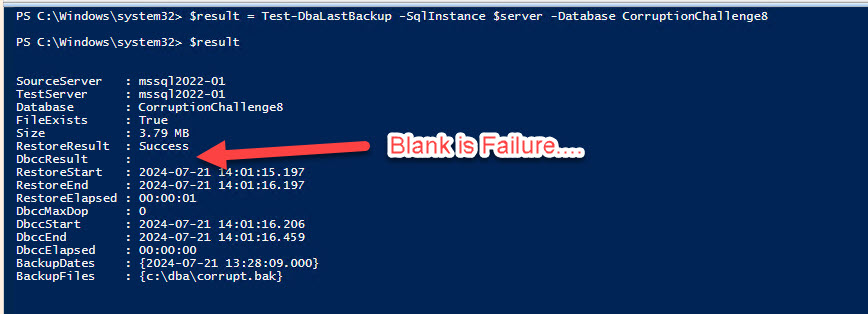
Okay, was I the only one who expected to see Failed as the status for the integrity check (DBCCResult)?
Instead, it’s blank, as I show below. So, when you dump these results back out, make sure to make your check for anything other than Success.
I had some other questions, too, which are answered on the official documentation page for the Test-DbaLastBackup command. I will list them below, but you can review the documentation to find the answers.
What if I want to test the last full backup?
What if I want to test the last full and last differential?
What if I wanted to offload the validation process to another server?
What if I don’t want to drop the database but use this to restore for non-production testing?
What if I wanted to do physical only for the integrity check?
What if I want to do performance testing of my restore process by changing the Max Transfer Size and Buffer Counts?
What questions did we miss that you would like answered? Let us know in the comments.
https://procuresql.com/wp-content/uploads/2024/07/ExtendedEventTrace.jpg5781570John Sterrett/wp-content/uploads/2024/05/Data-Architecture-as-a-Service-with-ProcureSQL.pngJohn Sterrett2024-07-21 22:52:132025-01-02 19:06:37Validating Your SQL Server Backups Made Easy!
To provide the best experiences, we use technologies like cookies to store and/or access device information. Consenting to these technologies will allow us to process data such as browsing behavior or unique IDs on this site. Not consenting or withdrawing consent, may adversely affect certain features and functions.
Functional
Always active
The technical storage or access is strictly necessary for the legitimate purpose of enabling the use of a specific service explicitly requested by the subscriber or user, or for the sole purpose of carrying out the transmission of a communication over an electronic communications network.
Preferences
The technical storage or access is necessary for the legitimate purpose of storing preferences that are not requested by the subscriber or user.
Statistics
The technical storage or access that is used exclusively for statistical purposes.The technical storage or access that is used exclusively for anonymous statistical purposes. Without a subpoena, voluntary compliance on the part of your Internet Service Provider, or additional records from a third party, information stored or retrieved for this purpose alone cannot usually be used to identify you.
Marketing
The technical storage or access is required to create user profiles to send advertising, or to track the user on a website or across several websites for similar marketing purposes.