
• Link to Facebook
  • Link to Instagram
  • Link to LinkedIn
  • Link to Youtube
  • Link to X
Call Us Today! 512-640-5750
Data Architect as a Service | Remote DBA Services
  • Services
    • Analytics Architecture
    • Database Architecture
    • Software Architecture
    • Microsoft Fabric Consulting
      • Microsoft Fabric Health Check
  • About Us
    • Testimonials
    • Recommendation Program
    • Jobs
      • Data Engineering Consultant
      • Principal Data Analytics Architect
  • Resources
    • Blog
    • Videos
  • Contact
  • Click to open the search input field Click to open the search input field Search
  • Menu Menu

Azure Backup for SQL Server VMs

Data Architecture

I am not sure why but sometimes I am glutting for punishment. Maybe its why I try every backup and restore solution I can get my hands on? While Microsoft has done an amazing job at building the best relational database engine Azure Backup for SQL Server Virtual Machines has some architecture problems. In this post, I will showcase things you need to focus on, problems, and workarounds for your initial run with an Azure Backup for SQL Server VMs.

What’s Azure Backup for SQL Server Virtual Machines (VMs)?

If you take a look at Azure Backup they added functionality for backing up SQL Server databases inside an Azure VM. This seems like a really cool feature. Let’s use the same technology we use to backup our VM’s to also backup our databases. You know the whole one-stop-shop for your disaster recovery needs. Comes with built-in monitoring and it also eliminates the struggle some people have with setting up certificates, encryptions, purging old backups in blob storage, backups and restores from blob storage. It is really nice to also have a similar experience as restoring Azure SQL Databases as well.

Unfortunately, the product doesn’t work as expected at this point in time. I would expect any database backup tool to be able and backup the system databases by default without any customization. Therefore, Last night I setup my first Azure Backup for SQL Server Virtual Machines in the Backup Vault and this morning you can see my results below.

Azure Backup for SQL Server VM’s gets 0/3 system databases backed up by default

Now we will dig into concerns and initial problems with Azure Backup for SQL Server Virtual Machines (VMs).

Automatically Backup New Databases

Having the ability to backup new databases automatically is taken for granted. So much, that I noticed that Azure Backup for SQL Server VM’s will not automatically backup new databases for you. That’s right. Make sure you remember to go in and detect and select your new database every time you add a database or you will not be able to recover.

Azure Backup for SQL Server VM’s has an interesting feature called Autoprotect. This should automatically backup all your databases for you. Unfortunately, this does not work. Yes, I double-checked by enabling autoprotect for a VM and I added a new database. The database didn’t get backed up so I had to manually add the database.

Simple Recovery Problems

Looking into the failures for my system database backups I noticed something interesting in the log for the master database. It looks like you will get errors with the only SQL Server backup policy created by default. The reason is the policy includes transactional log backups and as you know its impossible to take a transactional log backup if your database utilizes the simple recovery model. Now, most backup tools know how to roll with databases in simple and full recovery.

Looks like Azure Backup for SQL Server VM’s is not one of these tools that easily allow you to mix databases utilizing both simple and full recovery models.
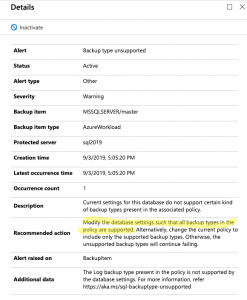
Yup.. Simple recovery model is no bueno..
Yup, simple recovery model is no bueno..

So, how do we get around this? It is not too hard. Just create a new backup policy that does not include transactional log backups and assign it to your databases that utilize the simple recovery model.

Transactional Log Backup Problems

So, what happens when you try to take a transactional log backup of a database that doesn’t have a full backup? It fails. This is by design. If you try to take a log backup in this scenario with T-SQL it will fail as well. That said, several 3rd Party open source backup solutions like my recommended one can gracefully handle this for you. It can take a full backup instead of the log backup. I have grown to expect this behavior.

Here is what you will see in the logs of Azure Backup for SQL Server VM’s.
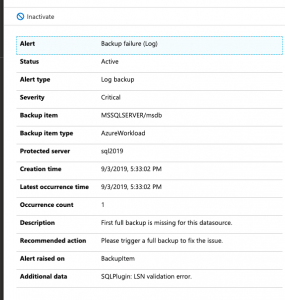
Log backups without a full backup fail. You have to force a full backup
You have to force a full backup or wait until the scheduled full backup occurs. Yuck!

So, the workaround here is simple. You can force a backup. This will start the process of allowing your schedule log backups to work as designed. You could also wait until the scheduled full backup runs but know this means you will not have point in time recovery until that full backup runs. There should be an option to perform a full backup instead of a transactional log backup if a full backup does not exist. This would prevent the transactional log scheduled backups from failing.

Things to Know!

Azure Backup for SQL Server VM’s pricing goes off of storage as well as instances of SQL. By default, compression is not used for the SQL Server Backups. You will most likely want to make sure you enable this to save some money.

Azure Backup for SQL Server VMs has a good amount of documentation for troubleshooting common problems.

There are many documented limitations that we didn’t cover in this blog post. Some shocking ones to me are SQL Server Failover Cluster Instances and don’t configure backup for more than 50 databases in one go

The post Azure Backup for SQL Server VMs appeared first on SQL Server Consulting & Remote DBA Service.

September 4, 2019/1 Comment/by John Sterrett
/wp-content/uploads/2024/05/Data-Architecture-as-a-Service-with-ProcureSQL.png 0 0 John Sterrett /wp-content/uploads/2024/05/Data-Architecture-as-a-Service-with-ProcureSQL.png John Sterrett2019-09-04 21:25:312019-09-04 21:25:31Azure Backup for SQL Server VMs
Join Our Newsletter
  Thank you for Signing Up
Please correct the marked field(s) below.
1,true,6,Contact Email,21,false,1,First Name,21,false,1,Last Name,2
Search Search

Blog Categories

  • $150 Challenge
  • Advice
  • Announcements
  • Artificial Intelligence
  • Awards
  • Azure Data Factory
  • C-Level
  • Cloud
  • Community
  • Conferences
  • Data Architecture
  • Data Integration
  • Data Intergration
  • Data Visualization
  • Data Warehousing
  • DBA 101
  • Design
  • Disaster Recovery or High Availability
  • Education
  • Fabric Dev Ops
  • Fabric Lakehouse
  • Fabric Lakehouses
  • Fabric Mirroring
  • Fabric Notebooks
  • Features
  • General
  • Health Checks
  • Lab
  • Microsoft Fabric
  • Microsoft Technologies
  • Newsletter
  • Performance Tuning
  • Power BI
  • ProcureSQL
  • Python
  • Reporting
  • Security
  • SQL Server
  • SQL Server
  • sql server 101
  • SQLServerPedia Syndication
  • syndication
  • The Blog
  • Uncategorized
  • Visual Studio Credit

Tags

#SQLFamily automatic tuning availability group azure backup Backups career Data Governance Data Loss Data Platform DBA Denver Differential Backup Disaster Recovery Fabric Fabric Architecture Full Backup High Availability Houston Marketing Database Administrator Microsoft Microsoft Fabric Microsoft SQL Server mirroring parameter sniffing PASS performance tuning Professional Development query store Recovery Recovery Model Restores Security SQL Saturday SQL Server SQL Server 2017 sql server 2019 SQL Server 2022 sql server 2025 SSMS System Databases Transaction Log Backup tsqltuesday Tuning Wait Stats

Archives

  • September 2026
  • August 2026
  • July 2026
  • June 2026
  • May 2026
  • April 2026
  • March 2026
  • February 2026
  • November 2025
  • October 2025
  • September 2025
  • July 2025
  • June 2025
  • May 2025
  • April 2025
  • March 2025
  • January 2025
  • December 2024
  • November 2024
  • October 2024
  • September 2024
  • August 2024
  • July 2024
  • June 2024
  • May 2024
  • February 2024
  • January 2024
  • November 2023
  • October 2023
  • March 2023
  • January 2023
  • May 2022
  • April 2022
  • November 2021
  • September 2020
  • August 2020
  • April 2020
  • March 2020
  • February 2020
  • January 2020
  • December 2019
  • November 2019
  • September 2019
  • July 2019
  • April 2019
  • November 2018
  • September 2018
  • August 2018
  • July 2018
  • June 2018
  • May 2018
  • April 2018
  • March 2018
  • February 2018
  • January 2018
  • November 2017
  • October 2017
  • August 2017
  • July 2017
  • June 2017
  • April 2017
  • December 2016
  • November 2016
  • October 2016
  • July 2016
© Copyright 2026 - ProcureSQL - 1464 East Whitestone Blvd., Suite 1902 Cedar Park, TX 78613, USA
  • Link to Facebook
  • Link to Instagram
  • Link to LinkedIn
  • Link to Youtube
  • Link to X
Scroll to top Scroll to top Scroll to top
Manage Consent
To provide the best experiences, we use technologies like cookies to store and/or access device information. Consenting to these technologies will allow us to process data such as browsing behavior or unique IDs on this site. Not consenting or withdrawing consent, may adversely affect certain features and functions.
Functional Always active
The technical storage or access is strictly necessary for the legitimate purpose of enabling the use of a specific service explicitly requested by the subscriber or user, or for the sole purpose of carrying out the transmission of a communication over an electronic communications network.
Preferences
The technical storage or access is necessary for the legitimate purpose of storing preferences that are not requested by the subscriber or user.
Statistics
The technical storage or access that is used exclusively for statistical purposes. The technical storage or access that is used exclusively for anonymous statistical purposes. Without a subpoena, voluntary compliance on the part of your Internet Service Provider, or additional records from a third party, information stored or retrieved for this purpose alone cannot usually be used to identify you.
Marketing
The technical storage or access is required to create user profiles to send advertising, or to track the user on a website or across several websites for similar marketing purposes.
  • Manage options
  • Manage services
  • Manage {vendor_count} vendors
  • Read more about these purposes
View preferences
  • {title}
  • {title}
  • {title}