• Link to Facebook
  • Link to Instagram
  • Link to LinkedIn
  • Link to Youtube
  • Link to X
Call Us Today! 512-640-5750
Data Architect as a Service | Remote DBA Services
  • Services
    • Analytics Architecture
    • Database Architecture
    • Software Architecture
    • Microsoft Fabric Consulting
      • Microsoft Fabric Health Check
  • About Us
    • Testimonials
    • Recommendation Program
    • Jobs
      • Data Engineering Consultant
      • Principal Data Analytics Architect
  • Resources
    • Blog
    • Videos
  • Contact
  • Click to open the search input field Click to open the search input field Search
  • Menu Menu

Import Databases to Azure SQL Database

Cloud, Data Architecture

I recently spoke at a conference and was asked what is the easiest way to import databases to Azure SQL Database. Therefore, I wanted to share how I do this with DBATools.io. You can use the same code to just export if you need a local copy of an Azure SQL database as well.

Import-Module dbatools -Force
<# Variables #>
$BackupPath = "C:\Demo\AzureSQL\Bacpac" #folder location for backups
$SourceInstance = "sql2019\sql2016"
$DBName = "AdventureWorksLT2012"
$AzureDestInstance = "procuresqlsc.database.windows.net"
$DBNameDest = $DBName <# backpac options for import and export #>
$option = New-DbaDacOption -Type Bacpac -Action Export
$option.CommandTimeout = 0 $option2 = New-DbaDacOption -Type Bacpac -Action Publish
$option2.CommandTimeout = 0 <# The following assums Azure SQL Database exists and is empty Azure will create database by default if it doesn't exist #>
$bacpac = Export-DbaDacPackage -Type Bacpac -DacOption $option -Path `
$BackupPath -SqlInstance $SourceInstance -Database $DBName Publish-DbaDacPackage -Type Bacpac -SqlInstance `
$AzureDestInstance -Database $DBNameDest -Path $bacpac.path ` -DacOption $option2 -SqlCredential username 

What Is my Performance Tier?

Great question, as of 3/3/2020 if the database in Azure SQL Database does not exist then it will be created. When its created the following database uses the default performance tier. This is General Purpose (Gen5) with 2 vCores.
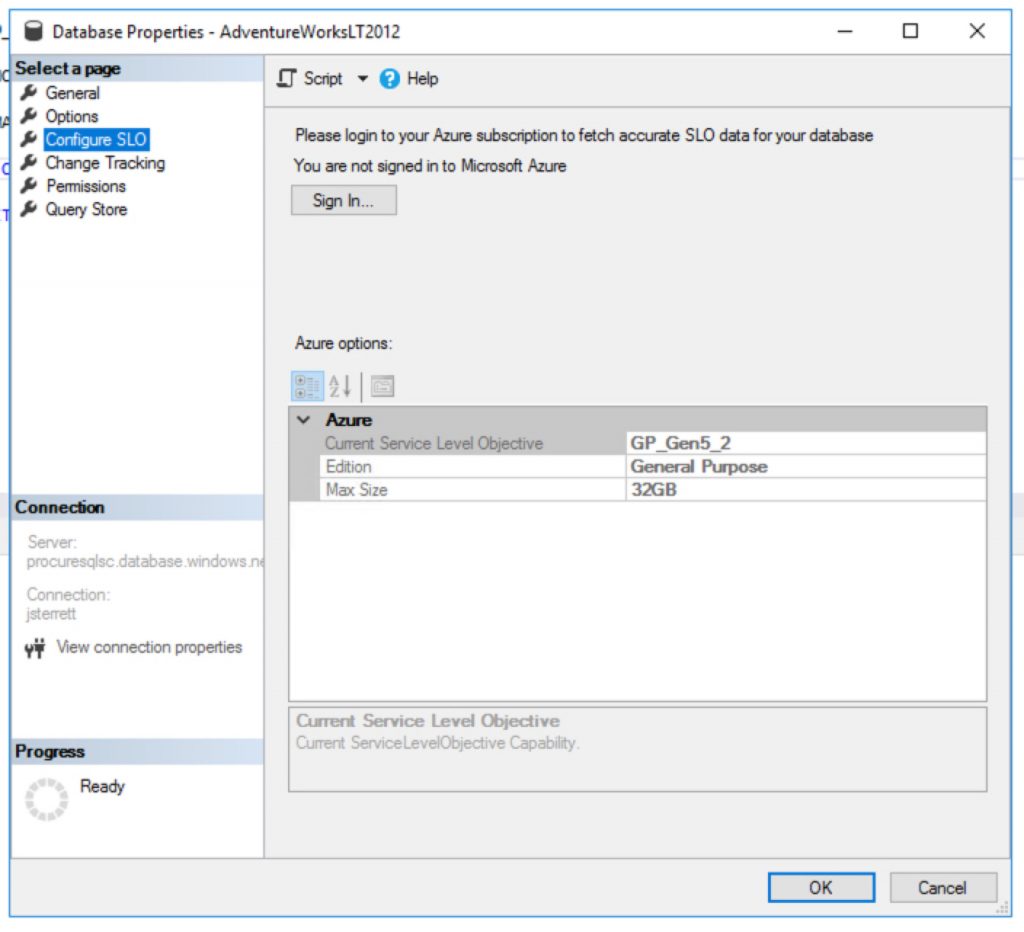
Default performance tier for a new Azure SQL Database costs $371.87 per month.
The default cost of a new Azure SQL Database is 371.87 per month.

How to create cheaper databases

Great question, you can import databases to Azure SQL Database cheaper using PowerShell. It is as simple as using the Azure PowerShell Module. The following example below I use my existing Azure SQL Database server and I end up creating a new database with the “S0” tier.

<# Install Azure Powershell module requires local admin
Install-Module -Name Az -AllowClobber -Scope AllUsers
#> Import-Module Az -Force
$RGName = "<Your Existing Resource Group>"
$ServerName = "<Your Azure SQL Database Server>"
$Tenant = "<Add Tenant ID>"
$Subscription = "<Add your Subscription ID>" Connect-AzAccount -Tenant $Tenant -SubscriptionId $Subscription
$server = Get-AzSqlServer -ResourceGroupName $RGName -ServerName $ServerName $db = New-AzSqlDatabase -ResourceGroupName $RGName `
-ServerName $server.ServerName -DatabaseName $DBName `
-RequestedServiceObjectiveName "S0"

Your Homework Assignment

You got all the nuts and bolts to generate a script that can migrate all your databases on an instance. Then you can import databases to Azure SQL Database in one loop.

Need Help Moving to Azure?

Let us help you! Schedule a free 30-minute chat to see if we can point you the right direction. Take advantage of our free resources too.

If you liked this blog post signup for our free newsletter!

The post Import Databases to Azure SQL Database appeared first on SQL Server Consulting & Remote DBA Service.
March 4, 2020/by John Sterrett
https://procuresql.com/wp-content/uploads/2018/09/Procure-SQL-string-or-binary-data-get-truncated-1-1.jpg 960 1440 John Sterrett /wp-content/uploads/2024/05/Data-Architecture-as-a-Service-with-ProcureSQL.png John Sterrett2020-03-04 23:56:312020-03-04 23:56:31Import Databases to Azure SQL Database

Allow users to start/stop Azure VMs

Data Architecture

Today I wanted to cover how you can grant the least privilege required to stop, start or restart an Azure VM. This is also a fun great example of how you can create custom Azure Security Roles too. That’s right, we are killing two birds with one stone today.

Why Should you create a custom Role?

Where possible I like to grant security towards resource groups. Therefore, let’s assume we got multiple VM’s built for the developer group to do some testing. You want to grant people access to start, restart or stop any VM in that group. We can then grant access to the resource group to our custom role. As VMs come in and out of the resource group they would inherit our custom group.

Now, you might be wondering why don’t I just give them the “Contributor” role or the “Virtual Machine Contributor” role and be on our way? Well, if you were to do this on a resource group you just gave access to create VM’s and a whole lot more.

Least privileged roles are your best friend. Today, you will see they are also not that hard to create either.

How do we create custom roles?

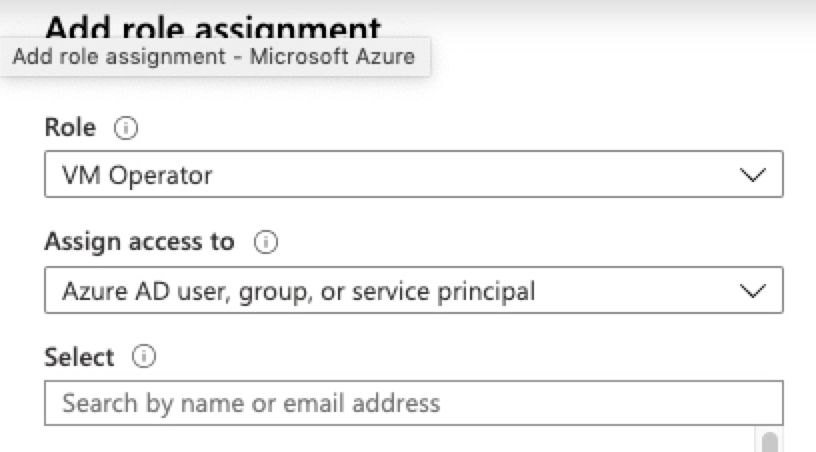
Great question, first you need to identify what tasks do we need the role to complete. In our case, you have to be able to see a VM in order to take any action against the VM. Then we want to start, stop (deallocate), and restart the VM. Digging through IAM. I found the following security options.

 "Microsoft.Compute/*/read",
 "Microsoft.Compute/virtualMachines/start/action",
 "Microsoft.Compute/virtualMachines/restart/action",
 "Microsoft.Compute/virtualMachines/deallocate/action"

Now, we can create our custom JSON text file that we will then import using Azure CLI. Below you will find a sample JSON file to build our custom security role. You will need to add your subscription id(s). You can also change your name and description you would see in the Azure Portal.

 "Name": "VM Operator", "IsCustom": true, "Description": "Can start, restart and stop (deallocate) virtual machines.",
 "Actions": [ "Microsoft.Compute/*/read", 
"Microsoft.Compute/virtualMachines/start/action", "Microsoft.Compute/virtualMachines/restart/action", 
"Microsoft.Compute/virtualMachines/deallocate/action" ], 
"NotActions": [ ], "AssignableScopes": 
[ "/subscriptions/<Subscription ID Goes Here>" ] }

How to Import Custom Security

Now that we are ready to go with our custom security role in a JSON file. We can then utilize Azure CLI to log in to the tenant and import our security role. First, we will log in to Azure with CLI as shown below.

az login --username <myEmailAddress> -t <customerTenantId-or-Domain>

Now we will load our saved JSON file. After a few minutes, we should then see our new security role in the Azure portal.

az role definition create --role-definition IAMRole-VMOperator.json

Now you can grant access to your custom role just like you would with any other role in Azure.

The post Allow users to start/stop Azure VMs appeared first on SQL Server Consulting & Remote DBA Service.
February 4, 2020/by John Sterrett
https://procuresql.com/wp-content/uploads/2018/09/Procure-SQL-string-or-binary-data-get-truncated-1-1.jpg 960 1440 John Sterrett /wp-content/uploads/2024/05/Data-Architecture-as-a-Service-with-ProcureSQL.png John Sterrett2020-02-04 22:49:082020-02-04 22:49:08Allow users to start/stop Azure VMs

Previous SQL Server Updates

Data Architecture

Hello everyone, this is John your Austin SQL Server Consultant here and today I am going to answer a question that comes up often so I wanted to blog about it for everyone. The question of the day is where can I download the previous SQL Server Updates?

The History towards Updates

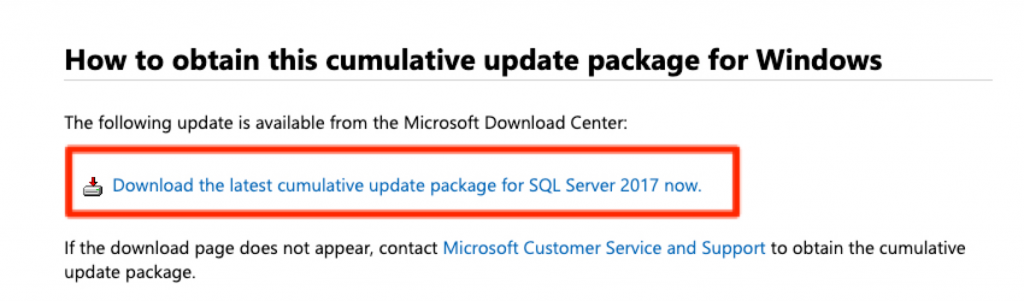
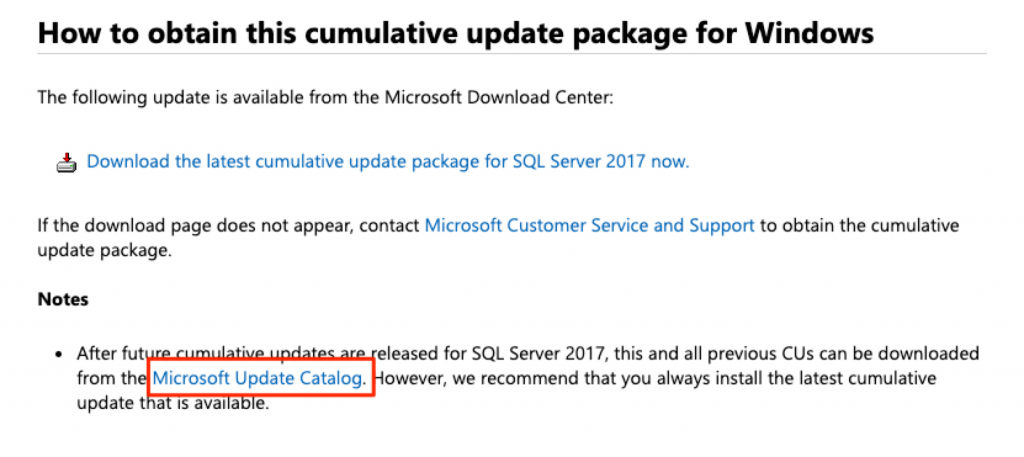
Back in the day when we were young but not a kid anymore there were service packs and cumulative updates. We could download these separately and all of the updates were easy to find. Now today, if you click on a KB article to download an update you get pointed to the latest update as shown below.

Current SQL Server KB articles point to only the latest update.

How far is My SQL Server on Updates?

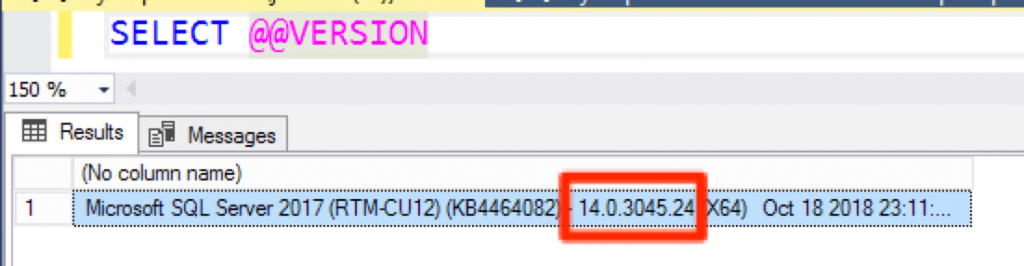
This is also another great question. My favorite place to find all the history of updates toward SQL Server is the SQL Server Build List Blog. You can cross-reference this towards your version by running the following query below.

You can use SELECT @@VERSION to get your current version number.

I fully get exactly why Microsoft is trying to point everyone to the latest update. Normally, it makes perfect sense but let’s take a look at today Jan 9th, 2020. I am planning to update SQL Server 2017 to CU17. Its been out for two months. Today CU18 is released and if I wasn’t careful I would have downloaded a different update than expected.

SQL Server Blog List is a great resource for finding a list of all SQL Server Updates

Getting a previous SQL Server Update

So, on to the solution. It’s actually an easy one but also one that is easy to overlook as well. Let’s go back to the new standard update page for SQL Server updates.

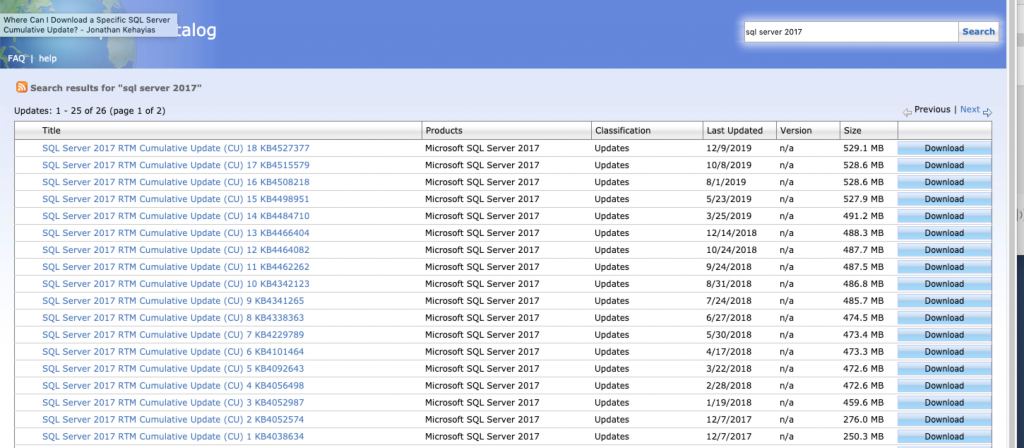
That is right, the Microsoft Update Catalog is your best friend to find all your updates for Microsoft products including SQL Server. You can search for the product you want. For example, in this case, I am looking for SQL Server 2017 and can see all the previous updates for SQL Server.

All SQL Server Updates Can be Found in the Microsoft Update Catalog.
All the SQL Server Updates can be found in the Microsoft Update Catalog

If you enjoyed this tip and found it helped make sure to join our newsletter so you can enjoy more free tips, tricks, and video demos.

Join our Newsletter for Free Tips

The post Previous SQL Server Updates appeared first on SQL Server Consulting & Remote DBA Service.

January 9, 2020/2 Comments/by John Sterrett
/wp-content/uploads/2024/05/Data-Architecture-as-a-Service-with-ProcureSQL.png 0 0 John Sterrett /wp-content/uploads/2024/05/Data-Architecture-as-a-Service-with-ProcureSQL.png John Sterrett2020-01-09 19:43:342020-01-09 19:43:34Previous SQL Server Updates

Free SQL Server Training Videos

Data Architecture

Hello everyone! This is your SQL Server Consultant in Austin, TX and due to some posts on twitter about SQL PASS recordings costing $999 I wanted to share some of my favorite places to find free SQL Server training videos. I hope this helps make your data fast, secure and highly available in 2020 and beyond!

$999 for 2019 PASS recordings?

You must be out of you mind.

— Ned Otter (@NedOtter) December 26, 2019

https://platform.twitter.com/widgets.js

Where Is the Good Stuff Give Me Some More

Speaking on Migrating to Azure SQL Database at Ignite 2017
Attending conferences is nice but free recorded sessions are priceless!

Those who know me know I love music. I especially love the underground non-mainstream content. Therefore, my first recommendation is UserGroup.TV. As of December 27th, there are 127 videos tagged as SQL Saturday alone. Shawn goes around to almost every Tech conference he can find and brings his rig and records sessions for the community.

Are you in love with the new pop singles? Wish you could hear them before they hit the radio? If you like your tech like your music than Microsoft Ignite is for you. Every year Microsoft puts on a conference called, Ignite. This conference is usually where Microsoft will break its cutting edge tech. My favorite thing about the conference is that the content is available online for free. Midway through the page, you can search through the massive collection of free recorded sessions.

Next up, is the consistent greatest hits. Almost every session is a banger! This reminds me of my favorite Microsoft Data Platform conference. This is SQLBits and yes, their video content is also available for FREE.

Finally, Here is a collection of some great videos on performance tuning. Make SQL Server Go Faster, SQL Server Performance Improvements with SQL 2019. Another one is 7 Reasons your SQL Server Code is Slow! You can also find more great videos at Procure SQL Youtube Channel.

Need SQL Server Help?

The post Free SQL Server Training Videos appeared first on SQL Server Consulting & Remote DBA Service.
December 27, 2019/by John Sterrett
/wp-content/uploads/2024/05/Data-Architecture-as-a-Service-with-ProcureSQL.png 0 0 John Sterrett /wp-content/uploads/2024/05/Data-Architecture-as-a-Service-with-ProcureSQL.png John Sterrett2019-12-27 15:59:022019-12-27 15:59:02Free SQL Server Training Videos

5 Game Changers with SQL Server 2019

Data Architecture, Performance Tuning

Microsoft made SQL Server 2019 Generally Available this week we want to share some videos and code examples of our favorite new features. Most of these will make your code go faster without any code changes!

We have been testing SQL Server 2019 for months and hope you enjoy these features as much as we do!

Access our SQL Server 2019 Videos!

The post 5 Game Changers with SQL Server 2019 appeared first on SQL Server Consulting & Remote DBA Service.
November 5, 2019/by John Sterrett
https://procuresql.com/wp-content/uploads/2019/12/5-game-changers-with-sql-server-2019-1.gif 1 1 John Sterrett /wp-content/uploads/2024/05/Data-Architecture-as-a-Service-with-ProcureSQL.png John Sterrett2019-11-05 22:06:242019-11-05 22:06:245 Game Changers with SQL Server 2019

Keeping Data Safe: Row-Level Security

Data Architecture

In this tip, we want to go over the fundamentals of Row-Level-Security for a database table. Don’t let your data be vulnerable to data breaches. It makes sense to secure the data all the way down to the row level. Common real-world examples include multi-tenant applications, sensitive data, and data that could be broken down into territories or regions.

How Do Does Row-Level Security Work?

This is a great question. It works off of a table value function to layout the security check and a policy that implements the security function for a table.

Let’s check it out! First, we will create two tables. The Sales table that holds the sales data and the SalesReps table which holds the Many to Many relationships on who can see whos sales. In this example, the Manager will see all rows, SalesLead will see SalesLead and Sales1 rows.

Note: In this example by default, Sales3 won’t be able to see its own data. Neither would sysadmin or database owner. Therefore you will need to make sure your security function allows a failsafe for seeing data for the people who should be able to touch all the data for the table.

USE [master]
GO
IF EXISTS (SELECT * FROM sys.databases WHERE name LIKE 'RLS_Demo')
BEGIN
	DROP DATABASE RLS_Demo
END

CREATE DATABASE RLS_Demo
GO

USE [RLS_Demo]
GO

/* Create database users for testing */
CREATE USER Manager   WITHOUT LOGIN;  
CREATE USER SalesLead WITHOUT LOGIN;  
CREATE USER Sales2    WITHOUT LOGIN; 
CREATE USER Sales3    WITHOUT LOGIN; 

CREATE TABLE Sales  
    (  
    OrderID int,  
    SalesRep sysname,  
    Product varchar(30),  
    Qty int  
    ); 
	
	/* Define who can more than one SalesRep's orders */
CREATE TABLE SalesResp
( SalesRepLead sysname,
  SalesRep sysname,
  PRIMARY KEY (SalesRepLead, SalesRep)
  ) 

  /*Sales1 is TeamLead*/
  INSERT INTO SalesResp (SalesRepLead, SalesRep)
  VALUES ('SalesLead', 'SalesLead')
    INSERT INTO SalesResp (SalesRepLead, SalesRep)
  VALUES ('SalesLead', 'Sales2')
      INSERT INTO SalesResp (SalesRepLead, SalesRep)
  VALUES ('Sales2', 'Sales2')

  /* Note no records for Sales3 in our Many to Many lookup */

INSERT INTO Sales VALUES (1, 'SalesLead', 'Pirates Hat', 5);
INSERT INTO Sales VALUES (2, 'SalesLead', 'Terrible Towel', 2);
INSERT INTO Sales VALUES (3, 'SalesLead', 'Clemente Jersey', 4);
INSERT INTO Sales VALUES (4, 'Sales2', 'Pirates Hat', 2);
INSERT INTO Sales VALUES (5, 'Sales2', 'Clemente Jersey', 5);
INSERT INTO Sales VALUES (6, 'Sales2', 'Terrible Towel', 5);
INSERT INTO Sales VALUES (4, 'Sales3', 'Pirates Hat', 1);
INSERT INTO Sales VALUES (5, 'Sales3', 'Clemente Jersey', 1);
INSERT INTO Sales VALUES (6, 'Sales3', 'Terrible Towel', 2);

GRANT SELECT ON Sales TO Manager;  
GRANT SELECT ON Sales TO SalesLead;  
GRANT SELECT ON Sales TO Sales2;  
GRANT SELECT ON Sales TO Sales3; 
/* RLS not in place. Should see all 9 rows */
SELECT * FROM Sales;

Now let’s look at the meat and potatoes of Row-Level Security. This would be the function and the policy that bounds the row-level security to a table.

/* Keep all your Row Level Security in its own securable schema */
CREATE SCHEMA Security;  
GO  
/* Note no failsave for sysadmin and Sales3 doesn't exist in SalesResp table either */ 
CREATE FUNCTION Security.fn_securitypredicate(@SalesRep AS sysname)  
    RETURNS TABLE  
WITH SCHEMABINDING  
AS  
    RETURN SELECT 1 AS fn_securitypredicate_result
WHERE @SalesRep IN (SELECT SalesRep FROM dbo.SalesResp WHERE SalesRepLead = USER_NAME() )
OR USER_NAME() = 'Manager';  

CREATE SECURITY POLICY SalesFilter  
ADD FILTER PREDICATE Security.fn_securitypredicate(SalesRep)
ON dbo.Sales  
WITH (STATE = ON);  

GRANT SELECT ON security.fn_securitypredicate TO Manager;  
GRANT SELECT ON security.fn_securitypredicate TO SalesLead;  
GRANT SELECT ON security.fn_securitypredicate TO Sales2;  

You should notice there is no logic to help sysadmin users see the data in the table. Therefore just like Sales3 now any sysadmin wouldn’t see any data.

/* DB owner shows no rows due to RLS */
EXECUTE AS USER = 'dbo'
SELECT * FROM Sales;
REVERT; 

EXECUTE AS USER = 'SalesLead';  
SELECT * FROM Sales;
REVERT;  
  
EXECUTE AS USER = 'Sales2';  
SELECT * FROM Sales;
REVERT;  
  
EXECUTE AS USER = 'Manager';  
SELECT * FROM Sales;
REVERT;  

/* Notice no rows as security function returns zero rows from lookup table */
EXECUTE AS USER = 'Sales3';  
SELECT * FROM Sales;
REVERT; 

In this scenario, to allow Sales3 to see its own sales data we just need to insert a record into the SalesReps table as shown below and we are good to go.

 INSERT INTO SalesResp (SalesRepLead, SalesRep)
 VALUES ('Sales3', 'Sales3')

EXECUTE AS USER = 'Sales3';  
SELECT * FROM Sales;
REVERT; 

Now if you want to remove row-level security or make some modifications to the function used in the policy all you have to do is drop the security policy then the function.

/* Clean up */
DROP SECURITY POLICY SalesFilter 
DROP FUNCTION Security.fn_securitypredicate

Your Homework!

Figure how to implement row-level security to benefit your business! Also, go ahead and figure out how to add a failsafe so sysadmins can still see all the data like they normally would.

Got more Row-Level Security Questions?

Get A Free 30 Minute Consultation

November 4, 2019/by John Sterrett
https://procuresql.com/wp-content/uploads/2019/04/Icon-1-1.png 420 460 John Sterrett /wp-content/uploads/2024/05/Data-Architecture-as-a-Service-with-ProcureSQL.png John Sterrett2019-11-04 17:54:442019-11-04 17:54:44Keeping Data Safe: Row-Level Security

Azure Backup for SQL Server VMs

Data Architecture

I am not sure why but sometimes I am glutting for punishment. Maybe its why I try every backup and restore solution I can get my hands on? While Microsoft has done an amazing job at building the best relational database engine Azure Backup for SQL Server Virtual Machines has some architecture problems. In this post, I will showcase things you need to focus on, problems, and workarounds for your initial run with an Azure Backup for SQL Server VMs.

What’s Azure Backup for SQL Server Virtual Machines (VMs)?

If you take a look at Azure Backup they added functionality for backing up SQL Server databases inside an Azure VM. This seems like a really cool feature. Let’s use the same technology we use to backup our VM’s to also backup our databases. You know the whole one-stop-shop for your disaster recovery needs. Comes with built-in monitoring and it also eliminates the struggle some people have with setting up certificates, encryptions, purging old backups in blob storage, backups and restores from blob storage. It is really nice to also have a similar experience as restoring Azure SQL Databases as well.

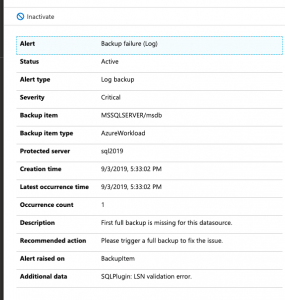
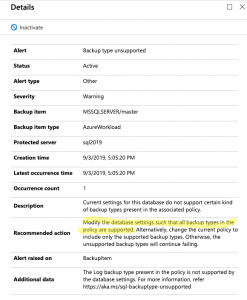
Unfortunately, the product doesn’t work as expected at this point in time. I would expect any database backup tool to be able and backup the system databases by default without any customization. Therefore, Last night I setup my first Azure Backup for SQL Server Virtual Machines in the Backup Vault and this morning you can see my results below.

Azure Backup for SQL Server VM’s gets 0/3 system databases backed up by default

Now we will dig into concerns and initial problems with Azure Backup for SQL Server Virtual Machines (VMs).

Automatically Backup New Databases

Having the ability to backup new databases automatically is taken for granted. So much, that I noticed that Azure Backup for SQL Server VM’s will not automatically backup new databases for you. That’s right. Make sure you remember to go in and detect and select your new database every time you add a database or you will not be able to recover.

Azure Backup for SQL Server VM’s has an interesting feature called Autoprotect. This should automatically backup all your databases for you. Unfortunately, this does not work. Yes, I double-checked by enabling autoprotect for a VM and I added a new database. The database didn’t get backed up so I had to manually add the database.

Simple Recovery Problems

Looking into the failures for my system database backups I noticed something interesting in the log for the master database. It looks like you will get errors with the only SQL Server backup policy created by default. The reason is the policy includes transactional log backups and as you know its impossible to take a transactional log backup if your database utilizes the simple recovery model. Now, most backup tools know how to roll with databases in simple and full recovery.

Looks like Azure Backup for SQL Server VM’s is not one of these tools that easily allow you to mix databases utilizing both simple and full recovery models.

Yup.. Simple recovery model is no bueno..
Yup, simple recovery model is no bueno..

So, how do we get around this? It is not too hard. Just create a new backup policy that does not include transactional log backups and assign it to your databases that utilize the simple recovery model.

Transactional Log Backup Problems

So, what happens when you try to take a transactional log backup of a database that doesn’t have a full backup? It fails. This is by design. If you try to take a log backup in this scenario with T-SQL it will fail as well. That said, several 3rd Party open source backup solutions like my recommended one can gracefully handle this for you. It can take a full backup instead of the log backup. I have grown to expect this behavior.

Here is what you will see in the logs of Azure Backup for SQL Server VM’s.

Log backups without a full backup fail. You have to force a full backup
You have to force a full backup or wait until the scheduled full backup occurs. Yuck!

So, the workaround here is simple. You can force a backup. This will start the process of allowing your schedule log backups to work as designed. You could also wait until the scheduled full backup runs but know this means you will not have point in time recovery until that full backup runs. There should be an option to perform a full backup instead of a transactional log backup if a full backup does not exist. This would prevent the transactional log scheduled backups from failing.

Things to Know!

Azure Backup for SQL Server VM’s pricing goes off of storage as well as instances of SQL. By default, compression is not used for the SQL Server Backups. You will most likely want to make sure you enable this to save some money.

Azure Backup for SQL Server VMs has a good amount of documentation for troubleshooting common problems.

There are many documented limitations that we didn’t cover in this blog post. Some shocking ones to me are SQL Server Failover Cluster Instances and don’t configure backup for more than 50 databases in one go

The post Azure Backup for SQL Server VMs appeared first on SQL Server Consulting & Remote DBA Service.

September 4, 2019/1 Comment/by John Sterrett
/wp-content/uploads/2024/05/Data-Architecture-as-a-Service-with-ProcureSQL.png 0 0 John Sterrett /wp-content/uploads/2024/05/Data-Architecture-as-a-Service-with-ProcureSQL.png John Sterrett2019-09-04 21:25:312019-09-04 21:25:31Azure Backup for SQL Server VMs

Join us for FryeDay!

Data Architecture

Once again it is PASS Summit week in Seattle. This is the biggest event in the world for SQL Server and Microsoft Data Professionals to gather to connect,

Frye First Time Speaker

Frye First Time Speaker

share and learn.

I will never forget being anxious and scared the first time I gave a presentation at PASS in front of hundreds of people.  Therefore, one of my favorite traditions during PASS Summit is to find a first-time speaker at PASS and try to make them at ease by having their friends and peers wear something special during their first presentation.

This year, I couldn’t think of a better person than Jeremy Frye. I have known Jeremy for years. I have been blessed to work with him at RDX. While everyone in the community knows him as the speaker who wears a Pittsburgh Pirates hat at SQL Saturday’s he is an inspiration to me. He is proof that good guys can be successful in this community. He is one of the most humble, kind and helpful people I know.  I have been

Dress like Frye Day!

Dress like Frye Day!

blessed to see him share his knowledge for years and am excited for everyone to do so this week as well. Therefore, to help Jeremy for his first session we will be giving out Pittsburgh Pirates hats to support Jeremy. If you can make Jeremy’s session on “Speed Up Your SSAS Data Refresh with Dynamic Partition Processing” at 11:00 am in room 604 on Friday (I like to call it FryeDay) come on by the RDX booth and ask for a Pirates hat. When you see Jeremy around this week tell him you got this and you cannot wait for his session!


The post Join us for FryeDay! appeared first on SQL Server Consulting & Remote DBA Service.

November 7, 2018/by John Sterrett
/wp-content/uploads/2024/05/Data-Architecture-as-a-Service-with-ProcureSQL.png 0 0 John Sterrett /wp-content/uploads/2024/05/Data-Architecture-as-a-Service-with-ProcureSQL.png John Sterrett2018-11-07 20:49:272018-11-07 20:49:27Join us for FryeDay!

Best Hidden Feature in SQL Server 2019

Data Architecture

With Microsoft’s Ignite conference this week a lot of new features are being advertised all over the internet.  Most likely if you are following along you have heard of Big Data Clusters, Spark, Performance Tuning, and security features.  I am really excited about this new feature and hope you are as excited about it too.


The post Best Hidden Feature in SQL Server 2019 appeared first on SQL Server Consulting & Remote DBA Service.
September 26, 2018/by John Sterrett
/wp-content/uploads/2024/05/Data-Architecture-as-a-Service-with-ProcureSQL.png 0 0 John Sterrett /wp-content/uploads/2024/05/Data-Architecture-as-a-Service-with-ProcureSQL.png John Sterrett2018-09-26 17:51:212018-09-26 17:51:21Best Hidden Feature in SQL Server 2019

Where did my string or binary data get truncated?

Data Architecture, Design

[Updated on 10/25/2018]

With MSIgnite being this week tons of great new features are being announced.  While many will focus on Spark integration, performance tuning, security, and containers sometimes it’s the simple things that give us the most value. I will talk about a feature that is hidden on page 17 in Microsoft’s SQL 2019 whitepaper. This feature is not getting a lot of love now but everyone will love it.  I will be honest, I didn’t even know about it until reading the white paper.  What is really super cool is that this new feature will find its way into SQL Server 2017 and SQL Server 2016. More on this in a bit.

In the past, I have struggled with the classic string truncation error. Everyone has at one point in time or another. It’s tricky to troubleshoot especially when you are processing a big batch of data.

String or binary data would be truncated

So even in SQL 2019, SQL Server 2017 CU12, and SQL Server 2016 (upcoming SQL Server 2016 SP2 CU)  by default, you will see the very classic “string or binary data would be truncated. The statement has been terminated.” message. Developers, DBA’s, IT Professionals, and almost everyone who has ever touched SQL Server have seen this frustrating error at least once. It is very frustrating for two separate reasons. One, you have no idea which column had the truncation. Second, you have no idea which row also had the error.

Let’s take a look at a very simple example.

use [tempdb]
go

if exists (select 1 from sys.tables where name like 'WorldSeries')
drop table dbo.WorldSeries
GO

CREATE TABLE dbo.WorldSeries (TeamName varchar(200), Championships varchar(3))
GO

INSERT INTO dbo.WorldSeries (TeamName, Championships) VALUES ('Texas Rangers', null)

INSERT INTO dbo.WorldSeries (TeamName, Championships) VALUES ('Houston Astros', 'one'), 
('Atlanta Braves', 'two'), ('Pittsburgh Pirates', 'five')
GO

You will see that our first statement on inserting the Texas Rangers completes successfully even though the Rangers have zero (I like NULL) championships.  We have an error in the next batch of doing three inserts in a single query so the whole transaction will rollback. In this example, we could figure out where our error is but let’s pretend we are doing a massive data load into several columns with billions of records. Actually, I don’t even want to think about troubleshooting that and with this new hot feature in SQL Server 2019, you won’t have too either.

SQL Server 2019 Feature Everyone Will Love

Okay, I think you know where this is going… Let’s not prolong this any longer. We will rerun the last statement with just adding trace flag 460.

DBCC traceon(460)
INSERT INTO dbo.WorldSeries (TeamName, Championships) VALUES ('Houston Astros', 'one'), 
('Atlanta Braves', 'two'), ('Pittsburgh Pirates', 'five')

GO

Now it is crystal clear.  The Pittsburgh Pirates have won too many championships to fit into this table. Okay, I guess we can both agree the string “five” is too big to fit into a varchar(3) column.

John’s Thoughts and Recommendation

All you have to do in SQL Server 2019 CTP 2.0 (Current newest public release) is enable trace flag 460.  I hope, the need for trace flag 460 goes away when SQL Server 2019 is Generally Available.  That said, enabling the trace flag is easy and this feature is going to be a lifesaver especially for people consuming data from other sources and struggle troubleshooting data that doesn’t fit into their data model due to the length of a value.

I am sure I am not the only person who provided feedback on this new feature to Microsoft.  That said, I am really excited to see Pedro’s announcement that the trace flag 460 shouldn’t be required when SQL Server 2019 is Generally Available (GA). The new error message (message 2628) will replace the old error message (message 8152). I am also excited that you will be able to utilize this new feature in SQL Server 2016 and 2017. It makes perfect sense for backward compatibility that you will need to provide trace flag 460 if you are using SQL Server 2017 CU 12 or SQL Server 2016.  Way to go Pedro and the SQL Server Team. This is amazing news!

use [tempdb]
go

if exists (select 1 from sys.tables where name like 'WorldSeries')
drop table dbo.WorldSeries
GO

CREATE TABLE dbo.WorldSeries (TeamName varchar(200), Championships varchar(3))
GO

INSERT INTO dbo.WorldSeries (TeamName, Championships) VALUES ('Texas Rangers', null)

INSERT INTO dbo.WorldSeries (TeamName, Championships) VALUES ('Houston Astros', 'one'), 
('Atlanta Braves', 'two'), ('Pittsburgh Pirates', 'five')
GO
September 26, 2018/by John Sterrett
https://procuresql.com/wp-content/uploads/2018/09/Procure-SQL-string-or-binary-data-get-truncated-2.jpg 960 1440 John Sterrett /wp-content/uploads/2024/05/Data-Architecture-as-a-Service-with-ProcureSQL.png John Sterrett2018-09-26 16:46:092018-09-26 16:46:09Where did my string or binary data get truncated?
Page 4 of 512345
Join Our Newsletter
  Thank you for Signing Up
Please correct the marked field(s) below.
1,true,6,Contact Email,21,false,1,First Name,21,false,1,Last Name,2
Search Search

Blog Categories

  • $150 Challenge
  • Advice
  • Announcements
  • Artificial Intelligence
  • Awards
  • Azure Data Factory
  • C-Level
  • Cloud
  • Community
  • Conferences
  • Data Architecture
  • Data Integration
  • Data Visualization
  • Data Warehousing
  • DBA 101
  • Design
  • Disaster Recovery or High Availability
  • Education
  • Fabric Dev Ops
  • Fabric Lakehouse
  • Fabric Lakehouses
  • Fabric Mirroring
  • Fabric Notebooks
  • Features
  • General
  • Health Checks
  • Lab
  • Microsoft Fabric
  • Newsletter
  • Performance Tuning
  • Power BI
  • ProcureSQL
  • Python
  • Reporting
  • Security
  • SQL Server
  • sql server 101
  • SQLServerPedia Syndication
  • syndication
  • The Blog
  • Uncategorized
  • Visual Studio Credit

Tags

#SQLFamily Artifical Intelligence automatic tuning availability group azure backup Backups career Data Loss Data Platform DBA Denver Differential Backup Disaster Recovery Fabric Fabric Architecture Full Backup High Availability Houston Marketing Database Administrator Microsoft Microsoft Fabric Microsoft SQL Server mirroring parameter sniffing PASS performance tuning Professional Development query store Recovery Recovery Model Restores Security SQL Saturday SQL Server SQL Server 2017 sql server 2019 SQL Server 2022 sql server 2025 SSMS System Databases Transaction Log Backup tsqltuesday Tuning Wait Stats

Archives

  • October 2026
  • September 2026
  • August 2026
  • July 2026
  • June 2026
  • May 2026
  • April 2026
  • March 2026
  • February 2026
  • November 2025
  • October 2025
  • September 2025
  • July 2025
  • June 2025
  • May 2025
  • April 2025
  • March 2025
  • January 2025
  • December 2024
  • November 2024
  • October 2024
  • September 2024
  • August 2024
  • July 2024
  • June 2024
  • May 2024
  • February 2024
  • January 2024
  • November 2023
  • October 2023
  • March 2023
  • January 2023
  • May 2022
  • April 2022
  • November 2021
  • September 2020
  • August 2020
  • April 2020
  • March 2020
  • February 2020
  • January 2020
  • December 2019
  • November 2019
  • September 2019
  • July 2019
  • April 2019
  • November 2018
  • September 2018
  • August 2018
  • July 2018
  • June 2018
  • May 2018
  • April 2018
  • March 2018
  • February 2018
  • January 2018
  • November 2017
  • October 2017
  • August 2017
  • July 2017
  • June 2017
  • April 2017
  • December 2016
  • November 2016
  • October 2016
  • July 2016
© Copyright 2026 - ProcureSQL - 1464 East Whitestone Blvd., Suite 1902 Cedar Park, TX 78613, USA
  • Link to Facebook
  • Link to Instagram
  • Link to LinkedIn
  • Link to Youtube
  • Link to X
Scroll to top Scroll to top Scroll to top
Manage Consent
To provide the best experiences, we use technologies like cookies to store and/or access device information. Consenting to these technologies will allow us to process data such as browsing behavior or unique IDs on this site. Not consenting or withdrawing consent, may adversely affect certain features and functions.
Functional Always active
The technical storage or access is strictly necessary for the legitimate purpose of enabling the use of a specific service explicitly requested by the subscriber or user, or for the sole purpose of carrying out the transmission of a communication over an electronic communications network.
Preferences
The technical storage or access is necessary for the legitimate purpose of storing preferences that are not requested by the subscriber or user.
Statistics
The technical storage or access that is used exclusively for statistical purposes. The technical storage or access that is used exclusively for anonymous statistical purposes. Without a subpoena, voluntary compliance on the part of your Internet Service Provider, or additional records from a third party, information stored or retrieved for this purpose alone cannot usually be used to identify you.
Marketing
The technical storage or access is required to create user profiles to send advertising, or to track the user on a website or across several websites for similar marketing purposes.
  • Manage options
  • Manage services
  • Manage {vendor_count} vendors
  • Read more about these purposes
View preferences
  • {title}
  • {title}
  • {title}