• Link to Facebook
  • Link to Instagram
  • Link to LinkedIn
  • Link to Youtube
  • Link to X
Call Us Today! 512-640-5750
Data Architect as a Service | Remote DBA Services
  • Services
    • Analytics Architecture
    • Database Architecture
    • Software Architecture
    • Microsoft Fabric Consulting
      • Microsoft Fabric Health Check
  • About Us
    • Testimonials
    • Recommendation Program
    • Jobs
      • Data Engineering Consultant
      • Principal Data Analytics Architect
  • Resources
    • Blog
    • Videos
  • Contact
  • Click to open the search input field Click to open the search input field Search
  • Menu Menu

Tag Archive for: azure

The $150 Challenge: What We’re Building and Why

$150 Challenge, Lab, Visual Studio Credit

Series: Building a SQL Server Always On Lab in Azure
Before You Begin

This is the first post in the series. There are no prerequisites beyond an active Azure subscription with the Visual Studio credit activated. If you haven’t done that yet, the next post covers it as its first step.

Who Is This Series For

I’m a DBA with about ten years of experience. I feel like know SQL Server inside and out. Whether it is execution plans, AG internals, backup strategies, or something in between, I feel comfortable with all of it. What I’ve been less confident about is a lot of what surrounds SQL Server. It could be the networking, the Windows configuration, or the Active Directory setup that the sysadmin team always handled while I waited for a server to be handed to me.

This series is my attempt to understand the full picture by building it myself, from scratch, in Azure and writing down everything I learn along the way.

If you’re a DBA, this will hopefully teach you enough Windows administration and Azure networking to stop feeling like a passenger when infrastructure conversations happen. If you’re a sysadmin, the SQL Server sections will explain why DBAs make the configuration requests they do, not just what those requests are. If you’re on the security side of things, the series tries to make a point to call out every decision that has a security implication and explains the reasoning, not just the steps.

My goal is for anyone in a tech background to be able to do this just like me, I try not to assume you’ve done any of this before and explain everything.

So What Are We Building

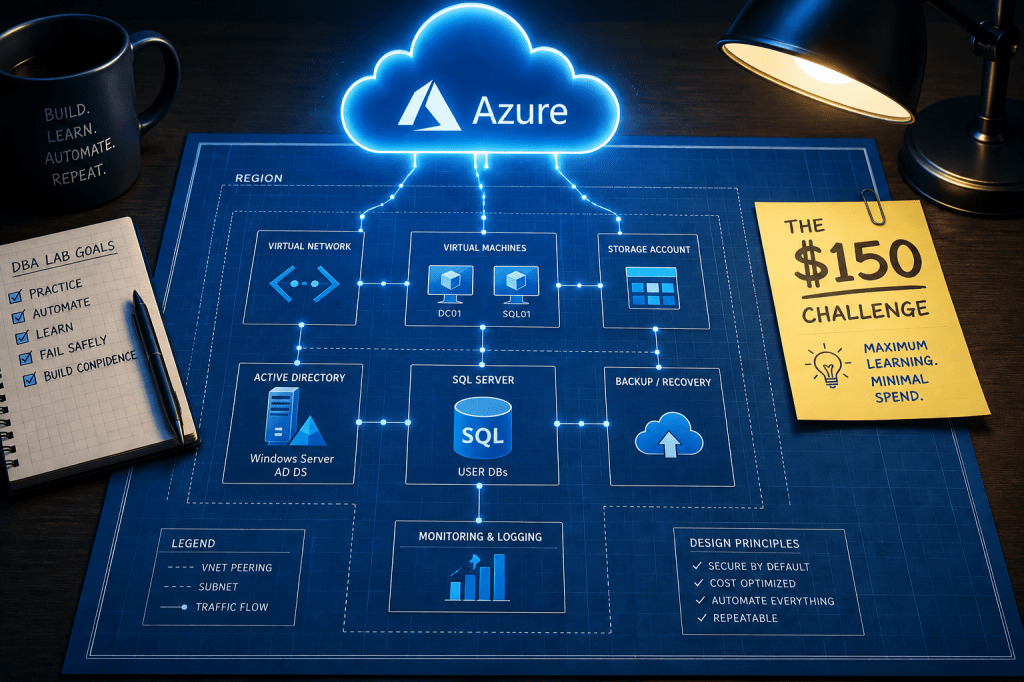
By the end of this series, we’ll have a Management/Monitoring server and a fully functional SQL Server Always On Availability Group running in Azure, built on a real domain, with proper networking, service accounts, and backups. The environment will look like this:

Machine Role Size Private IP
JUMPBOX01 Management/Monitoring Server B2s 10.10.0.4
DC01 Domain Controller and file share witness B2s 10.10.1.4
SQL01 SQL Server Primary D2s_v3 10.10.2.4
SQL02 SQL Server Secondary D2s_v3 10.10.2.5

All four machines live inside a single Azure Virtual Network (vnet-pcsql-lab-eus-001, 10.10.0.0/16) in East US, divided into dedicated subnets by role. The only machine with a public IP is JUMPBOX01, and that IP is locked to your home IP address via a Network Security Group. Everything else is completely private.

The domain is procuresql.local. The company in all examples is Procure SQL.

The SQL nodes will be members of a Windows Server Failover Cluster (SQLCluster01) with DC01 providing the third vote via a file share witness at \\DC01\SQLWitness. The Availability Group and listener will follow the naming pattern we’ve established for the series, but we’ll get to that later in this page.

Backups go to Azure Blob Storage. Service accounts are Group Managed Service Accounts. No plaintext passwords in scripts, anywhere.

Why Azure? Why $150?

The Visual Studio subscription credit gives you $150 per month in Azure resources. It resets monthly, it doesn’t roll over, and if you go over the limit Azure will suspend your subscription rather than charge you, which makes it a hard ceiling that forces you to actually think about cost, which is a valuable skill in itself.

Here’s what this environment costs assuming 9 hours of uptime per day (8am to 5pm), 22 working days a month, with auto-shutdown handling the rest. If you don’t use it the entire work day and/or if you don’t use it every work day, these estimated costs will be lower.

Resource Notes Est Monthly Cost
JUMPBOX01 – B2s 9hrs/day × 22 days @ $0.042/hr $8
DC01 – B2s 9hrs/day × 22 days @ $0.042/hr $8
SQL01 – D2s_v3 9hrs/day × 22 days @ $0.188/hr $37
SQL02 – D2s_v3 9hrs/day × 22 days @ $0.188/hr $37
OS Disks (x4 Standard SSD) Disks are billed at rest, this covers each VM’s C drive $8
SQL Data Disks (x2 Premium SSD P10) One per SQL AG Node $10
SQL Log Disks (x2 Premium SSD P10) One per SQL AG Node $10
Blob Storage for backups 50GB of Azure Locally Redundant Storage (LRS) $3
Internal Load Balancer and Public IP ILB for the AG Listener, Static Public IP for JUMPBOX01 $7
Key Vault, VNet, NSGs Free Tier $0
Total $138

A note on the SQL disks: unlike a traditional active/passive failover cluster where the storage floats between nodes, an Always On AG keeps a completely independent copy of every database on each replica. SQL01 and SQL02 each need their own data disk and their own log disk.

The $12 of headroom is tighter than it looks. Disks are billed whether the VM is running or not, so the ~$28 in disk costs hits every month regardless of how disciplined you are with uptime. The budget alert we’ll set in the next post will warn you at $140, so at $138 estimated, a few extra hours of VM uptime in a given month is genuinely enough to clip the ceiling. Which brings me to the final note on cost.

Auto-shutdown is non-negotiable here. A single D2s_v3 left running 24/7 for a full month costs around $137 by itself. Two of them running wide open and you’ve blown the budget before you’ve touched a SQL setting. We’ll configure auto-shutdown on every VM at deploy time, not as an afterthought.

How The Series Is Structured

I am trying to break this down so that each post covers a single topic. Every post follows the same structure:

  • Why we’re doing this – the reasoning behind the decision, not just the steps
  • How to do it – step by step, with individual commands and code blocks inline as you read
  • How to verify it worked – because “it didn’t throw an error” is not a test

Throughout each post, individual steps are broken into small code blocks so you read what you’re about to do, do that one thing, and then move on. At the end of every post is a consolidated PowerShell script that runs everything from that post in one shot, which I always found to be useful once you’ve read through it once and understand what it’s doing.

Posts reference each other. If something was set up in an earlier post, you’ll see a link like “we set the static IPs back in post 6” so you can jump back if you need a refresher without the current post re-explaining it.

If you’re following along from the beginning, each post’s testing section produces a state that the next post assumes. If something breaks, the testing sections are your breadcrumb trail back to where things went sideways.

Some Additional Notes

Naming Conventions

I have a naming convention for things that works for me, it might not work for you. But if you want to try to follow it, every resource in this series follows this one. This table is your reference for the entire series.

Thing Convention Example
Servers ALLCAPS## SQL01, DC01, JUMPBOX01
Domain (FQDN) procuresql.local
NetBIOS PROCURESQL
Databases PascalCase HRSystem, WidgetTracker
AG name AppNameAG (max 14 characters) HRSystemAG
AG listener AppNameAGL (max 15 characters) HRSystemAGL
Cluster SQLCluster01
File Share Witness \\DC01\SQLWitness
Service Accounts svc_ServiceName (gMSA) svc_SQLEngine$, svc_SQLAgent$
Resource Group rg-{workload}-{env} rg-pcsql-lab
VNet vnet-{workload}-{env}-{region}-{instance} vnet-pcsql-lab-eus-001
Subnets snet-{role}-{env}-{instance} snet-mgmt-lab-001
Storage Accounts st{type}{workload}{env}{instance} stblobbackuplab001
Network Security Groups nsg-{subnet}-{env}-{instance} nsg-mgmt-lab-001

Why A File Share Witness Instead Of A Cloud Witness

This comes up quickly when you start reading about Windows Server Failover Clustering in Azure. Microsoft’s own documentation often defaults to Azure Blob Storage as the cluster quorum witness, and it works fine. We’re doing something slightly different: using DC01 as a file share witness instead.

There are two reasons. First, we have a domain controller, so we have a third machine that can serve as the tiebreaker vote without adding cost. This also gives you insight into how a typical on prem setup would work. Second and more importantly for this series, understanding why WSFC needs a third vote, and how a file share witness actually provides it, teaches you more about quorum mechanics than pointing a script at a blob container does. The manual approach here is intentional.

What’s Next

Post 2 will be Subscription Setup & Cost Guardrails is where we start actually touching Azure. We’ll activate the Visual Studio credit, create the resource group, set up budget alerts, and configure the auto-shutdown policy that keeps us inside the $150 ceiling for the rest of the series.
July 1, 2026/by Kyle Wagner
/wp-content/uploads/2024/05/Data-Architecture-as-a-Service-with-ProcureSQL.png 0 0 Kyle Wagner /wp-content/uploads/2024/05/Data-Architecture-as-a-Service-with-ProcureSQL.png Kyle Wagner2026-07-01 19:33:162026-09-01 02:24:53The $150 Challenge: What We’re Building and Why

Microsoft Entra Authentication: A Superior Alternative to SQL Server Authentication

Data Architecture

Microsoft Entra Authentication is A Superior Alternative to SQL Server Authentication

Securing data access is paramount for organizations of any size. Nobody wants to be the following data security leak that goes viral. Adopting robust authentication methods that enhance security, streamline user experience, and simplify management is crucial for decision-makers. Today, I write about how you could utilize Microsoft Entra ID to improve your database security footprint.

ProcureSQL recommends that Microsoft Entra ID replace traditional SQL authentication for Azure SQL Databases and Azure Managed Instances. Microsoft Entra ID offers benefits that address the shortcomings of SQL authentication.

What is SQL Server Authentication?

At the beginning of SQL Server, there was Windows Authentication and SQL Server Authentication. SQL Server Authentication is known as SQL Authentication. SQL Authentication allows users to connect with a username and password. SQL Authentication was helpful in environments where users were not part of a Windows domain or when applications needed to connect without using Windows credentials.

The Pitfalls of SQL Server Authentication

Here is why SQL authentication is inadequate:

Security Vulnerabilities

SQL authentication relies on username and password combination stored within the instance. This approach presents several security risks:

Password Attacks

SQL-authenticated accounts are susceptible to brute-force and dictionary attacks. If you have weak passwords, you rotate them infrequently; the bad guys can break through eventually.

Credential Storage

Passwords are often stored in connection strings or configuration files, increasing the risk of exposure.

Limited Password Policies

Most people don’t even implement SQL Server’s native password policy enforcement for SQL-authenticated accounts. Regardless, it is less robust than that of modern identity management systems.

Management Overhead

Decentralized Account Management

Every Azure Managed Instance or Azure SQL database requires separate account management. Managing all these accounts per instance or database increases the administrative burdens and the risk of inconsistencies.

Password Rotation Challenges

Implementing regular password changes across multiple databases and all their applications is complex and error-prone.

Wouldn’t it be nice if password rotation was in a single place?

The Microsoft Entra ID Authentication Advantage

Microsoft Entra authentication addresses these issues and significantly improves several key areas:

Enhanced Security

Centralized Identity Management

Microsoft Entra ID is a central repository for user identities, eliminating the need for separate database-level accounts per instance or database. This centralization reduces the attack surface and simplifies security management.

Robust Password Policies

Entra ID enforces strong password policies, including complexity requirements and regular password rotations. It also maintains a global banned password list, automatically blocking known weak passwords.

Multi-Factor Authentication (MFA) Support

The last thing we want to see is another data breach due to MFA not being enabled. Microsoft Entra authentication seamlessly integrates with Microsoft Entra MFA, adding an extra layer of security. Users can be required to provide additional verification, such as a phone call, text message, or mobile app notification.

Advanced Threat Protection

Microsoft Entra ID includes sophisticated threat detection capabilities that identify and mitigate suspicious login attempts and potential security breaches.

Improved Access Management

Role-Based Access Control (RBAC)

Entra ID allows for granular permission management through Azure RBAC, enabling administrators to assign specific database roles and permissions to users and groups.

Group Memberships

Administrators can create groups, automating access management as users join, move within, or leave the organization. Is it ideal to deactivate a user’s Entra ID account only and deactivate access everywhere when they leave?

Conditional Access Policies

Entra ID supports conditional access, allowing organizations to define conditions under which access is granted or denied. Examples can include users, device compliance, or network location.

Seamless Integration with Azure Services

Microsoft Entra authentication works harmoniously with other Azure services. Use managed identities for your service resources to simplify access management across the Azure ecosystem. Microsoft Entra Managed Identities eliminates the application needing a password similar to the Group Managed Service Accounts (gMSA) in Active Directory on-premise.

Streamlined User Experience

Single Sign-On (SSO)

Users can access Azure SQL databases using their organizational Microsoft Entra credentials, eliminating the need to remember multiple credentials.

Self-Service Password Reset

Entra ID offers self-service password reset capabilities to reduce the burden on IT helpdesks and the response to resolution time, improving user productivity.

Reduced Password Fatigue

Centralizing authentication simplifies password management for all users. Centralizing authentication results in better password management and reduced risk of using the same or similar passwords.

Compliance and Auditing

Comprehensive Audit Logs

By logging authentication events, Microsoft Entra ID offers improved visibility into user access patterns and potential security incidents.

Regulatory Compliance

Entra password authentication helps organizations meet regulatory requirements, such as GDPR, HIPAA, and PCI DSS, by providing strong authentication and detailed audit trails.

Integration with Azure Policy

Organizations can enforce compliance at scale by defining and implementing Azure Policies that govern authentication methods and access controls.

Implementation Considerations

While the benefits of Microsoft Entra Authentication are clear, decision-makers should consider the following when planning a migration:

Hybrid Environments

For organizations with on-premises Active Directory, Microsoft Entra Connect can synchronize identities, enabling a smooth transition

Application Compatibility

Ensure all applications connecting to Azure SQL databases support Microsoft Entra Authentication methods.

Training and Change Management

Plan for user education and support to ensure a smooth transition from SQL Authentication to Entra password authentication.

Gradual Migration

Consider a phased approach, migrating critical databases first and gradually expanding to the entire environment.

Final Thoughts

As information technology leaders, moving from SQL Authentication to Microsoft Entra Authentication for Azure SQL databases and Managed Instances is strategic. This transition addresses the security vulnerabilities and management challenges of SQL Authentication and paves the way for a more secure, compliant, and user-friendly database access experience. Adopting Microsoft Entra Authentication for Azure SQL databases is not just a best practice—it’s necessary for forward-thinking IT leaders committed to safeguarding their organization’s digital future in Azure.

About ProcureSQL

ProcureSQL is the industry leader in providing data architecture as a service to enable companies to harness their data to grow their business. ProcureSQL is 100% onshore in the United States and supports the four quadrants of data, including application modernization, database management, data analytics, and data visualization. ProcureSQL works as a guide, mentor, leader, and implementor to provide innovative solutions to drive better business outcomes for all businesses. Click here to learn more about our service offerings.

November 6, 2024/by John Sterrett
https://procuresql.com/wp-content/uploads/2024/11/Microsoft-Entra-Authentication-A-Superior-Alternative-to-SQL-Server-Authentication.png 720 1279 John Sterrett /wp-content/uploads/2024/05/Data-Architecture-as-a-Service-with-ProcureSQL.png John Sterrett2024-11-06 21:05:442024-11-06 21:05:44Microsoft Entra Authentication: A Superior Alternative to SQL Server Authentication

Import Databases to Azure SQL Database

Cloud, Data Architecture, Data Intergration

I recently spoke at a conference and was asked what is the easiest way to import databases to Azure SQL Database. Therefore, I wanted to share how I do this with DBATools.io. You can use the same code to just export if you need a local copy of an Azure SQL database as well.

Import-Module dbatools -Force
<# Variables #>
$BackupPath = "C:\Demo\AzureSQL\Bacpac" #folder location for backups
$SourceInstance = "sql2019\sql2016"
$DBName = "AdventureWorksLT2012"
$AzureDestInstance = "procuresqlsc.database.windows.net"
$DBNameDest = $DBName <# backpac options for import and export #>
$option = New-DbaDacOption -Type Bacpac -Action Export
$option.CommandTimeout = 0 $option2 = New-DbaDacOption -Type Bacpac -Action Publish
$option2.CommandTimeout = 0 <# The following assums Azure SQL Database exists and is empty Azure will create database by default if it doesn't exist #>
$bacpac = Export-DbaDacPackage -Type Bacpac -DacOption $option -Path `
$BackupPath -SqlInstance $SourceInstance -Database $DBName Publish-DbaDacPackage -Type Bacpac -SqlInstance `
$AzureDestInstance -Database $DBNameDest -Path $bacpac.path ` -DacOption $option2 -SqlCredential username 

What Is my Performance Tier?

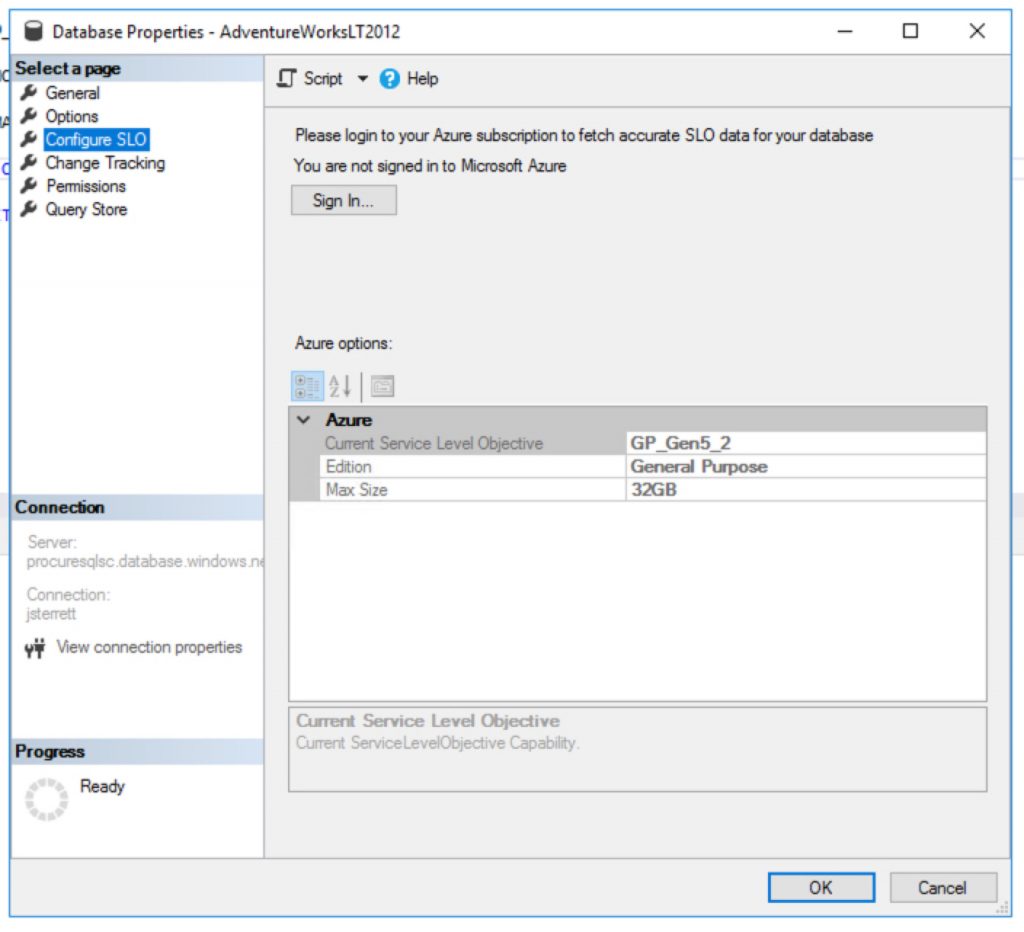
Great question, as of 3/3/2020 if the database in Azure SQL Database does not exist then it will be created. When its created the following database uses the default performance tier. This is General Purpose (Gen5) with 2 vCores.

Default performance tier for a new Azure SQL Database costs $371.87 per month.
The default cost of a new Azure SQL Database is 371.87 per month.

How to create cheaper databases

Great question, you can import databases to Azure SQL Database cheaper using PowerShell. It is as simple as using the Azure PowerShell Module. The following example below I use my existing Azure SQL Database server and I end up creating a new database with the “S0” tier.

<# Install Azure Powershell module requires local admin
Install-Module -Name Az -AllowClobber -Scope AllUsers
#> Import-Module Az -Force
$RGName = "<Your Existing Resource Group>"
$ServerName = "<Your Azure SQL Database Server>"
$Tenant = "<Add Tenant ID>"
$Subscription = "<Add your Subscription ID>" Connect-AzAccount -Tenant $Tenant -SubscriptionId $Subscription
$server = Get-AzSqlServer -ResourceGroupName $RGName -ServerName $ServerName $db = New-AzSqlDatabase -ResourceGroupName $RGName `
-ServerName $server.ServerName -DatabaseName $DBName `
-RequestedServiceObjectiveName "S0"

Your Homework Assignment

You got all the nuts and bolts to generate a script that can migrate all your databases on an instance. Then you can import databases to Azure SQL Database in one loop.

Need Help Moving to Azure?

Let us help you! Schedule a free 30-minute chat to see if we can point you the right direction. Take advantage of our free resources too.

If you liked this blog post signup for our free newsletter!

The post Import Databases to Azure SQL Database appeared first on SQL Server Consulting & Remote DBA Service.

March 4, 2020/by John Sterrett
https://procuresql.com/wp-content/uploads/2018/09/Procure-SQL-string-or-binary-data-get-truncated-1-1.jpg 960 1440 John Sterrett /wp-content/uploads/2024/05/Data-Architecture-as-a-Service-with-ProcureSQL.png John Sterrett2020-03-04 23:56:312020-03-04 23:56:31Import Databases to Azure SQL Database

Does Automation Kill the DBA “Store”?

Cloud, Community

In my opinion, automation will enhance DBAs.  It will allow DBAs to provide more value to the business.Good DBAs will be fine. If you are a DBA with ten years of DBA experience who just repeats year one ten times, this might be a different story for a different blog post.  Therefore, automation enhances the Good DBAs careers just like the sync button enhances turntablists but the sync button doesn’t replace good turntablists’ careers.

Follow along to see if you agree or disagree. I look forward to seeing your feedback in the comments section on this topic.

Some of my good friends know I have a passion for DJing on the ones and twos.  A subset of those friends know I took a job in high school just so I could buy two Technics 1200s and records. In my free time, I started taking an online DJ Masterclass and it quickly jumped out to me that the sync button for turntablists, club DJs (see just like DBAs there are several different types of DJs) isn’t much different from automation for good DBAs. The sync button is a way to automate the tedious task of making sure two different songs are played at the same speed so they could be mixed together. In the past few years, I started to hear buzz that automation will replace DBAs so I wanted to write a blog post providing more details into a recent tweet of mine.

Saying the DBA's job is going away due to automation is just like saying the sync button will replace all DJs. #NotGoingToHappen

— John Sterrett (@johnsterrett) July 29, 2017


What is this sync Button You Speak Of? How does it relate to DBAing?

Going back to my high school days for a second. One of the core fundamentals of being a turntablist is using beat matching to keep the dance floor going as you transition from one song to another song. It took me months to learn this fundamental skill. I had to learn how to measure BPM (beats per minute) to see if the songs could even mix together. I had to learn beats (think of pages) and bars (think of extents) and learn how to mix the songs on the same beat on right bars. I had to learn how to adjust the speed of each of the two records to make the BPMs match on my own. When mixing, I had to make sure the two records stayed on beat during the mix.  Syncing records isn’t the hard part of DJing, it’s just a tedious part.

Today, most DJ software packages have a sync button so this process can be automated.  Now we can hit the sync button and the BPMs will match almost all of the time.  What would you do if you didn’t learn the basics and relied on the sync button and the BPM for your song is wrong, or worse, your venue doesn’t have the sync button? I think this would be similar to having corruption occur and not knowing the basics behind DBCC CHECKDB, Backups and Restores. You won’t be keeping people on the dance floor for long, or have a successful DBA Career.

If you don’t know the basics, you will rely on the software and have no other options if and when the software doesn’t automatically work for you. 


I Love Automation, I have loved it for years!

I love automation because it allows me to automate tedious tasks and focus on ones I love and which provide value. For now, I will talk about automation in general and will focus a bit later on some new features with SQL Server that help automate things.

 I have been using automation as a tool in my toolbox for almost my whole DBA career. I have given talks on Getting Started with PowerShell for DBAs; my first PASS Member Session was on utilizing Policy-Based Management to automate basic health checks. You can even use 3rd party tools or custom scripts like this, this, this, this, or this to help with some automation. Just make sure they work for you and your environment. I have seen a nice automated SQL Server installer built a very long time ago that used JavaScript before JavaScript was cool. I bet it actually started with JScript (Insert painful JScript vs JavaScript memories from my web development days).

The language used doesn’t matter, what matters is what the process does. 

At the same time, I have actually seen a software service provider application that in my opinion didn’t monitor transactional log backups correctly, yikes.  I mention this not to scare you, but to remind you that you need to know the basics to know if an automation process works for your needs. If you don’t know what the automated process is supposed to do how do you know it is doing it correctly? Using the wrong automation tool, or using the tools incorrectly, could be very hurtful to your career. This looks a lot like the sync button for DJing to me. Automation tools/scripts also evolve and change so this isn’t a set it and forget it thing either, in my humble opinion.

Good, experienced DBAs have been leveraging automation for years.

It has been a tool in their toolbag for quite a while, not a new thing. DBAs also know how to leverage it as a great tool instead of seeing it as a new tool that replaces their jobs.  BIML is a great automation tool for Business Intelligence (BI) Developers. Does BIML automate good BI Developers out of their jobs? Nope. Does it help them automate so they can focus more time toward high-value tasks and get more things done? Yep, it sure does.

If automation is new to you as a DBA, or maybe you are starting out as a DBA, I suggest checking out some well-proven open source tools in a non-production environment. If you try to test out automation, several solutions include options to script out but not execute the tasks. This can be very helpful for learning (just like I used the script feature in SSMS to learn a lot about T-SQL behind the GUI).  If you are looking for a place to start, I highly recommend dbatools.io . It’s amazing to look at all the things one could do with this single tool.

Can Self-Tuning Databases Completely Automate DBA Tuning?

Performance tuning is one of my favorite parts of being a DBA; therefore, there is no way I would skip talking about some of the great enhancements that allow SQL Server to tune your own environment in Azure SQL Database and the box product. It’s purely amazing to see some of the new cutting-edge tuning features that, in my opinion, are game changers that will help Microsoft further separate themselves from all other database management systems on the market. 

Don’t hold your breath while you try to read about some of these great performance improvements provided just since SQL Server 2014.  There is cardinality estimator changes, auto tuning for adding and removing indexes, adaptive plan changes, query store, resumable index rebuilds, heck good old Database Tuning Advisor gets better and wait for it…. Automate Tuning. Don’t take my word for it that these features will be amazing. Go check out Lance Tidwell’s  about some of these new features in his PASS Summit talk in November. Actually, take a second to read his abstract. Notice the following, “We will also look at some of the pitfalls and potential issues that can arise from these new features.” I find it interesting that it looks like Automated Tuning and other features might not safely automate all your tuning needs.

I don’t foresee Self-Tuning Databases being able to self-tune everything.

 A friend of mine Joey D’Antoni wrote a great blog post recently on Self-Tuning Databases. Let’s go by this statement in his blog post, “I am sure this would take years and many versions to come into effect.” Let’s fast forward and assume this is fully in effect including even multiple features outside of execution plan changes. I will throw in an example, Artificial Intelligence that could find several common known T-SQL Anti-Patterns and rework the code for all of them so the optimizer friendly version executes.

Let’s take a look at why I do not foresee automated tuning fully replacing Performance Tuning DBAs.

The way people implement business processes with technology will prevent automated tuning from fixing everything in your environment. It could be hardware, database design, could be bad coding, bad anti-patterns in code, misuse of ORMs, ORMs struggling to your data model, etc. My point is, I don’t see performance tuning getting completely automated to the point where performance tuning skills will be obsolete. I am not alone, another good friend of mine, Grant Fritchey writes, “Finally, despite the fact of adaptive plans and automated regressions, you are still writing code that NO amount of automation can fix.”


Will the Cloud Automate DBAs Out of their Jobs?

The cloud will not automate DBAs out of their jobs. First, let me start with the fact that I love the cloud. I write about Azure, and I give presentations on Azure SQL Database. Azure SQL Database has grown a lot over the years and almost has all the same features as the box product. Microsoft has also added great additional features to differentiate themselves from their competitors like Query Performance Insight, Automated Tuning to add and remove indexes, Geo-Replication and more to help make Azure SQL Database my favorite platform as a service offering. Soon, Azure Managed Instances of SQL Server will even make admin tasks easier for DBAs as they will be able to apply their skills directly with fewer changes like the box product. 

Even though it is a fantastic time to leverage cloud services not all companies are going to put all of their critical data there. Many are still using SQL Server 2005. Some still work with mainframes. Using the same logic, shouldn’t those DBAs have been automated away years ago?

migrations to multiple cloud providers and even helped clients spin up their own cloud environments that they offer as a service, while also providing them Remote DBA Services as well.

I know what you’re thinking.Why do I need DBA help if I am in the cloud?

If someone is using a managed service for their databases in a platform as a service model (PaaS) like Amazon RDS or Azure SQL Databases, why would they need a DBA to manage the databases, isn’t the managed service managing them for you? Well, it’s simple, your needs might not be completely aligned with the service level agreements that are offered. Take a second and read Amazon RDS SLA and then Azure SQL Database SLA. Keep in mind, I am not telling you to not leverage these services; I just want you to know what is covered and what gaps DBAs can still fill. If you also take a look at Amazon RDS Best Practices you see several things that can keep DBAs busy. 

Did you notice any mentions of your data in the SLA’s? 

Is anything mentioned in writing about what will happen when stack dumps occur or data corruption happens? Did you see anything written on how you get notified if corruption happens and what actions will be taken on your behalf that might cause data loss, or if you should make business decisions and take action? 

Thinking this could not happen to you? I ask because while performing our health check on a non-Microsoft cloud PaaS provider for a new client, we detected stack dumps… and this was the first time our client was notified, yikes!

The DBA Profession Is Not Going Away

To wrap this up, I don’t see the DBA profession going away. The DBA role has pivoted and evolved constantly over the years.  I don’t see that changing.  It’s one of the many reasons why I am passionate about helping clients solve their business problems with SQL Server.  While some think  machines are close to automating away your job as a DBA, I would hate it if new DBAs or experienced DBAs see written content like this and assume they need to change their career. Not only do I respectfully disagree, I do not see this happening and I am not alone. 

When you want to focus on growing your skills, I see several benefits towards investing time both inside and outside of the role of a DBA.

I think automation will enhance good DBAs and reduce time spent on repeatable trivial tasks allowing DBAs to move faster and provide more value.  I don’t see good DBAs being replaced by a handful of PowerShell scripts.  To me, this is the DBA version of the sync button that allows turntablists to spend less time on preparing a mix and more time to providing a better experience to the dance floor.

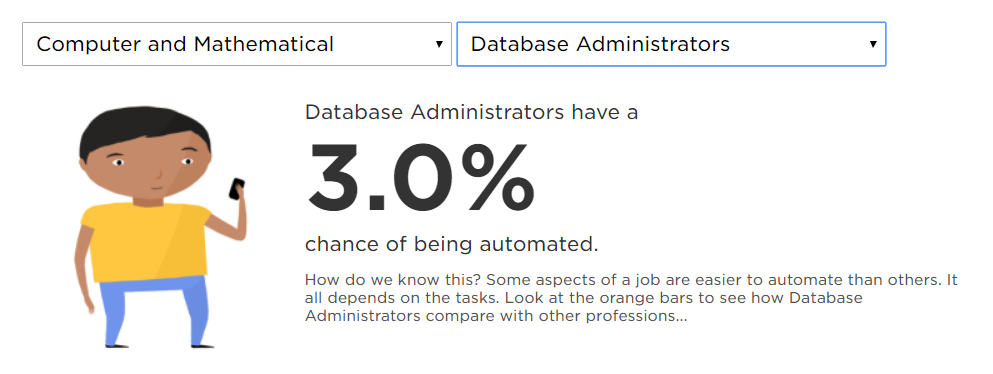
Seriously, don’t just take my words for it. NPR predicts only a 3% chance of automation taking over DBAs’ jobs.  Even better, take a look at US Bureau of Labor Statistics you will see DBAs are not losing their jobs. When the tedious parts of both database administration and DJing have been automated away, it leaves people like me more time doing what we love. Embrace automation and find ways to add value so the business loves you.

Don’t make DBA stand for Don’t Bother Asking or you might get replaced by another DBA or a managed service provider. 


August 8, 2017/19 Comments/by John Sterrett
https://procuresql.com/wp-content/uploads/2018/09/Procure-SQL-Does-Automation-Kill-the-DBA-Store-1.jpg 564 1093 John Sterrett /wp-content/uploads/2024/05/Data-Architecture-as-a-Service-with-ProcureSQL.png John Sterrett2017-08-08 21:09:162025-09-09 21:37:36Does Automation Kill the DBA “Store”?

Resources for Performance Tuning Article

Education, Performance Tuning

The following are some resources that are included in John Sterrett’s Introduction to Performance Tuning with Azure SQL Databases Idera Geek Sync.

Performance Root Cause Analysis Toolkit

Calculate DTU on Your Own 

Benchmark Azure SQL Database Wait Stats

What Is Running

Microsoft – Improved Automated Tuning SQL Database Advisor

Azure SQL Database Features

April 26, 2017/by John Sterrett
https://procuresql.com/wp-content/uploads/2018/09/Procure-SQL-Introduction-to-Performance-Tuning-with-Azure-SQL-Databases-1.png 597 1091 John Sterrett /wp-content/uploads/2024/05/Data-Architecture-as-a-Service-with-ProcureSQL.png John Sterrett2017-04-26 15:28:392017-04-26 15:28:39Resources for Performance Tuning Article
Join Our Newsletter
  Thank you for Signing Up
Please correct the marked field(s) below.
1,true,6,Contact Email,21,false,1,First Name,21,false,1,Last Name,2
Search Search

Blog Categories

  • $150 Challenge
  • Advice
  • Announcements
  • Artificial Intelligence
  • Awards
  • Azure Data Factory
  • C-Level
  • Cloud
  • Community
  • Conferences
  • Data Architecture
  • Data Integration
  • Data Intergration
  • Data Visualization
  • Data Warehousing
  • DBA 101
  • Design
  • Disaster Recovery or High Availability
  • Education
  • Fabric Dev Ops
  • Fabric Lakehouse
  • Fabric Lakehouses
  • Fabric Mirroring
  • Fabric Notebooks
  • Features
  • General
  • Health Checks
  • Lab
  • Microsoft Fabric
  • Microsoft Technologies
  • Newsletter
  • Performance Tuning
  • Power BI
  • ProcureSQL
  • Python
  • Reporting
  • Security
  • SQL Server
  • SQL Server
  • sql server 101
  • SQLServerPedia Syndication
  • syndication
  • The Blog
  • Uncategorized
  • Visual Studio Credit

Tags

#SQLFamily automatic tuning availability group azure backup Backups career Data Governance Data Loss Data Platform DBA Denver Differential Backup Disaster Recovery Fabric Fabric Architecture Full Backup High Availability Houston Marketing Database Administrator Microsoft Microsoft Fabric Microsoft SQL Server mirroring parameter sniffing PASS performance tuning Professional Development query store Recovery Recovery Model Restores Security SQL Saturday SQL Server SQL Server 2017 sql server 2019 SQL Server 2022 sql server 2025 SSMS System Databases Transaction Log Backup tsqltuesday Tuning Wait Stats

Archives

  • September 2026
  • August 2026
  • July 2026
  • June 2026
  • May 2026
  • April 2026
  • March 2026
  • February 2026
  • November 2025
  • October 2025
  • September 2025
  • July 2025
  • June 2025
  • May 2025
  • April 2025
  • March 2025
  • January 2025
  • December 2024
  • November 2024
  • October 2024
  • September 2024
  • August 2024
  • July 2024
  • June 2024
  • May 2024
  • February 2024
  • January 2024
  • November 2023
  • October 2023
  • March 2023
  • January 2023
  • May 2022
  • April 2022
  • November 2021
  • September 2020
  • August 2020
  • April 2020
  • March 2020
  • February 2020
  • January 2020
  • December 2019
  • November 2019
  • September 2019
  • July 2019
  • April 2019
  • November 2018
  • September 2018
  • August 2018
  • July 2018
  • June 2018
  • May 2018
  • April 2018
  • March 2018
  • February 2018
  • January 2018
  • November 2017
  • October 2017
  • August 2017
  • July 2017
  • June 2017
  • April 2017
  • December 2016
  • November 2016
  • October 2016
  • July 2016
© Copyright 2026 - ProcureSQL - 1464 East Whitestone Blvd., Suite 1902 Cedar Park, TX 78613, USA
  • Link to Facebook
  • Link to Instagram
  • Link to LinkedIn
  • Link to Youtube
  • Link to X
Scroll to top Scroll to top Scroll to top
Manage Consent
To provide the best experiences, we use technologies like cookies to store and/or access device information. Consenting to these technologies will allow us to process data such as browsing behavior or unique IDs on this site. Not consenting or withdrawing consent, may adversely affect certain features and functions.
Functional Always active
The technical storage or access is strictly necessary for the legitimate purpose of enabling the use of a specific service explicitly requested by the subscriber or user, or for the sole purpose of carrying out the transmission of a communication over an electronic communications network.
Preferences
The technical storage or access is necessary for the legitimate purpose of storing preferences that are not requested by the subscriber or user.
Statistics
The technical storage or access that is used exclusively for statistical purposes. The technical storage or access that is used exclusively for anonymous statistical purposes. Without a subpoena, voluntary compliance on the part of your Internet Service Provider, or additional records from a third party, information stored or retrieved for this purpose alone cannot usually be used to identify you.
Marketing
The technical storage or access is required to create user profiles to send advertising, or to track the user on a website or across several websites for similar marketing purposes.
  • Manage options
  • Manage services
  • Manage {vendor_count} vendors
  • Read more about these purposes
View preferences
  • {title}
  • {title}
  • {title}