

Finding Query Anti-Patterns in Your Developer’s Queries

In the beginning of my IT career, I was a developer. I wrote a lot of bad code that didn’t perform well. As more data entered my tables my stored procedures got slower and slower. More data, more problems! I started my career in performance tuning by making my crappy code a little less crappy. Therefore, I wanted to share with you an extended event added in SQL Server 2022 to help you identify some bad coding practices in your code that is also known as query anti-patterns.
Query Anti-Pattern’s Video
In the following video, you can learn how to capture query anti-patterns via Extended Events. Once you have found them, you can aggregate them to find the most occurring offenders or the offenders causing the most harm!
Query Anti-Pattern Demos
To start this demo, you will need to download a copy of the WildWorldImporters sample database.
You will need SQL Server 2022 as the query anti-pattern extended event is new in SQL Server 2022.
You will also need SQL Server Management Studio if you don’t already have it.
Demo Setup
Create Index
First, we will need to create an index we will use for our implicit conversion demo. If this index already exists, we will drop it.
USE [WideWorldImporters]
GO

DROP INDEX IF EXISTS [idx_Invoices_PurchaseOrder] ON [Sales].[Invoices]
GO

/****** Create Index for Anit-Pattern Implicit Conversion Demo ******/
CREATE NONCLUSTERED INDEX [idx_Invoices_PurchaseOrder] ON [Sales].[Invoices]
(
	[CustomerPurchaseOrderNumber] ASC
)
WITH (PAD_INDEX = OFF, STATISTICS_NORECOMPUTE = OFF, SORT_IN_TEMPDB = OFF,
DROP_EXISTING = OFF, ONLINE = OFF, ALLOW_ROW_LOCKS = ON, ALLOW_PAGE_LOCKS = ON,
OPTIMIZE_FOR_SEQUENTIAL_KEY = OFF) ON [USERDATA]
GO
Create Query Anti-Pattern Extended Event
Next, we will create our extended event used to capture the query anti-pattern. If it exists, we will drop it before creating the extended event.
/***** Create Extended Event *****/
IF EXISTS (SELECT name FROM sys.dm_xe_sessions  WHERE name = 'query_antipattern')
DROP EVENT SESSION [query_antipattern] ON SERVER
GO

CREATE EVENT SESSION [query_antipattern] ON SERVER
ADD EVENT sqlserver.query_antipattern(
    ACTION(sqlserver.session_id, sqlserver.client_app_name,sqlserver.client_hostname
	,sqlserver.database_name,sqlserver.query_hash,sqlserver.query_plan_hash,
	sqlserver.sql_text,sqlserver.username))
ADD TARGET package0.ring_buffer(SET max_events_limit=(0),max_memory=(51200))
WITH (MAX_MEMORY=4096 KB,EVENT_RETENTION_MODE=ALLOW_SINGLE_EVENT_LOSS,
MAX_DISPATCH_LATENCY=30 SECONDS,MAX_EVENT_SIZE=0 KB,MEMORY_PARTITION_MODE=NONE,
TRACK_CAUSALITY=OFF,STARTUP_STATE=ON)
GO
-- Start Extended Event
ALTER EVENT SESSION [query_antipattern] ON SERVER STATE = START;
GO
QDS and Plan Cache Cleanup
Before we start, we will want to clear out or query store data and execution plans in cache. NOTE: Only do this in non-production. We shouldn’t be testing demo’s in production.
/* Start the Demo by puring plans and QDS */
USE [WideWorldImporters]
GO
ALTER DATABASE SCOPED CONFIGURATION CLEAR PROCEDURE_CACHE;
ALTER DATABASE [WideWorldImporters] SET QUERY_STORE CLEAR
GO
What are query anti-patterns?
What are query anti-patterns? Great question. I like Andreas Schörghuber’s definition .. “Anti-patterns are common solutions to ineffective problems and cause more problems than they solve.” [1] In simpler terms, a query is written to get the correct data but consumes more reads, CPU or duration than rewriting the query to get the same results in a way that allows the query optimizer to utilize less reads, CPU or duration.
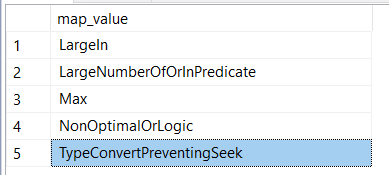
SQL Server’s Extended Events map values also lets you know which anti-patterns can be captured by the query_antipattern event.
/* What types of query_antipatterns are included? */
SELECT map_value
FROM sys.dm_xe_map_values
WHERE name = N'query_antipattern_type';
Below are the query anti-patterns included in the extended event as of SQL Server 2022 CU 10.
Start Query Anti-Pattern’s Demo
Finally, we can now utilize that index we created to go over our query anti-pattern example.
Implicit Conversion AKA ConvertPreventingSeek
In this example, we a have a simple query. As you can see in the video above. The column is NVARCHAR (20) but the predicate filter is INTEGER data type. The following image should help you visualize the data type mismatch.

The query has to convert the data in CustomerPurchaseOrderNumber column to integer to utilize the filter.
/*
Examine what an implicit conversion is and
how it will hurt performance!
*/
SELECT InvoiceID
FROM [Sales].[Invoices]
WHERE [CustomerPurchaseOrderNumber]=17913
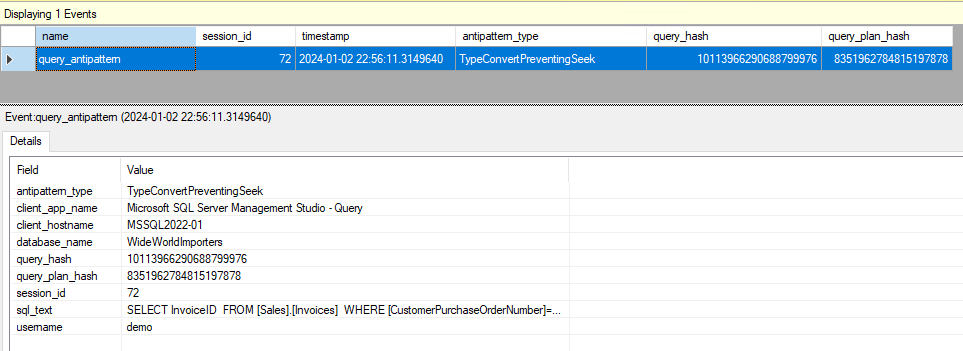
If you look at the live data of the extended event we added. You will see the following data collected.
Fix Implicit Conversion Query Anti-Pattern
This fix isn’t magic. It’s actually quite simple. You just have to make the data type of the predicate filter match the data type of the column.
/* How to fix an implicit conversion?
Change the data type to match the column.
*/
SELECT InvoiceID
FROM [Sales].[Invoices]
WHERE [CustomerPurchaseOrderNumber]=N'17913'
Large Number of In Predicate
For our next query anti-pattern we will focus on an IN statement that has too many values.
/* Long List of IN Statements.
	Do we get alerts for both IN statements and Convert? */
 SELECT *
 FROM Sales.Invoices
 WHERE CustomerPurchaseOrderNumber IN (12126,15342,12211,17129,10369,
 13383,17913,14518,17577,18030,17639,10941,16374,17521,11911,10690,
 10255,13260,16825,12227,16070,16793,12467,13700,11503,13916,17783,
 13042,10411,15084,14159,11389,12559,19457,18468,14486,19057,18036,
 13079,19402,15267,12781,17334,16645,17591,14618,19857,17849,10947,
 11610,14853,10821,15491,14474,10079,11612,11991,19321,10210,14970,
 17468,11643,16411,19525,10996,16474,15832,12134,13630,14902,15212,
 19609,19809,13551,12805,18797,11553,11156,18583,19122,11615,12262,
 10310,19254,13954,13960,14630,18585,18834,18451,19842,18893,13004,
 19890,12941,13508,15403,19391,17938,19140,16362,18795,16388,18492,
 15272,14938,13868,18901,15236,19782,11134,10182,18651,14169,18514,
 18108,17328,13949,12727,17486,13783,15165,17627,13215,18992,10815,
 17466,12153,16275,10695,14744,12253,13328,18450,12232,19473,14441,
 19357,19208,14194,14468,16930,14270,13096,19458,13731,14609,17253,
 13190,16905)
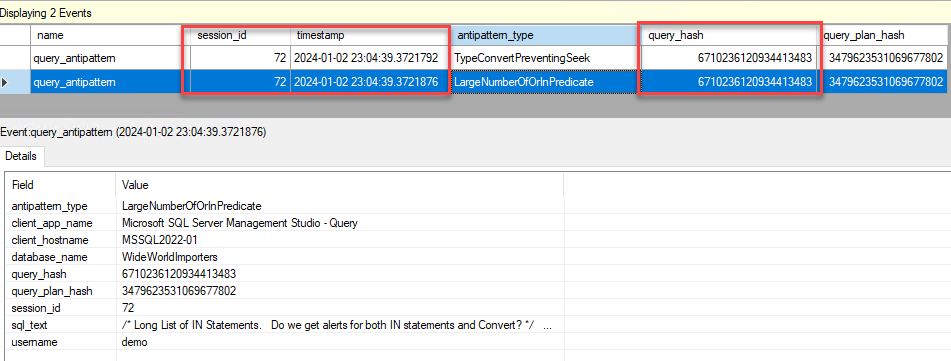
A good question you might be wondering is which query anti-pattern will this query return. Is it the previous TypeConvertPreventingSeek or LargeNumberOfOrINPredicate?
If you cleared the Live Data Viewer for your extended event you will notice that its actually both anti-patterns. In the screen shot below I put a box around the query_hash so you know its the same unique query text. I also include the session_id and timestamp as well.
Fix Large Number of In Predicate
Now there are multiple ways on how you can convert this massive IN clause into joining to a Temp Table, Table Variable, Table-Valued Parameters, etc. I will leave up which one is best for another day. Today, we are going to use the Table-Valued Parameter.
NOTE: I am creating and dropping the table type in the demo code because this is a demo. Usually, you might have a table type per common data type filter you might use.
SECOND NOTE: Hopefully, you will see we also converted the list of integers into a list of NVARCHAR values. This also removes the Implicit Conversion query anti-pattern.
/*  How to fix this anti-pattern?  */
DROP TYPE IF EXISTS KeyList;
GO
CREATE TYPE KeyList AS TABLE (
	KeyValue NVARCHAR(50)
	)
GO
	DECLARE @Values KeyList
	INSERT INTO @Values VALUES (N'12126'),(N'15342'),(N'12211'),(N'17129'),(N'10369'),(N'13383'),(N'17913'),(N'14518'),(N'17577'),(N'18030'),(N'17639'),(N'10941'),(N'16374'),(N'17521'),(N'11911'),(N'10690'),(N'10255'),(N'13260'),(N'16825'),(N'12227'),(N'16070'),(N'16793'),(N'12467'),(N'13700'),(N'11503'),(N'13916'),(N'17783'),(N'13042'),(N'10411'),(N'15084'),(N'14159'),(N'11389'),(N'12559'),(N'19457'),(N'18468'),(N'14486'),(N'19057'),(N'18036'),(N'13079'),(N'19402'),(N'15267'),(N'12781'),(N'17334'),(N'16645'),(N'17591'),(N'14618'),(N'19857'),(N'17849'),(N'10947'),(N'11610'),(N'14853'),(N'10821'),(N'15491'),(N'14474'),(N'10079'),(N'11612'),(N'11991'),(N'19321'),(N'10210'),(N'14970'),(N'17468'),(N'11643'),(N'16411'),(N'19525'),(N'10996'),(N'16474'),(N'15832'),(N'12134'),(N'13630'),(N'14902'),(N'15212'),(N'19609'),(N'19809'),(N'13551'),(N'12805'),(N'18797'),(N'11553'),(N'11156'),(N'18583'),(N'19122'),(N'11615'),(N'12262'),(N'10310'),(N'19254'),(N'13954'),(N'13960'),(N'14630'),(N'18585'),(N'18834'),(N'18451'),(N'19842'),(N'18893'),(N'13004'),(N'19890'),(N'12941'),(N'13508'),(N'15403'),(N'19391'),(N'17938'),(N'19140'),(N'16362'),(N'18795'),(N'16388'),(N'18492'),(N'15272'),(N'14938'),(N'13868'),(N'18901'),(N'15236'),(N'19782'),(N'11134'),(N'10182'),(N'18651'),(N'14169'),(N'18514'),(N'18108'),(N'17328'),(N'13949'),(N'12727'),(N'17486'),(N'13783'),(N'15165'),(N'17627'),(N'13215'),(N'18992'),(N'10815'),(N'17466'),(N'12153'),(N'16275'),(N'10695'),(N'14744'),(N'12253'),(N'13328'),(N'18450'),(N'12232'),(N'19473'),(N'14441'),(N'19357'),(N'19208'),(N'14194'),(N'14468'),(N'16930'),(N'14270'),(N'13096'),(N'19458'),(N'13731'),(N'14609'),(N'17253'),(N'13190'),(N'16905')
	select *
	FROM Sales.Invoices
	JOIN @Values Tst on (Tst.KeyValue = CustomerPurchaseOrderNumber)
GO
Query Anti-Pattern Wrap Up
It’s now easier than before, to find your top offending anti-patterns. Just create the extended event and aggregate the results.
If you would like some help making your queries go faster contact us. We also do health checks where you get results. We guarantee value provided or you get a 100% refund!
Also, if you liked this tip join our newsletter so you can get more free videos and tips.
