• Link to Facebook
  • Link to Instagram
  • Link to LinkedIn
  • Link to Youtube
  • Link to X
Call Us Today! 512-640-5750
Data Architect as a Service | Remote DBA Services
  • Services
    • Analytics Architecture
    • Database Architecture
    • Software Architecture
    • Microsoft Fabric Consulting
      • Microsoft Fabric Health Check
  • About Us
    • Testimonials
    • Recommendation Program
    • Jobs
      • Data Engineering Consultant
      • Principal Data Analytics Architect
  • Resources
    • Blog
    • Videos
  • Contact
  • Click to open the search input field Click to open the search input field Search
  • Menu Menu

Tag Archive for: PowerBI

Images in PBIR Format Reports: A Guide to Easy Replacements

Power BI
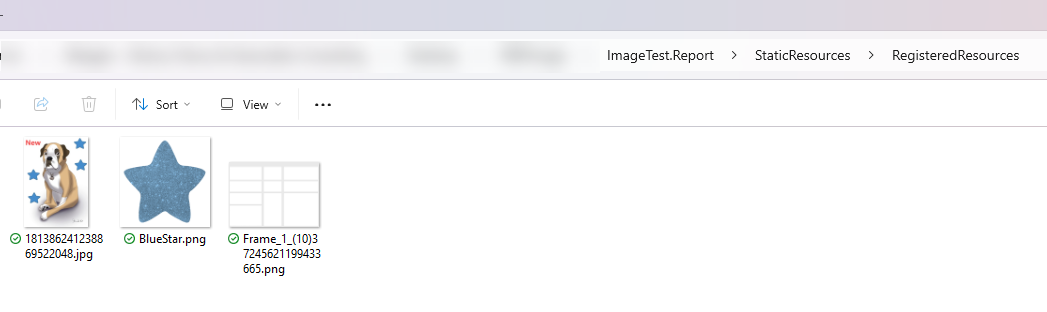
Lets talk about Images in PBIR and how to replace them.  With the PBIR format of Power BI reports, it’s much easier to make report updates outside of Power BI Desktop. One thing you may want to do is to switch out an image in a report. Maybe you need to rebrand a report, updating some of the images (logos and background images). You could import the images or use image URLs with DAX, but that comes with its own problems. If you have some dev ops or automation skills, this becomes pretty easy. Today, we will share an Data Architecture tip to get this done! When you insert an image into a report in Power BI Desktop, the original name of the image file is modified by adding a string of characters onto the end of the name. For a report in PBIR format, all images are placed into the <ReportName>.Report\StaticResources\RegisteredResources folder.
Screenshot of the RegisteredResourcesFolder in a PBIR format report containing 3 images
The RegisteredResources folder containing 3 images

Replacing an image with the same name

If you have the name of the file that is in the RegisteredResources folder, you can simply replace it with a file of the same name. This assumes the dimensions and resolution of the file are the same so it looks ok in the report. You could automate this in Azure DevOps pipelines or Github Actions, or just write a PowerShell script that checks out the branch in source control, replaces the image, and then checks it back in.

Replacing an image with a different name

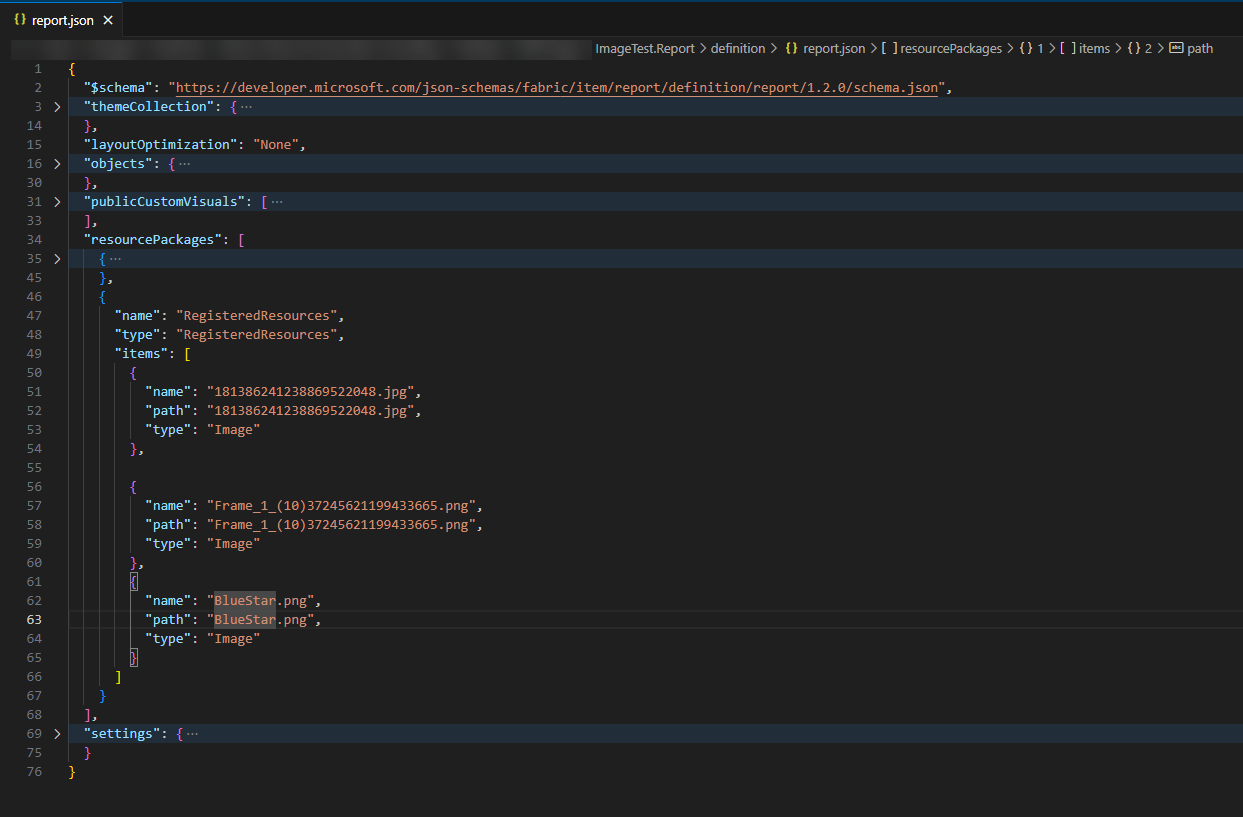
If you need to replace the image file with a file that has a different name, there are more modifications to be done. The image file name is referenced in 2 files:
  • the report.json file for the report, found in the <ReportName>.Report\definition folder
  • the visual.json file for the visual that contains the image, found in the <ReportName>.Report\definition\pages\<PageName>\visuals\<VisualName> folder
Screenshot of the report.json folder showing the references to the 3 images from the RegisteredResources folder.
report.json file containing references to the image in PBIR files
You could delete the original image, add the new image with new file name, and then update the references in those two files. I’ve tested both ways using an Azure DevOps pipeline for automation. I added a step that runs a PowerShell script. Unless the image name is very important to you, I would just rename the new image to match the current image and avoid having to update the JSON files. The post Replacing Images in PBIR Format Reports first appeared on Data Savvy.
December 30, 2024/by Meagan Longoria
https://procuresql.com/wp-content/uploads/2025/09/cropped-MeaganLongoria.avif 800 800 Meagan Longoria /wp-content/uploads/2024/05/Data-Architecture-as-a-Service-with-ProcureSQL.png Meagan Longoria2024-12-30 20:19:122026-02-05 17:08:04Images in PBIR Format Reports: A Guide to Easy Replacements
Join Our Newsletter
  Thank you for Signing Up
Please correct the marked field(s) below.
1,true,6,Contact Email,21,false,1,First Name,21,false,1,Last Name,2
Search Search

Blog Categories

  • $150 Challenge
  • Advice
  • Announcements
  • Artificial Intelligence
  • Awards
  • Azure Data Factory
  • C-Level
  • Cloud
  • Community
  • Conferences
  • Data Architecture
  • Data Integration
  • Data Intergration
  • Data Visualization
  • Data Warehousing
  • DBA 101
  • Design
  • Disaster Recovery or High Availability
  • Education
  • Fabric Dev Ops
  • Fabric Lakehouse
  • Fabric Lakehouses
  • Fabric Mirroring
  • Fabric Notebooks
  • Features
  • General
  • Health Checks
  • Lab
  • Microsoft Fabric
  • Microsoft Technologies
  • Newsletter
  • Performance Tuning
  • Power BI
  • ProcureSQL
  • Python
  • Reporting
  • Security
  • SQL Server
  • SQL Server
  • sql server 101
  • SQLServerPedia Syndication
  • syndication
  • The Blog
  • Uncategorized
  • Visual Studio Credit

Tags

#SQLFamily automatic tuning availability group azure backup Backups career Data Governance Data Loss Data Platform DBA Denver Differential Backup Disaster Recovery Fabric Fabric Architecture Full Backup High Availability Houston Marketing Database Administrator Microsoft Microsoft Fabric Microsoft SQL Server mirroring parameter sniffing PASS performance tuning Professional Development query store Recovery Recovery Model Restores Security SQL Saturday SQL Server SQL Server 2017 sql server 2019 SQL Server 2022 sql server 2025 SSMS System Databases Transaction Log Backup tsqltuesday Tuning Wait Stats

Archives

  • September 2026
  • August 2026
  • July 2026
  • June 2026
  • May 2026
  • April 2026
  • March 2026
  • February 2026
  • November 2025
  • October 2025
  • September 2025
  • July 2025
  • June 2025
  • May 2025
  • April 2025
  • March 2025
  • January 2025
  • December 2024
  • November 2024
  • October 2024
  • September 2024
  • August 2024
  • July 2024
  • June 2024
  • May 2024
  • February 2024
  • January 2024
  • November 2023
  • October 2023
  • March 2023
  • January 2023
  • May 2022
  • April 2022
  • November 2021
  • September 2020
  • August 2020
  • April 2020
  • March 2020
  • February 2020
  • January 2020
  • December 2019
  • November 2019
  • September 2019
  • July 2019
  • April 2019
  • November 2018
  • September 2018
  • August 2018
  • July 2018
  • June 2018
  • May 2018
  • April 2018
  • March 2018
  • February 2018
  • January 2018
  • November 2017
  • October 2017
  • August 2017
  • July 2017
  • June 2017
  • April 2017
  • December 2016
  • November 2016
  • October 2016
  • July 2016
© Copyright 2026 - ProcureSQL - 1464 East Whitestone Blvd., Suite 1902 Cedar Park, TX 78613, USA
  • Link to Facebook
  • Link to Instagram
  • Link to LinkedIn
  • Link to Youtube
  • Link to X
Scroll to top Scroll to top Scroll to top
Manage Consent
To provide the best experiences, we use technologies like cookies to store and/or access device information. Consenting to these technologies will allow us to process data such as browsing behavior or unique IDs on this site. Not consenting or withdrawing consent, may adversely affect certain features and functions.
Functional Always active
The technical storage or access is strictly necessary for the legitimate purpose of enabling the use of a specific service explicitly requested by the subscriber or user, or for the sole purpose of carrying out the transmission of a communication over an electronic communications network.
Preferences
The technical storage or access is necessary for the legitimate purpose of storing preferences that are not requested by the subscriber or user.
Statistics
The technical storage or access that is used exclusively for statistical purposes. The technical storage or access that is used exclusively for anonymous statistical purposes. Without a subpoena, voluntary compliance on the part of your Internet Service Provider, or additional records from a third party, information stored or retrieved for this purpose alone cannot usually be used to identify you.
Marketing
The technical storage or access is required to create user profiles to send advertising, or to track the user on a website or across several websites for similar marketing purposes.

  • Manage options
  • Manage services
  • Manage {vendor_count} vendors
  • Read more about these purposes
View preferences
  • {title}
  • {title}
  • {title}